
UX design decides whether people can use custom software without workarounds, and internal tools need it as much as customer apps. Our business analysts and engineers design with AI at every stage, so we explore and test far more options than a traditional process allows. People give the first input and feedback, and review every design.
Design is one area of software delivery where we lean fully into AI, and it is where we see some of our best results. This guide explains what UX design means in a custom software project, why good design has always depended on understanding the technology, and how AI changes each stage of the work. It also covers who does the design when AI is involved, and what people still decide.
What is UX design in custom software?
UX (user experience) design is the work of deciding how people will use a system to get their job done. In custom software, that means the journeys through the system, the screens along each journey, the information and actions on each screen, and how the software behaves when something goes wrong.
Custom software makes this harder than it sounds. A booking app, a case management system, or a field service tool exists because an organisation’s work does not fit an off-the-shelf product. The design has to fit that work, including its exceptions, its permissions, and the data it already holds.
Good UX in custom software usually shows up as an absence of things:
- Staff do not keep a spreadsheet alongside the system to track what it cannot show them.
- Customers do not phone because they could not finish a journey online.
- New starters learn the system in days rather than weeks.
- Errors are caught on the screen where they happen, not in a report a month later.
What is the difference between UX and UI design?
UX design decides what the software does for the person using it and in what order. UI (user interface) design decides how each screen looks: layout, colour, type, spacing, and the visual style of controls.
The two overlap on every screen. A form that looks polished but asks for information in the wrong order is a UX problem. A well-ordered form with low-contrast text and tiny tap targets is a UI problem, and often an accessibility problem as well. In a custom software project we treat them as one piece of work, because the person using the screen experiences them as one thing.
Do internal tools and back-office systems need UX design?
Yes. Internal tools often need it more than customer apps, because staff use them for hours every day and rarely get to choose them. A confusing screen in an internal system costs a few seconds on every task, for every user, for years.
We often see internal systems where design stopped after the first few screens. The main journey works, but the admin screens, error states, and reports were built without anyone designing them. Those are the screens where staff lose time and invent workarounds.
Why has good UX always depended on understanding the technology, data, and constraints?
The best user experiences have always come from people who understood what the system could do, what the data looked like, and where the constraints were. A design that ignores those things looks right in a design file and then falls apart in the build.
Where designs and systems disagree
In our experience, the gaps show up in predictable places:
- Real data: a customer name that is 60 characters long, a list with 4,000 items instead of 12, or a record with half its fields empty.
- Performance: a screen that needs data from three systems cannot always load instantly, so the design needs a loading state that makes sense.
- Permissions: different users see different things, and the design has to work for each of them.
- Integration: the system of record might not support an action the design assumes, such as editing an order after it has been dispatched.
Traditionally, a designer produced screens, engineers then found these constraints during the build, and the design was patched to fit. Good teams closed the gap by putting designers and engineers in the same room. Even then, design time was expensive, so it went into the main journeys and not much else.
How does AI let the technology drive the UX?
AI changes the order of the work. When the patterns for a product live in a design system, and the people designing understand the data and the technology, AI can produce designs that already fit the system from the first draft.
In practice, the patterns, components, and brand rules become the vocabulary AI designs with, so a search screen uses the product’s search pattern and a form uses its own components and validation rules. Tables are designed for the real number of rows rather than a tidy dozen. The design starts from what the technology can do, and people spend their time on the problems no pattern covers.
This is also why, in our experience, the people who understand the system are now the right people to design it. Our view is that AI has made the old hand-off between design and engineering far less necessary. Our guide on harness templates for AI coding shows the same principle on the code side: user interface work that follows a design system is something AI can produce reliably.
There are limits to this approach. Patterns do not replace feedback from real users, and pattern-led design can drift towards a generic look unless the brand decisions that make a product distinctive are written down. We cover both in our guide on where AI helps in UX design and where people decide.
Who does the design work when AI is involved?
Design is done by our business analysts and engineers, working with AI. With good brand input from you or your agency, we do not need a separate designer.
This works because of the point above. Business analysts understand the users, the process, and the requirements. Engineers understand the data, the integrations, and what the technology can do. With AI producing the design work in between, the people who know the system can explore and test far more options than a traditional process allows.
The tools we use
We design and prototype with Claude:
- Claude Design, launched by Anthropic Labs in April 2026, builds a design system for a team by reading its codebase and design files, then applies that system’s colours, typography, and components to later work. Designs can be handed to Claude Code for the build.
- Claude artifacts let us build working, clickable prototypes in conversation, so people can react to something real rather than a static picture.
- Storybook documents components and their states in isolation, which gives designers, engineers, and AI tools one shared reference for how each part of the product should look and behave.
Why brand input matters so much
AI can only apply a brand it has been given. When we get a clear colour palette, licensed fonts, logo files, and examples of how the brand should feel, the designs are on-brand from the first draft. When the brand arrives as a print-focused PDF, someone has to interpret it first, and that interpretation is where designs drift.
What happens at each stage, and where do AI and people each contribute?
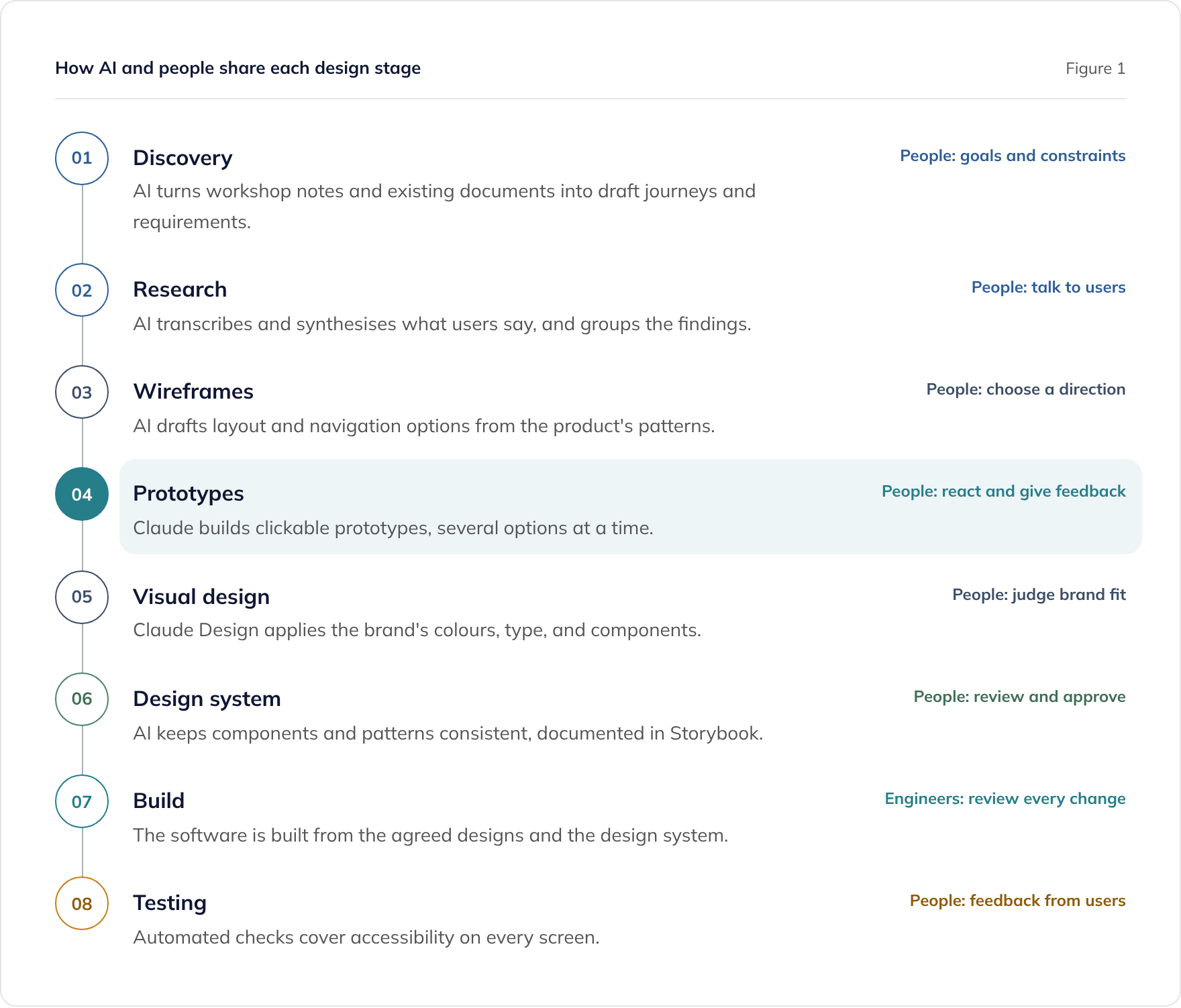
AI is involved at every stage of our design process. People give the first input and feedback, and review what AI produces. Figure 1 shows how that plays out across a project.
Discovery and research
Discovery starts with people: your goals, your users, and the constraints of the business. AI turns workshop notes, existing documents, and process descriptions into draft journeys and requirements that everyone can review.
Research with users stays with people. AI does not run user research, but it takes on much of the work around it, such as transcribing sessions, synthesising notes, and grouping findings. That frees our business analysts to spend more time talking to the people who will use the software.
Wireframes and prototypes
This is where AI makes the biggest difference. Producing each layout option by hand takes time, so traditional projects usually explored only a few. With AI, we explore far more options than a traditional process allows, and turn the promising ones into clickable prototypes.
People react to the prototypes, give feedback, and choose a direction. Seeing a working prototype often surfaces questions that a requirements document never would, which is why we build them early.
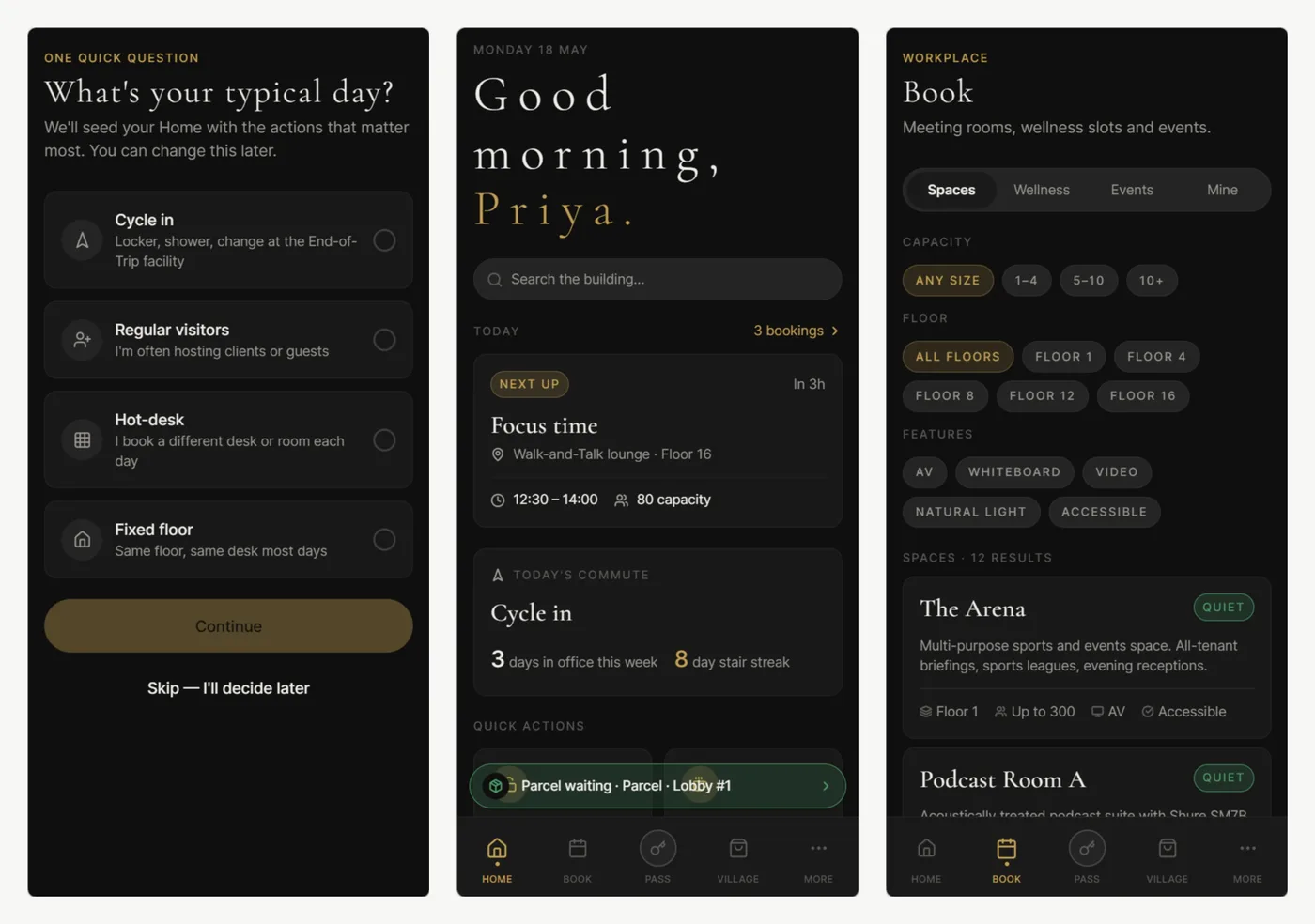
Visual design and the design system
Claude Design applies the brand’s colours, typography, and components to each screen. People judge whether the result fits the brand, and the agreed components become part of the product’s design system, documented in Storybook.
Build and testing
Because the designs already follow the design system and the real data, the build starts from screens that fit the technology. Engineers review every change. Automated accessibility checks run across every screen, and feedback from users shapes the next round of changes.
Can UX now cover every screen, not just a sample?
Yes. Traditional projects could afford detailed design for a sample of key screens at the start, and the rest of the product followed patterns as best it could. With AI, the time and cost of design have fallen so far that we apply UX to every screen on our current projects, not a sample.
That includes the screens that used to miss out:
- Admin and settings screens
- Error, empty, and loading states
- Reports and exports
- Features added after launch
When does design happen in a project?
Design runs through discovery and the build, and it is usually part of legacy modernisation as well. It is not a separate phase that ends before engineering starts, and we do not sell it as a separate service.
- In discovery, design helps everyone agree what the software should do, using prototypes rather than long documents.
- During the build, every new screen and change is designed as it is built, in the same two-week sprint cycle as the rest of the work.
- In legacy modernisation, design is the chance to fix the workarounds staff have lived with for years, rather than copying an old interface onto new technology.
How does design work with your brand, your agency, or your own designs?
We work with clients’ brand agencies and within their brand guidelines. Some clients like to collaborate closely on design. Others provide their own designs, which we build from.
Working from your brand and your agency
Your brand agency can own the brand while we design and build the software. The most useful thing an agency can give us is brand input that AI can apply directly:
- A colour palette with exact values
- Fonts licensed for web and app use
- Logo files
- Examples of the brand in use
Building from your own designs
If you already have designs, we can build them to match pixel for pixel. In our experience, giving us your brand guidelines and designing with AI is now far more efficient, because we can explore and test more options. Either way, a build needs every state, screen size, and component defined, not just the main screens.
How is accessibility built in from the start?
We design to WCAG 2.2 AA by default, and we are used to it being a strict requirement. WCAG is the Web Content Accessibility Guidelines published by the W3C, and AA is the level most organisations target.
Many accessibility problems start in design, such as low colour contrast, an illogical focus order, or controls with no clear label. Fixing them in the design and in shared components means they are fixed everywhere those components are used. We check accessibility with automated testing, alongside standard techniques and tools.
How do you choose a supplier that designs well?
Ask a supplier to show you how it designs, not only what it has built. Useful questions include:
- Who does the design work, and how do they understand our data and systems?
- Where does AI help, and where do people decide?
- Which screens get design attention: a sample, or all of them?
- How are designs tested with users before and during the build?
- Which accessibility standard do you design to, and how do you check it?
- Who owns the design files and the design system at the end of the project?
On ownership, our position is that design files and the design system follow the same licence terms as the software itself. Our guide to software IP licensing and source code handover explains those terms.
Where to go next
If you are weighing up whether to build at all, our guide to build vs buy with AI-augmented development covers the decision. For how AI fits into the rest of delivery, see what AI-augmented development means and our AI approach.
To talk about the design of your own system, book a consultation or read about our custom software development service.