
Whether to design or prototype depends on how much of the product has to be imagined. When a complex product needs bringing to life so people can react to it, prototype it. When the product is well understood, design screens from your brand and patterns. With AI, we can move between the two quickly.
Design is one area where we lean fully into AI, and it has changed how we choose between designing screens and building prototypes. This guide explains the difference, when to use each, and how to test either with real users before the build starts. It is part of our series on UX design for custom software.
What is the difference between a design and a prototype?
A design shows what the software will look like. A prototype shows how it will behave. Both are ways of trying an idea before paying to build it properly.
- A design is a set of screens: layouts, content, colours, and components. It answers questions about structure, hierarchy, and brand.
- A prototype is something people can use: click through, type into, and try a task with. It answers questions about flow, interaction, and whether the idea works at all.
The line between the two has blurred. With AI tools, a design can quickly become a clickable prototype, and a prototype can be built with the product’s real components and brand from the start.
When should you design, and when should you prototype?
In our experience, it depends on how much of the product has to be imagined. If people cannot yet picture the product, they cannot give useful feedback on screens, so the first job is to bring it to life.
| Design first | Prototype first | |
|---|---|---|
| The product is | Well understood, or similar to something that exists | New, complex, or hard to picture |
| The main questions are about | Layout, hierarchy, content, and brand | Flow, interaction, and whether the idea works |
| Feedback comes from | Reviewing screens | Trying real tasks |
| Typical examples | A new section of an existing product, a redesign of known screens | A new product, a complex multi-step process, a new way of working |
Prototype first when a product needs imagining
A new product, or a complex process that has never been put into software, is hard to discuss on paper. Stakeholders read the same requirement differently, and nobody spots the gaps until they try to use it. A working prototype gives everyone the same thing to react to.
Design first when the product is well understood
When the product follows familiar patterns, such as a new set of admin screens in an existing system, designing the screens from the product’s design system is quicker. Prototype only the parts with real uncertainty, such as an unusual workflow.
How does AI change the choice?
AI makes both cheaper, so the choice is less of a trade-off than it used to be. We design and prototype with Claude: Claude Design applies the product’s design system to new screens, and Claude artifacts let us build working, clickable prototypes in conversation.
That has two effects we see on our projects:
- Prototypes come earlier. When a working prototype takes little effort, it makes sense to build one in discovery rather than after weeks of written requirements.
- More options get tested. AI is involved at every stage of our design process, so we can explore and test far more options than a traditional process allows. We no longer need to prototype one idea and defend it.
People still decide which options to take forward. Our guide on where AI helps in UX design and where people decide covers that split in detail.
Why test before you build?
Changing a design or a prototype is cheap, while a change to working software touches code, tests, data, and sometimes training and documentation. Testing before the build moves the expensive discoveries to the point where they are cheap.
Testing also settles arguments. When two stakeholders disagree about how a screen should work, watching real users try both versions usually resolves it faster than another meeting.
How do you run a usability test on a design or prototype?
A usability test asks real users to complete real tasks while someone watches. People run the sessions: AI helps around them, but it does not replace watching a person use the software.
- Choose the tasks. Pick the journeys that matter most or carry the most risk, and write them as goals (‘book a room for Thursday afternoon’), not instructions.
- Find the participants. Use real users or people who match them. For internal tools, that is usually your own staff.
- Run the sessions. Ask participants to think aloud while they work, and resist the urge to help.
- Capture what happens. Record where people hesitate, make mistakes, or give up.
- Synthesise the findings. AI can transcribe the sessions and group the issues, and people judge which ones matter.
The GOV.UK Service Manual has a clear, practical guide to moderated usability testing that applies well beyond government. It also covers making prototypes at different levels of fidelity.
How many people do you need?
Fewer than most people expect. Nielsen Norman Group’s guidance is that around five users per round finds most of the usability problems in a qualitative test, and that several small rounds work better than one large one. Fix what you find, then test again.
What should you measure?
For most design decisions, simple measures are enough:
- Task success: could the participant complete the task without help?
- Time on task: how long did it take, compared with other versions?
- Errors: where did people go wrong, and could they recover?
- Confidence: did the participant feel sure they had done it right?
The observations usually matter more than the numbers. A participant who completes a task but says ‘I’m not sure that worked’ has told you something a success rate would miss.
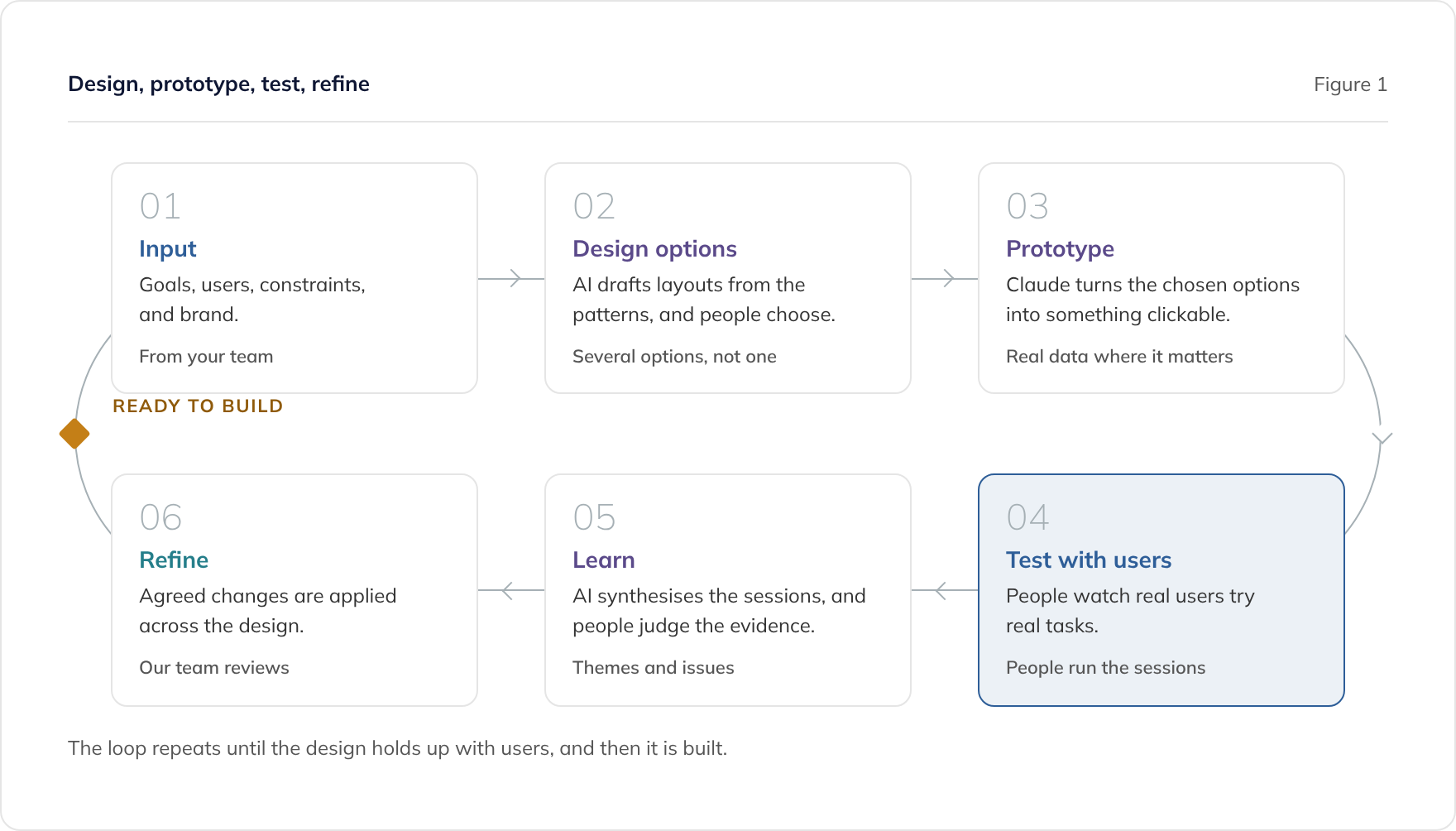
What happens to a tested prototype next?
The tested design carries forward into the build. The prototype itself usually does not, because it was built to answer questions quickly, not to be secure, maintainable, and reliable in production.
We build from the agreed designs and the product’s design system, and our engineers review every change. If you already have a prototype built with an AI app builder, our prototype to production service covers taking it further. Our guide to what AI-built software needs to ship explains what that involves.
A prototype is also not the same as a minimum viable product. An MVP is real software that people use. Our MVP development service covers building one once the idea has been tested.
Where to go next
For the business analysis view of prototyping, see our post on using AI prototypes to validate requirements. For why design now runs through the whole build, see UX on every screen.
To talk about prototyping your product, book a consultation or read about our MVP development service.
Frequently asked questions
Should we design or prototype first?
How many users do you need to test with?
Can we test with our own staff?
Is a prototype the same as an MVP?
Can a tested prototype go straight to production?
Related guides
Can AI Do UX Design? Where AI Helps and Where People Decide
What AI does well in UX design, from card sorting to synthesis, where people must decide, and how to use research data safely under UK GDPR.
Accessible by Design: Building Software That Meets WCAG 2.2 AA
How to design accessible software from the start, what WCAG 2.2 AA means in practice, and what UK public sector accessibility regulations require.
What to Ask an Agency About Its Design Process (and Who Owns the Designs)
The questions to ask a software agency about design: who does it, how ideas are tested, how accessibility is checked, and who owns the design files.