
In our experience, the best way to move a design between Claude chats, and from Claude Design into Claude Code, is the project’s .zip archive. We drop it into the chat without extracting it, and Claude works from the source files. We mostly go from Claude into code, then check the build with screenshots, the source, or the browser.
Design is one area where we lean fully into AI, and a design can move between several places. It can start in a Claude conversation, move into Claude Code (Anthropic’s coding agent) to be built, and come back when the screens need to change. This guide explains how we carry a design between those places and how we check the result. It is part of our series on UX design for custom software.
What is a Claude Design project archive?
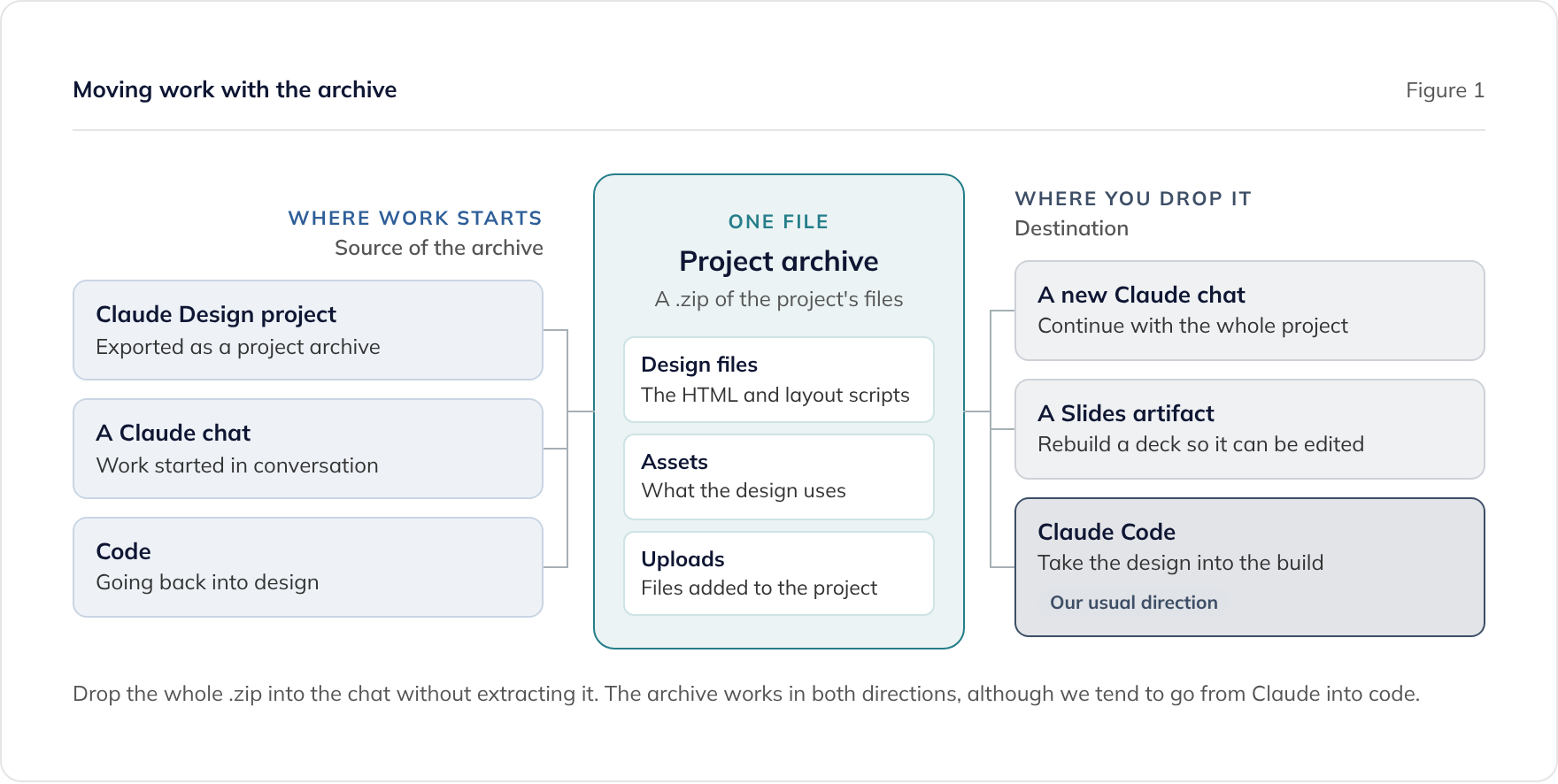
A project archive is a .zip of every file in a Claude Design project. As well as the design’s HTML, it holds the scripts that lay the design out, its assets, and the files uploaded to the project. Claude can therefore work from the source files rather than from a picture of the result.
That is why we use it as our portable format. A PDF or a screenshot shows what a design looks like, while the archive holds what the design is made of. Whatever receives it starts from the same place.
In standalone Claude Design, you export one by opening the project and choosing Share, then Project HTML. Keep Project archive selected and click Export. Menu names change, so check Anthropic’s article on moving from standalone Claude Design to Claude before you start. Our post on Claude Design after 14 December covers the closure of the standalone site.
How do you move a design into Claude Code?
Give Claude Code the archive and ask it to build from the design. We drop the whole .zip into the chat without extracting it. In our experience that gives Claude Code everything it needs to take the design into the build.
This is the direction we use most. We tend to go from Claude into code in one direction, then check the built result against the design. Our engineers use Claude Code daily on production projects, and our Claude Code development page explains how we use it.
Claude Code also has its own route in. Anthropic’s Claude Code artifacts documentation says the /design command drafts a design as a canvas of editable artboards, and Claude can then implement the option you pick. It needs Claude Code v2.1.265 or later. We are adopting /design alongside the archive, so that design and build happen in the same place.
How do you carry a design between Claude chats?
Drop the archive into a new chat. That gives the new conversation the whole project, so work can continue wherever it is needed. We use this to move work between Claude instances.
How do you rebuild a moved deck?
A project that has moved into Claude becomes a plain artifact, not a Slides, Docs, or Design artifact. You can change it by asking Claude, but you cannot edit it in place, and in our experience its PDF export is much weaker. Starting a new Slides artifact and giving it the archive rebuilds the deck from its source files.
We have tested this with slide decks. For document-style designs we would try the same approach with the Docs template, but we have not confirmed that it works as well. Our post on Claude Design after 14 December sets out the steps in full.
How do you check what was built against the design?
The way we check depends on the kind of app. In each case, people review the result, and our engineers review every change.
- Mobile and desktop apps: we tend to update the design in the chat with screenshots of what was built, so Claude can see the real screens.
- Web apps: we may still use screenshots, but we can also give Claude the source code or ask it to check the result directly in the browser.
For web apps, checking in the browser lets Claude look at the real page instead of a picture of it.
Can work go back from code into design?
Yes. The archive works in both directions, so work can move from code back into design and on again. In practice we use this less than the route into code, because we tend to go in one direction. We have used the archive extensively for both.
When should you sync the design system instead?
Sync the design system from your code when your colours, type, and components already exist there. The archive carries one project, while a design system carries the brand and the parts every project should use.
In Claude you can use Sync from GitHub, and in Claude Code you can run /design-sync, which reads your tokens and components directly. When you sync again later, changed values update and new ones are added, while your usage notes, fonts, and assets stay. Anthropic’s documentation also says Claude Code looks for an existing design system in your project before choosing its own styles, so recording your tokens in the project’s CLAUDE.md or a theme file helps.
Our guide to design systems, UX patterns, and Storybook covers how much of a design system a product needs.
What should you check before you rely on an archive?
Treat an archive like any other file you hand to an AI tool, and check these points first:
- Compare it with the original. Look at each screen or slide against the original before you stop using the old version.
- Check what is inside. The archive includes the files uploaded to the project, so look for personal data and confidential files before you drop it into a chat. Our guide on whether Claude is GDPR compliant covers the assurances to look for.
- Check your organisation’s settings. Anthropic’s admin guide says Claude Design does not currently support data residency requirements, and organisations with zero data retention cannot turn on artifacts.
- Export before the standalone site closes. Anthropic’s article does not say whether projects can still be downloaded once the standalone version is read-only, so export what you need before 14 December 2026.
Where does this fit in a project?
Design in Claude gets an idea to something people can react to quickly, and Claude Code takes it into the build. A design or a clickable prototype is not production software, though. Our guide on when to design and when to prototype explains how to choose between them.
If you already have a prototype built this way, our guide to what AI-built software needs to ship explains what the step to production involves. Our prototype to production service covers it, or you can book a consultation to talk it through.
Frequently asked questions
Can you use a Claude Design project in Claude Code?
What is a Claude Design project archive?
Can you go from code back into Claude Design?
How do you check that the build matches the design?
Should I sync my design system or use the archive?
What should I check before dropping an archive into a chat?
Related guides
AI-Friendly Brand Guidelines: What Your Brand Agency Should Give a Software Team
What your brand agency should give a software team so AI design tools such as Claude Design can apply your brand: palette, fonts, logos, and examples.
Can AI Do UX Design? Where AI Helps and Where People Decide
What AI does well in UX design, from card sorting to synthesis, where people must decide, and how to use research data safely under UK GDPR.
Design or Prototype? When to Use Each, and How to Test Before You Build
When to design and when to prototype, how to test either with real users before the build, and how AI tools such as Claude make moving between them cheaper.