
Yes, you can bring your own designs, and we can build them to match pixel for pixel. In our experience, giving us your brand guidelines and designing with AI is now far more efficient, because we can explore and test more options. Either way, a build needs every state, screen size, and component defined.
Some clients like to collaborate closely on design, and others provide their own designs, which we build from.
This guide covers the second route. It explains what a development team needs from your design files and the gaps to look for before the build starts. It also explains why we now find designing from your brand input the more efficient alternative. It is part of our series on UX design for custom software.
Can we provide our own designs for a software build?
Yes. If you have an in-house designer or a design agency, we can build their designs to match pixel for pixel.
The quality of the build depends on the completeness of the files. A set of polished main screens is a good start, but a working product needs every state and every screen size defined. The sections below set out what to check.
What does a development team need from a design file?
A development team needs to know how every screen looks and behaves, not only how it looks at its best. A complete set of design files covers the following.
Screens and states
- Every screen, including admin, settings, and reporting screens, not only the main journey.
- Every state of each screen: empty, loading, error, success, and partly filled.
- Permission variants, where different users see different content or actions.
Behaviour
- Responsive layouts for each screen size you support, or clear rules for how layouts adapt.
- Interaction notes for anything that moves, expands, or changes as the user works.
- Validation and error messages, with the wording for each.
The building blocks
- Components and variants, such as every button style and every state of a form field.
- Design values for colour, type, spacing, and radius, ideally as design tokens (named values that design tools and code both read).
- Real content, or realistic examples, so layouts are tested against long names, empty fields, and large lists.
Accessibility
- Accessibility annotations, such as focus order, labels for icons, and alternative text for images.
- Colour pairs that meet contrast requirements. We design to WCAG 2.2 AA by default, so we check this before building.
What gaps do design files usually have?
Design files are usually strongest on the main journey and weakest on everything around it. Common gaps include:
- Screens designed for desktop only, with no mobile or tablet layouts.
- The happy path only, with no error, empty, or loading states.
- Placeholder text that hides how layouts behave with real data.
- One-off components that look similar to existing ones but differ slightly.
- Text and background colours that fail contrast checks.
- No notes on behaviour, so the build team has to guess.
Each gap becomes a question during the build. Answering it means waiting for the designer, or making a judgement call that the designer may later disagree with. Finding the gaps before the build starts avoids both.
Why do we find designing from brand input more efficient?
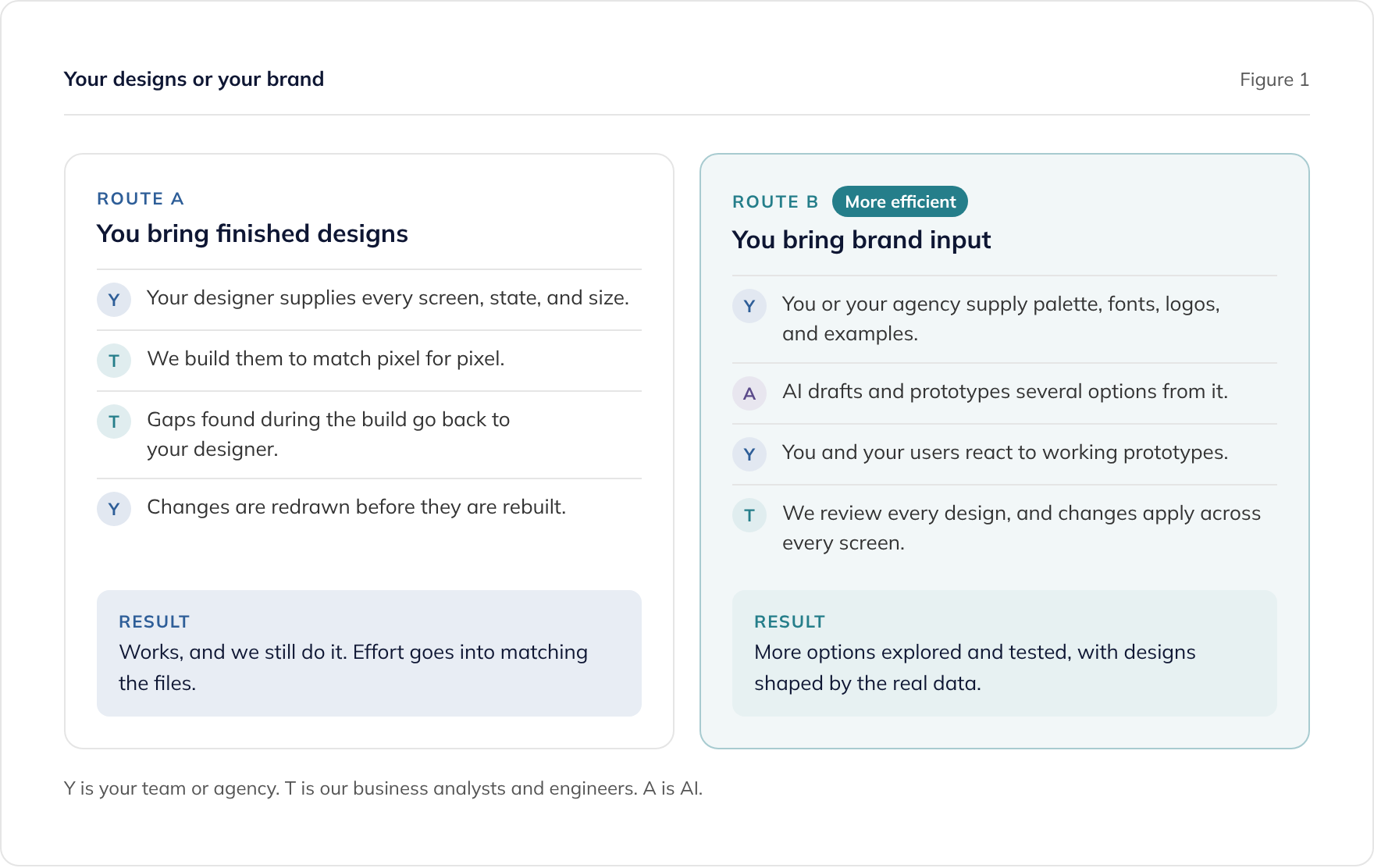
We can match pixel-perfect designs, and we still do when a client wants that. In our experience, though, it is now a far less efficient way to work than giving us your brand guidelines and designing with AI.
More options, tested earlier
When we design from brand input, AI is involved at every stage, so our business analysts and engineers can explore and test far more options than a traditional process allows. You react to working prototypes rather than approving static screens, which tends to surface questions earlier.
Designs that fit the technology
The people designing understand the data, the integrations, and what the technology can do. Designs start from the product’s patterns and real data, so fewer of them need reworking when the build begins. Our pillar guide explains why good UX has always depended on understanding the technology.
Every screen, not a sample
Finished design files tend to cover the screens someone had time to draw. Designing with AI as we build means every screen gets design attention, including admin screens, error states, and features added later.
If you would rather give us brand input, our guide to AI-friendly brand guidelines lists what to provide.
What happens when the design and the technology disagree?
Sometimes a design asks for something the data or the platform cannot support as drawn. We raise it, explain the constraint, and suggest options, and you or your designer decide.
The most common causes are:
- Real data that is longer, emptier, or larger than the design assumed.
- Performance, where a screen needs data from several systems and cannot load instantly.
- Platform conventions, such as Apple’s Human Interface Guidelines and Google’s Material Design on mobile, which users expect apps to follow.
- Accessibility, where a colour pair or interaction fails WCAG 2.2 AA.
Can we mix the two?
Yes. One option is to provide finished designs for the screens that matter most to your brand, such as a customer’s first experience, and give us brand input for the rest. We then design the remaining screens with AI so they match, and you review them.
Whichever route you choose, agree it at the start. Knowing who designs what, and who answers questions during the build, keeps sprints moving.
Where to go next
If you have a prototype built with an AI app builder rather than design files, our prototype to production service covers taking it to production software. For component libraries and design systems on React, see our React development service.
To talk about building from your designs or your brand, book a consultation or read about our custom software development service.
Frequently asked questions
Can you match our designs exactly?
Do we need to use Figma?
What if our designs only cover desktop?
Who fixes design gaps found during the build?
Can you build from a prototype made in an AI tool?
Related guides
AI-Friendly Brand Guidelines: What Your Brand Agency Should Give a Software Team
What your brand agency should give a software team so AI design tools such as Claude Design can apply your brand: palette, fonts, logos, and examples.
Can AI Do UX Design? Where AI Helps and Where People Decide
What AI does well in UX design, from card sorting to synthesis, where people must decide, and how to use research data safely under UK GDPR.
UX Design for Custom Software: How AI Changes Every Stage
What UX design means in custom software, why it depends on the technology and data, and how AI at every design stage lets teams explore and test more.