
Traditional projects could afford detailed UX design for a sample of key screens at the start, and the rest followed patterns as best it could. With AI, the time and cost of design have fallen so far that we include design in our discovery and build work, which makes UX on every screen affordable.
Design is one area where we lean fully into AI, and the clearest result is how much of a product now gets designed. This guide explains why projects used to design only a sample of screens, what happened to the rest, and how AI has changed the economics. It is part of our series on UX design for custom software.
Why did projects only design a sample of screens?
Design time was expensive, so it went where it seemed to matter most. A typical project designed the main journeys and a handful of key screens in detail before the build, then relied on those examples for everything else.
That was a rational choice under the old economics. Each screen had to be drawn by hand, reviewed, revised, and handed over, and a product can have hundreds of screens and states. Designing all of them up front would have cost more than many budgets allowed.
What happens to the screens nobody designed?
They get built anyway, by whoever is building them, using whatever examples are closest. In our experience, the gaps show up in the same places:
- Admin and settings screens, which staff use every day but nobody designed.
- Error, empty, and loading states, which appear when something goes wrong or nothing is there yet.
- Reports and exports, often bolted on late.
- Features added after launch, built long after the original designs were made.
These screens are often where users lose the most time. A customer-facing journey can look polished while the back-office screens that run the business are confusing, inconsistent, and full of workarounds.
How does AI change the cost of design work?
AI takes on much of the work between the first input and the final review. Our business analysts and engineers design with AI at every stage, which lets them explore and test far more options than a traditional process allows.
The effect on cost is large enough to change how we run projects. The time and cost of design are now minimal, so we include design in our discovery and build work rather than pricing it separately. Our guide on where AI helps in UX design and where people decide explains which tasks AI takes over.
Design is not the only part of a budget that AI changes. Our post on what AI-augmented development means for your budget covers the rest of a project.
What does design through the build look like?
We apply UX to every screen on our current projects, not a sample of screens at the start. Design starts in discovery and carries on through every sprint, alongside the build.
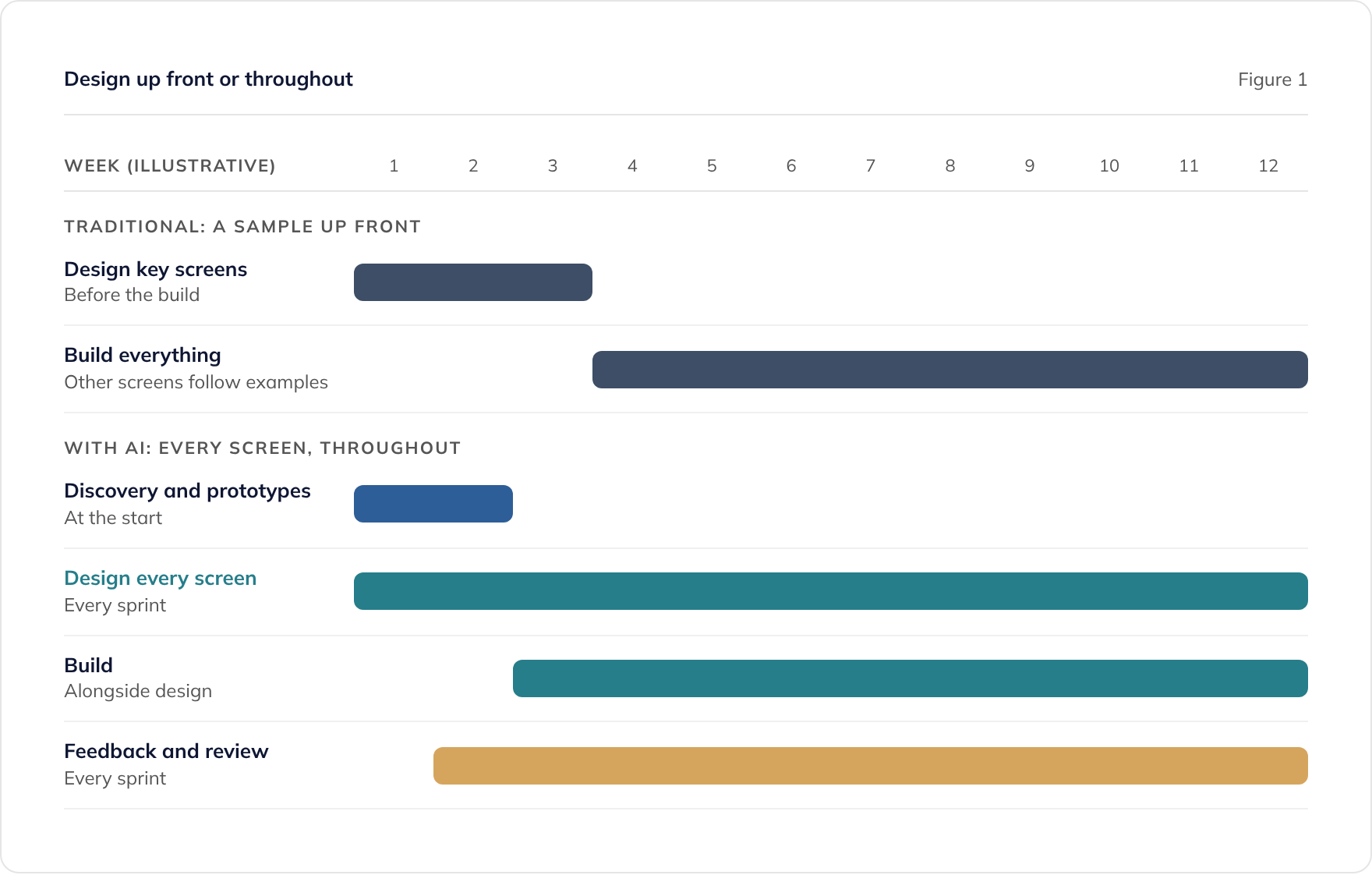
The weeks in Figure 1 are illustrative, not a plan for any particular project. They show that design no longer stops when the build starts.
Within each two-week sprint
We work in two-week sprints. In each one, the screens and changes in that sprint are designed, reviewed, and built:
- Input. Business analysts gather what each new screen needs to do, from your team and from users.
- Design. AI drafts the screens from the product’s design system, and our engineers steer them against the data and the technology.
- Review. You and your users give feedback on working prototypes, and people review every design before it is built.
- Build. The agreed designs are built, and engineers review every change.
What keeps hundreds of screens consistent
Designing every screen only works if the screens agree with each other. The product’s design system, with its tokens, components, and patterns documented in Storybook, means a filter or a form behaves the same everywhere. Our guide to design systems, UX patterns, and Storybook explains how much of a system a product needs.
Does more design mean more meetings for the client?
It should not. People give the first input and feedback, and review the output, but reviews can be short when the designs follow agreed patterns.
Three things keep the review load light:
- Agreed patterns. Once a pattern is approved, new screens that use it need a quick check, not a full design review.
- Working prototypes. Reacting to something you can click through is faster than reading a specification.
- Changes applied everywhere. When a review changes a pattern, AI applies the change across every screen that uses it, so the same point does not come up twice.
Where should people still spend the most time?
Designing every screen does not mean giving every screen equal attention. People should spend most of their time where the risk is highest:
- New journeys that solve a problem no existing pattern covers.
- Complex tasks, such as multi-step processes with many rules and exceptions.
- High-traffic screens, where small improvements add up across many users.
- Accessibility, where we design to WCAG 2.2 AA by default and check every screen with automated testing.
For those screens, testing with real users is worth the time, and our guide on whether to design or prototype explains how to run it. Our guide on the design stages of a custom software project shows where that testing fits.
Where to go next
If you have finished designs for some screens already, our guide to bringing your own designs covers how they fit alongside this approach. For the brand input that makes AI design work, see AI-friendly brand guidelines.
To talk about how design would run on your project, book a consultation or read about our custom software development and legacy application modernisation services.
Frequently asked questions
Is designing every screen more expensive?
Is design included in your price?
Does every screen need user testing?
How do patterns keep many screens consistent?
Does this apply to internal tools and legacy modernisation?
Related guides
Can AI Do UX Design? Where AI Helps and Where People Decide
What AI does well in UX design, from card sorting to synthesis, where people must decide, and how to use research data safely under UK GDPR.
Accessible by Design: Building Software That Meets WCAG 2.2 AA
How to design accessible software from the start, what WCAG 2.2 AA means in practice, and what UK public sector accessibility regulations require.
What to Ask an Agency About Its Design Process (and Who Owns the Designs)
The questions to ask a software agency about design: who does it, how ideas are tested, how accessibility is checked, and who owns the design files.