
AI-Friendly Brand Guidelines: What Your Brand Agency Should Give a Software Team
Yes, your brand agency can own the brand while we design and build the software. What we need from the agency is brand input an AI design tool can apply: a colour palette with values and roles, licensed fonts, logos, icons, imagery, and tone of voice, with examples. People then review whether the output fits.
Design is one area where we lean fully into AI, and the quality of the brand input sets how good the results can be. This guide explains what AI-friendly brand guidelines are, what your brand agency should provide, and how AI design tools use that input. It includes a checklist you can forward to your agency, and a worked example from this website’s own rules.
For how brand input fits into the wider design process, see our pillar guide on UX design for custom software.
Can our brand agency design it while you build it?
Yes. Your brand agency can own the brand while we design and build the product. We work with clients’ brand agencies and within their brand guidelines.
In practice, the work splits cleanly:
- Your brand agency defines the brand and supplies the brand input described below.
- Our business analysts and engineers design the product with AI, from that input and from what we learn about your users, data, and systems.
- Your team and your agency give feedback on working prototypes and review the designs for brand fit.
With good brand input from you or your agency, we do not need a separate designer. The input is the part that matters most.
Why do traditional brand guidelines fall short for software and AI?
Most brand guidelines are written for print, campaigns, and marketing pages. They show a logo, a palette, a typeface, and a few hero images, and they leave the rest to a designer’s judgement.
Software needs more than that, and AI needs it written down. A product has hundreds of screens, each with states that a campaign never has: empty, loading, error, disabled, and selected. A brand book rarely says what a disabled button looks like, how dense a data table should be, or what tone an error message takes.
A human designer fills those gaps by interpreting the brand. AI applies what it is given, so any gap is filled with a common pattern rather than your brand. Guidelines that are explicit, structured, and full of examples close those gaps before design starts.
What should your brand agency provide?
The checklist below is the ideal input. You may not have all of it, and we can work with less, but each item removes guesswork from the design.
Colour
- Exact values (hex or RGB) for every colour.
- A named role for each colour: primary, secondary, accent, neutral, and the states for success, warning, and error.
- Approved text and background pairs, with their contrast ratios.
Typography
- Font files licensed for web and app use, in the weights and styles you use.
- A type scale: sizes and line heights for headings, body text, labels, and captions.
- Fallback fonts for systems where the brand font cannot load.
Logo, icons, and imagery
- Logo files in vector format (SVG), with versions for light and dark backgrounds.
- Clear space and minimum size rules.
- An icon set, or a description of the icon style if you do not have one.
- Rules for photography and illustration, with examples.
Layout and components
- Spacing, corner radius, shadows, and grid, ideally as design tokens (named values, such as ‘spacing-md’ or ‘colour-primary’, that design tools and code both read).
- Any existing components, design files, or a product codebase that already uses the brand.
Voice and examples
- Tone of voice with example copy, and words to use and avoid.
- Real examples of the brand in use: finished screens, pages, or decks.
- Do and don’t examples for the decisions that make the brand distinctive.
Accessibility
- Any accessibility requirements the brand already commits to. We design to WCAG 2.2 AA by default, so we check the palette against it early.
How does Claude Design use brand input?
Claude Design turns brand input into a design system, which it then applies to every new design. Anthropic’s help article on setting up a design system says the system holds colours, typography, components, and layout patterns. Claude extracts them from the assets you provide.
What it accepts
The inputs Anthropic lists include:
- A codebase with a component library
- Slide decks and documents, including PowerPoint and PDF
- Logos, colour palettes, typography specimens, and fonts
- Prototypes, screenshots, and existing design files
What gets the best results
Anthropic’s advice is to include real examples, not just specs, because a finished page conveys how a brand feels better than a palette on its own. Its getting started guide also notes that a design system import is only as good as its source.
Claude Design launched as a standalone Anthropic Labs product in April 2026 and now works inside Claude itself. We design and prototype with it, and our business analysts and engineers review everything it produces.
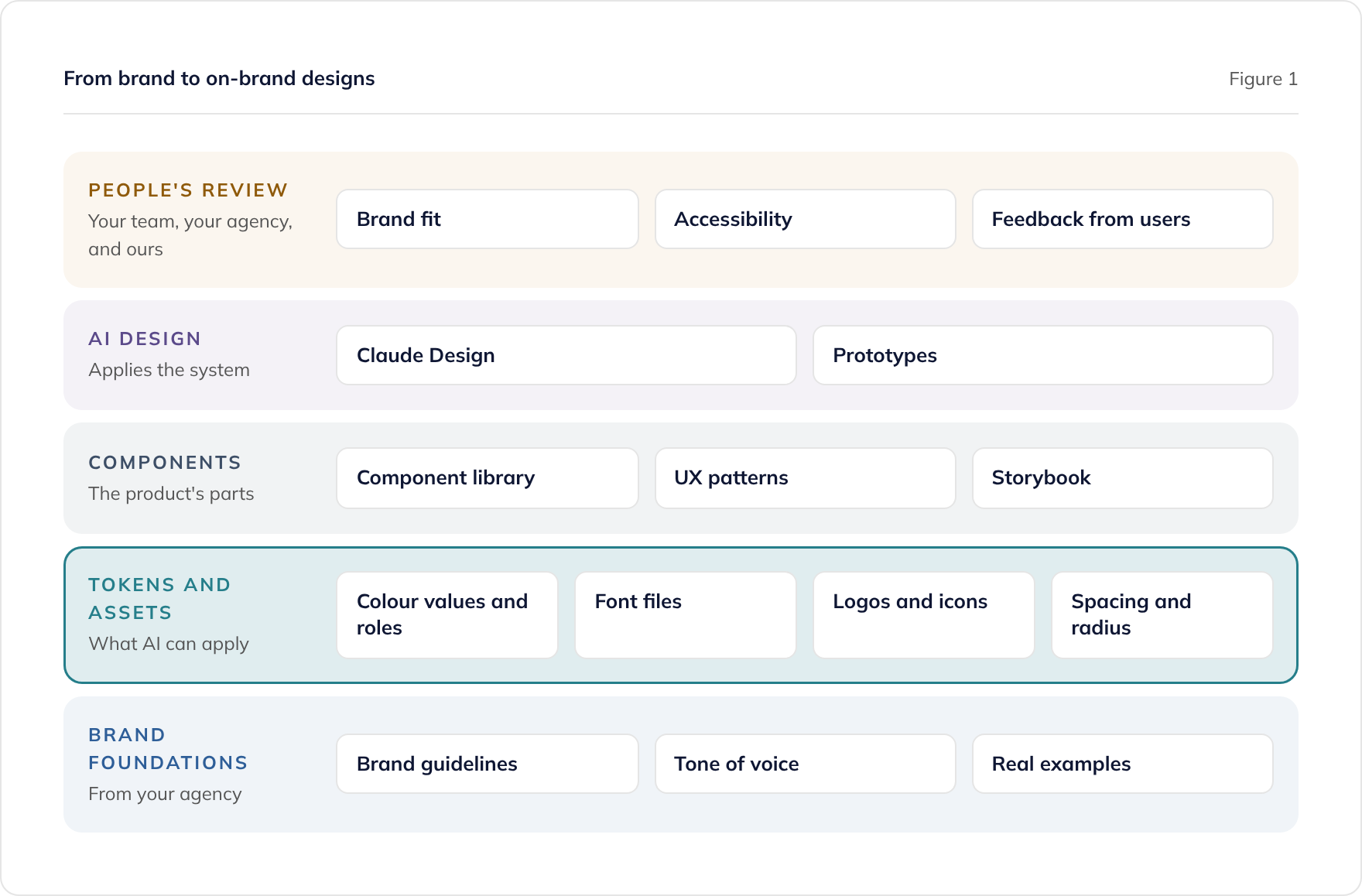
What does AI-friendly guidance look like in practice?
This website is our own worked example. Its standards live in the code repository as rule files that AI tools read and apply on every change, and they are written as explicit rules rather than descriptions of a feeling.
Copy rules
Our copywriting standards are applied to every page. They include rules such as:
- Never use the em dash; use a comma, parentheses, a colon, or a full stop instead.
- Aim for an average of 20 words per sentence, and never more than 35.
- Use the Oxford comma.
- Expand every acronym on first use.
Each rule comes with a short example of what to do and what to avoid, which is what makes it usable by AI. A rule such as ‘write in a direct voice’ is open to interpretation, while ‘never more than 35 words in a sentence’ is not.
Diagram design system
The diagrams on this site, including Figure 1 above, are built by AI from a written design system. It defines a small set of colours, each with an exact value and a stated purpose:
- Blue (#2E5E98) for users, clients, inputs, and discovery.
- Teal (#257E8A) for the primary path and the recommended option.
- Amber (#C47F17) for gates, reviews, and decisions.
- Purple (#5B4A8A) for work that AI does, used only where AI and people are shown side by side.
It also fixes the typeface, the shapes, and copy rules such as keeping diagram titles under six words. Because the purpose of each colour is written down, the diagrams stay consistent across dozens of pages without anyone redrawing them.
The same approach works for a product. When your brand’s decisions are explicit, with values, roles, and examples, AI applies them consistently on every screen.
How do you stop AI producing generic designs?
AI falls back on common patterns when it has nothing specific to apply, so the answer is to give it something specific. Three things keep a product recognisably yours:
- Write down what makes the brand distinctive. This might be a particular use of colour, a typographic detail, a tone of voice, or a style of illustration. If it is only in a designer’s head, AI will not apply it.
- Give it real examples. Finished screens, pages, or decks show the brand in use, which a palette alone cannot.
- Keep people reviewing every design. Someone who knows the brand checks each design, and their feedback goes back into the brand input and the design system.
Familiar patterns are not the enemy. People already know how a search box or a checkout should work, and using common patterns makes software easier to use. Our guide on where AI helps in UX design and where people decide covers this balance in more depth.
How do brand reviews fit into a two-week sprint cycle?
We work in two-week sprints, and design runs through each one. Your team and your agency give feedback on working prototypes, and people review the designs for brand fit before they are built.
Because AI applies agreed changes across every screen, a brand decision made once in a review is reflected everywhere. Reviews can then focus on new screens and new decisions, rather than checking the same details again.
Who maintains the guidelines once the software exists?
Your agency continues to own the brand. Inside the product, the brand lives on as the design system: the tokens, components, and patterns the software is built from. Design files and the design system follow the same licence terms as the software itself, which our guide to software IP licensing and source code handover explains.
When the brand changes, the agency updates the guidelines and we update the tokens and components. Because the product is built from those shared values, a brand refresh can then flow through to every screen.
Where to go next
If you already have finished designs rather than brand guidelines, our guide to bringing your own designs explains what a development team needs from your files. For the whole design process, see UX design for custom software.
To talk about designing your product from your brand, book a consultation or read about our custom software development service.
Frequently asked questions
Can our brand agency design the product while you build it?
Can AI design tools read our existing brand guidelines PDF?
What format should our colours and fonts be in?
Do we need to license fonts for an app?
What if our brand colours fail accessibility contrast?
Will AI make our product look like everyone else's?
Related guides
Bringing Your Own Designs: Pixel-Perfect Builds and the Alternative
Can a development team build your designs pixel-perfect? Yes. What your design files need to contain, and why brand input plus AI design is often faster.
Can AI Do UX Design? Where AI Helps and Where People Decide
What AI does well in UX design, from card sorting to synthesis, where people must decide, and how to use research data safely under UK GDPR.
UX Design for Custom Software: How AI Changes Every Stage
What UX design means in custom software, why it depends on the technology and data, and how AI at every design stage lets teams explore and test more.