
Accessible software is designed that way from the start rather than fixed at the end. We design to WCAG 2.2 AA by default, check it with automated testing and standard techniques, and are used to it being a strict requirement. UK public sector bodies must meet accessibility standards and publish an accessibility statement.
Design is one area where we lean fully into AI, and accessibility is part of the design from the first draft, not a check at the end. This guide explains what WCAG 2.2 AA means in practice, what the law asks of public and private organisations in the UK, which accessibility decisions are made in design, and how to test them. It is general information, not legal advice.
It is part of our series on UX design for custom software.
What does accessible software mean?
Accessible software can be used by as many people as possible, including people with visual, hearing, motor, and cognitive impairments. In practice that means someone can use it with a screen reader, a keyboard alone, voice control, high zoom, or more time than average.
Accessibility helps far more people than it is designed for. Clear labels, readable text, and forgiving forms make software easier for everyone, including people working on a phone in bright sunlight or with one hand free.
What is WCAG 2.2 AA?
The Web Content Accessibility Guidelines (WCAG) are published by the W3C, the body that sets web standards. WCAG 2.2 is the current version. It is organised as testable success criteria at three levels: A (the minimum), AA, and AAA (the highest).
AA is the level most organisations target, and it is the level UK public sector websites and apps must meet. It covers areas such as:
- Text alternatives for images and icons
- Colour contrast for text and controls
- Keyboard access to everything
- Visible focus, so keyboard users know where they are
- Clear labels, instructions, and error messages
- Content that adapts to zoom and screen size
What changed in WCAG 2.2?
WCAG 2.2 added nine success criteria to WCAG 2.1, six of them at level A or AA. The W3C summarises them in what’s new in WCAG 2.2. The A and AA additions are:
- Focus not obscured (minimum): a focused element must not be entirely hidden, for example behind a sticky header or banner.
- Dragging movements: anything done by dragging must also be possible with a single pointer action.
- Target size (minimum): controls must be large enough, or spaced well enough, to tap or click reliably.
- Consistent help: help options appear in the same place across pages.
- Redundant entry: users are not asked to enter the same information twice in a process.
- Accessible authentication (minimum): logging in must not rely on a cognitive test such as remembering or transcribing a code, unless an alternative is offered.
WCAG 2.2 also removed one criterion, 4.1.1 Parsing, which was considered obsolete.
What do UK public sector accessibility regulations require?
Public sector websites and mobile apps must meet the WCAG 2.2 AA standard and publish an accessibility statement. That is set out in GOV.UK’s guidance on accessibility requirements for public sector websites and apps, under the Public Sector Bodies (Websites and Mobile Applications) (No. 2) Accessibility Regulations 2018.
Who is covered
The regulations apply to central and local government and to some other organisations, unless they are exempt. GOV.UK lists the exemptions, which include:
- Non-government organisations such as charities, unless they are mostly funded by public money, provide essential public services, or serve disabled people.
- Public sector broadcasters and their subsidiaries.
Some bodies are partly exempt. Schools and nurseries, for example, must still make the content people need to use their services accessible, and must publish an accessibility statement.
How it is enforced
The Government Digital Service monitors compliance by testing a sample of public sector websites and apps each year. Enforcement sits with the Equality and Human Rights Commission in England, Scotland, and Wales, and the Equality Commission for Northern Ireland.
If you are commissioning software for a public body, our guide to the AI-augmented approach to the GDS Service Standard covers how accessibility fits alongside the rest of the Standard.
Do private sector organisations have to make software accessible?
There is no UK law that names WCAG for private organisations, but the duties are real. The Equality Act 2010 requires service providers and employers to make reasonable adjustments so disabled people are not put at a substantial disadvantage. Software that disabled customers or staff cannot use can fall foul of that duty.
Internal tools and staff software
Internal systems are easy to overlook, but employers’ Equality Act duties apply to the software staff use. GOV.UK notes that the public sector regulations do not cover mobile apps for specific groups such as employees, but the Equality Act still applies to them. Our guide to applying the GDS Service Standard in the private sector makes the same point about staff tools.
Selling into the EU
The European Accessibility Act has applied since 28 June 2025 to certain products and services sold in the EU. They include e-commerce, banking services, e-books, and services related to air, bus, rail, and waterborne passenger transport. Microenterprises providing services are exempt. UK organisations selling those services into the EU should check whether it applies to them.
Which accessibility decisions happen in design?
Many accessibility problems start in design, so they are cheaper to fix there than in code. The decisions that matter most include:
- Colour and contrast: text and controls with enough contrast against their background, and information that is never conveyed by colour alone.
- Focus order and visibility: a logical order for keyboard users, and a focus indicator that is always visible.
- Target size: buttons and links large enough to use on a touch screen.
- Labels and instructions: every field and icon has a clear label, and instructions come before the task, not after.
- Error messages: errors that say what went wrong and how to fix it, next to the field concerned.
- Motion: animation that can be reduced or turned off, and nothing that flashes.
AI design tools apply whatever the design system and brand input tell them. If the palette fails contrast, AI will reproduce the failure on every screen. Our guide to AI-friendly brand guidelines covers checking brand colours early, before they reach the product.
How do design systems make accessibility repeatable?
An accessible component fixes an issue everywhere it is used. If the form field component has a proper label, visible focus, and a clear error message, every form in the product inherits them.
That makes the design system the most effective place to invest in accessibility. Our guide to design systems, UX patterns, and Storybook explains how components and patterns are documented and shared.
How do you test accessibility?
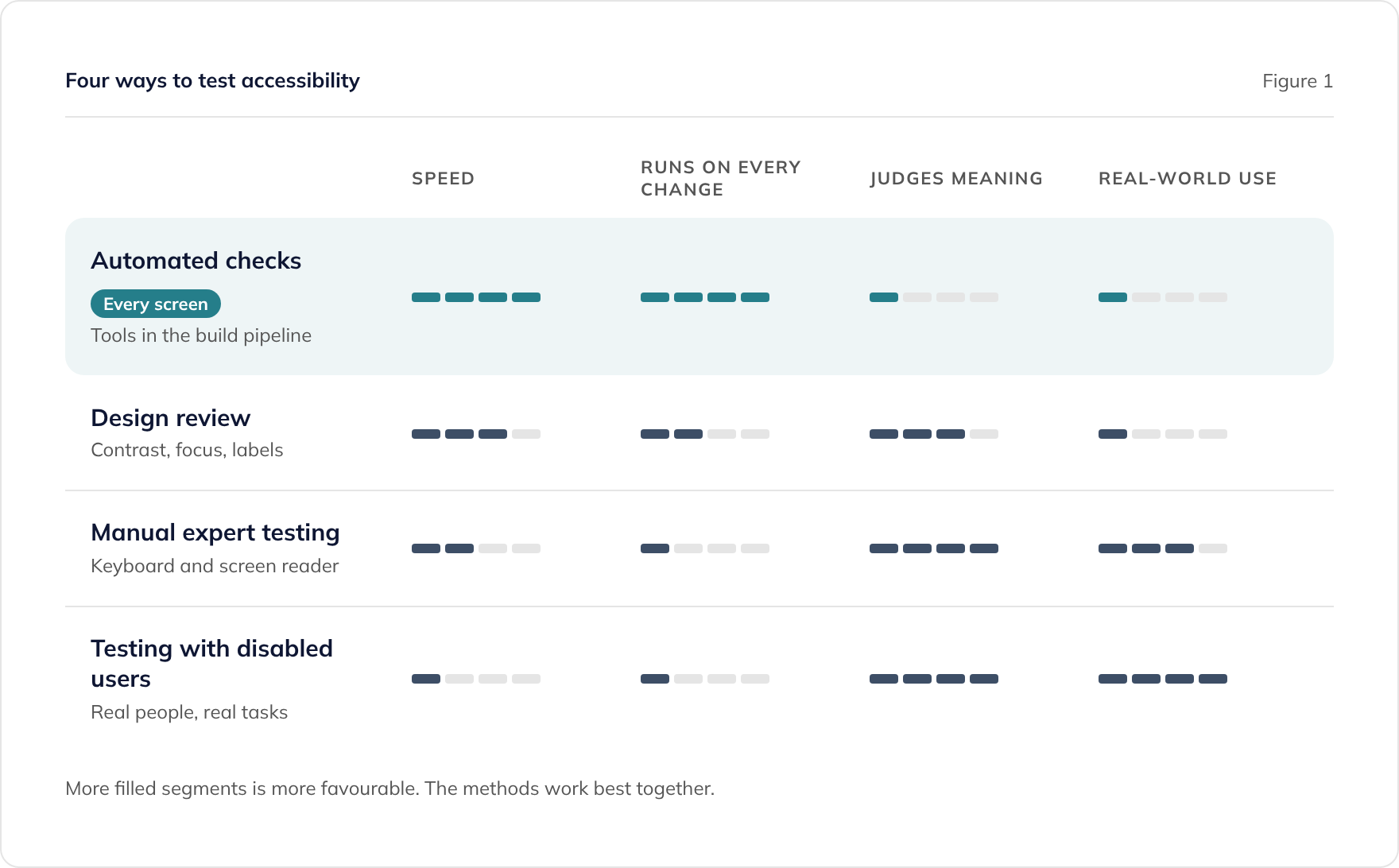
No single method catches everything, so accessibility testing combines approaches. Figure 1 compares the main ones.
Automated checks
Automated tools scan pages and components for issues such as missing labels, low contrast, and invalid markup. They are fast and can run on every change, which makes them the backbone of consistent accessibility. They cannot judge everything, such as whether alternative text is meaningful.
Manual review and testing
People check what tools cannot: whether the focus order makes sense, whether a screen reader announces things clearly, and whether a journey can be completed with a keyboard alone. Testing with disabled users goes further still, because it shows how real people use the software.
Where does AI help with accessibility, and where does it not?
AI helps by applying accessible patterns consistently. When the design system’s components are accessible, AI uses them on every new screen, and it can draft labels, alternative text, and error messages for people to review.
AI does not decide whether something is accessible. It can miss context, such as an image that needs a longer description, and it cannot tell you how a screen reader user experiences a journey. People review the output and own the result. Our guide on where AI helps in UX design and where people decide covers the wider split.
How do we approach accessibility?
We design to WCAG 2.2 AA by default, and we are used to it being a strict requirement. Accessibility is built into the design system and its components, so it carries through to every screen.
We check accessibility with automated testing, alongside standard accessibility techniques and tools. If your project has further requirements, such as testing with disabled users or an accessibility statement for a public sector service, agree them at the start so they are planned in.
Where to go next
For how accessibility fits into the design process as a whole, see UX design for custom software. For an example from education, see our post on improving accessibility for diverse learners.
To talk about accessible design for your system, book a consultation or read about our work with the government and public sector.
Frequently asked questions
Is WCAG 2.2 AA a legal requirement in the UK?
Do internal staff tools need to be accessible?
What is an accessibility statement?
Can automated tools prove a site is accessible?
Does accessibility cost more?
Related guides
Can AI Do UX Design? Where AI Helps and Where People Decide
What AI does well in UX design, from card sorting to synthesis, where people must decide, and how to use research data safely under UK GDPR.
What to Ask an Agency About Its Design Process (and Who Owns the Designs)
The questions to ask a software agency about design: who does it, how ideas are tested, how accessibility is checked, and who owns the design files.
AI-Friendly Brand Guidelines: What Your Brand Agency Should Give a Software Team
What your brand agency should give a software team so AI design tools such as Claude Design can apply your brand: palette, fonts, logos, and examples.