
AI can take on a large share of UX design work, but not the judgement. It can synthesise research notes, generate layout variations, and turn sketches into clickable prototypes, which lets a team test many more options. People decide which problem matters, which option works for real users, and whether it fits the brand.
Design is one area of software delivery where we lean fully into AI. This guide sets out what AI does well in UX (user experience) design, which tasks it can take over, and where people still decide. It is a companion to our pillar guide, UX design for custom software, which covers the whole design process.
Can AI do UX design?
Yes, much of it. AI can draft journeys, layouts, and screens, build working prototypes, apply a brand, and keep a design system consistent. What it cannot do is decide which problem is worth solving, judge whether a design works for the people who will use it, or take responsibility for what ships.
In our process, people give the first input and feedback, and review what AI produces. AI does the design work in between. That split lets our business analysts and engineers explore and test far more options than a traditional process allows.
Which UX ‘busy work’ can AI take over?
A lot of UX work is necessary but mechanical. AI is good at exactly that kind of work, which frees people for the parts that need judgement.
Research synthesis
- Transcription: turning interview and testing sessions into searchable text.
- Synthesis: pulling themes, quotes, and pain points out of hours of notes.
- Affinity mapping: grouping hundreds of observations into themes, ready for people to review and adjust.
Information architecture
Information architecture (IA) is how content and features are organised and labelled. AI can help with each part of the work:
- Card sort set-up: drafting the cards and instructions from the product’s content.
- Card sort analysis: finding which items participants grouped together and where they disagreed.
- First-draft navigation: proposing structures for people to test.
Design production
- Layout options: generating several approaches to the same screen from the product’s patterns.
- States and variants: drafting the empty, loading, error, and permission states that are often skipped.
- Copy options: suggesting labels, help text, and error messages in the brand’s tone of voice.
- Consistency checks: comparing new screens against the design system and flagging where they differ.
Checks and reviews
- First-pass heuristic reviews: checking screens against established usability principles before people review them.
- Accessibility checks: automated testing for issues such as colour contrast and missing labels.
Can AI replace card sorting and user testing with real people?
No. AI can prepare and analyse a card sort, but the evidence comes from real participants sorting real cards. The same is true of usability testing: AI can build the prototype and synthesise the session, but someone has to watch a real person try to complete a task.
Some tools now offer ‘synthetic users’, where AI simulates participants. We treat that as a first pass that helps sharpen the questions, not as evidence. A simulated participant reflects what the model has learned in general, not how your staff or customers work.
This matches our wider position on AI in delivery. AI does not run user research or stakeholder interviews; it takes on the work around them. Our guide on the AI-augmented software development lifecycle covers the same boundary for the rest of the project.
What do people do with the time AI frees up?
They spend it where it counts. In our experience, the time AI saves goes into three things:
- More time with users. Business analysts can run more conversations and review more sessions, because the transcription and synthesis no longer take days.
- More options tested. When options are quick to produce, a team can put several in front of users instead of defending the first one.
- More screens designed. We apply UX to every screen on our current projects, including admin screens, error states, and reports, rather than a sample of key screens at the start.
Do you still need a dedicated UX designer?
In our experience, not always. Design is done by our business analysts and engineers, working with AI. With good brand input from you or your agency, we do not need a separate designer.
That depends on good brand input. AI can only apply a brand it has been given, so the quality of the brand input sets the ceiling for the visual design. If your brand is still being defined, that work belongs with a brand agency, and we work with clients’ brand agencies and within their brand guidelines.
It also depends on who does the design. Business analysts understand the users and the process, and engineers understand the data and what the technology can do. With AI producing the design work, those are the people best placed to make designs that fit the system from the first draft.
How do we split the work between AI and people?
People set the direction and make the decisions. AI produces the work in between. Figure 1 shows how that looks across a typical piece of design work.
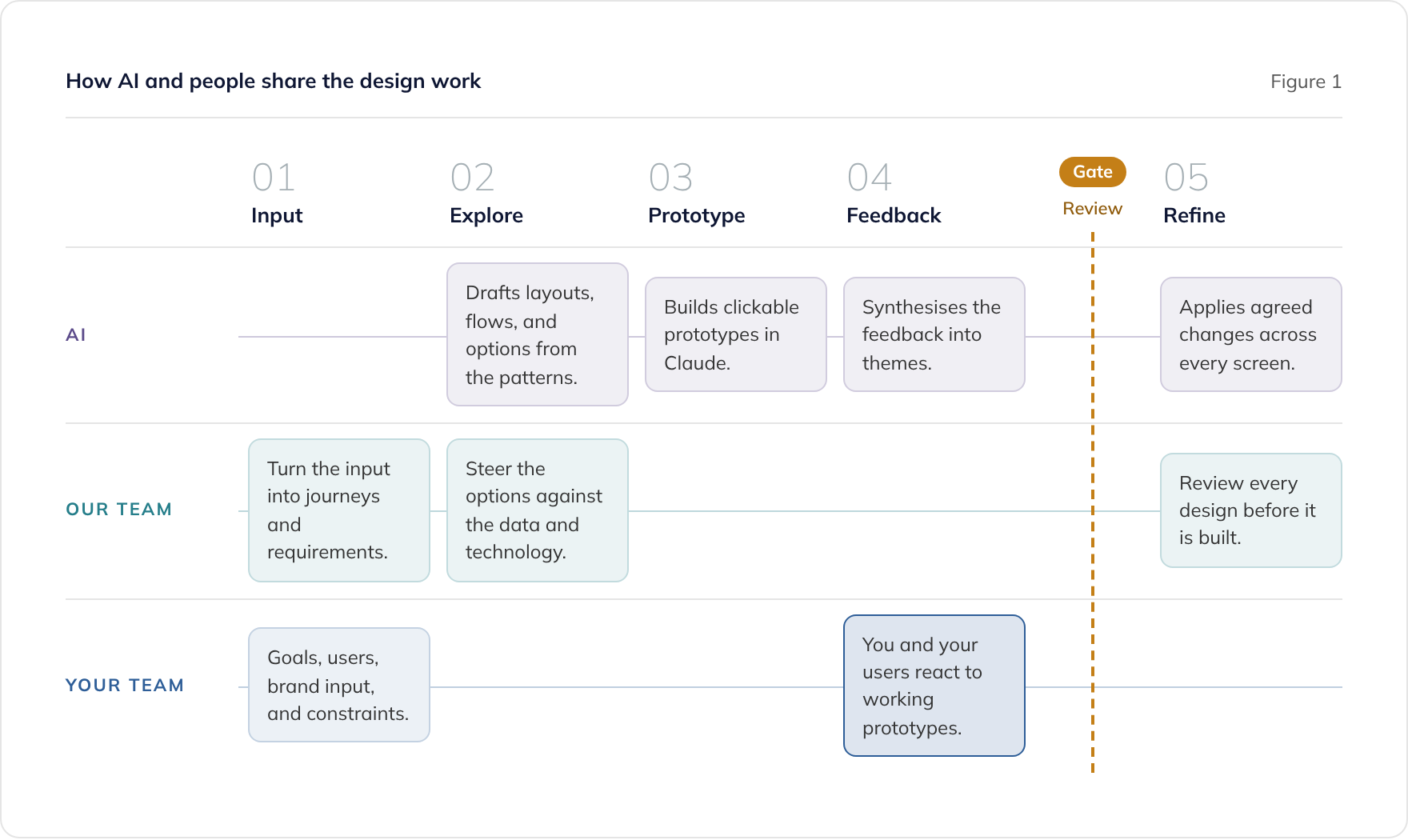
What AI does in our process
We design and prototype with Claude. Claude Design, launched by Anthropic Labs in April 2026, builds a design system by reading a team’s codebase and design files, then applies its colours, typography, and components to later designs. Claude artifacts let us turn an idea into a working, clickable prototype in conversation.
What people do in our process
- Your team gives the first input: goals, users, constraints, and brand guidelines. You and your users then give feedback on working prototypes.
- Our business analysts turn that input into journeys and requirements, and make sure the design answers the problem.
- Our engineers steer the design towards what the data and the technology can support.
- Everyone reviews the output. Nothing is built from a design that people have not reviewed.
Do AI-generated designs all look the same, and how do you avoid it?
They can. When AI is given nothing distinctive to work from, it falls back on common patterns, and the result looks like many other products. Three things prevent that.
- Clear brand input. A colour palette with exact values and roles, licensed fonts, logo files, and examples of the brand in use give AI something specific to apply.
- The product’s own design system. Components and patterns documented in a tool such as Storybook mean AI designs with your product’s parts, not generic ones.
- People reviewing every design. Someone who knows the brand checks that each design feels right, and the feedback goes back into the brand input and the design system.
Common patterns are not a bad thing in themselves. People already know how a search box, a date picker, or a checkout should work, and familiar patterns make software easier to use. The distinctive part of a product usually comes from its content, its tone, and a small number of deliberate brand decisions, and those need writing down.
Is it safe to use AI with user research data under UK GDPR?
It can be, with the same care you would apply to any other processing of personal data. Interview recordings, transcripts, and notes about named users are personal data under UK GDPR (the UK General Data Protection Regulation), and putting them into an AI tool is processing.
Questions to settle before research data goes into an AI tool
- Lawful basis: do participants know their sessions will be recorded and analysed, and on what basis is that done?
- Data minimisation: does the AI tool need names, faces, and voices, or will an anonymised transcript do?
- Processor terms: does the AI provider act as a processor under a data processing agreement, and does that agreement say whether your data is used for training?
- Data residency: where is the data processed and stored, and does that fit your policies?
- Retention: how long are recordings and transcripts kept, by you and by the provider?
Anonymise where you can
Data that has been effectively anonymised is no longer personal data, while pseudonymised data, where names are swapped for codes, still is. The Information Commissioner’s Office (ICO) explains the difference in its anonymisation guidance. Its guidance on AI and data protection covers lawfulness, data minimisation, and accountability. At the time of writing, the ICO notes that both are under review following the Data (Use and Access) Act, so check the current versions.
For more on the practical side, see our guides on data protection by design and using Anthropic’s Claude in line with UK GDPR. This section is general information, not legal advice.
What should you ask a supplier about AI in its design process?
A supplier that uses AI well in design should be able to answer these questions without hesitation:
- Which design tasks does AI do, and which do people do?
- Who reviews each design before it is built?
- How do you stop the designs looking generic?
- How are real users involved, and what do you treat as evidence?
- What happens to our research data inside your AI tools?
- Which screens get design attention: a sample, or all of them?
Our own answers are in our pillar guide on UX design for custom software, and our AI approach covers how we use AI across delivery. For the boundaries we keep in the rest of the lifecycle, see what AI-augmented development means.
To talk about how AI could help design your own system, book a consultation.