
Own vs Rent: Perpetual Licence versus Per-Member SaaS for Multi-Site Operators
Per-member and per-site SaaS subscriptions scale with your success: the bill climbs every time you add a member or a location. An owned platform with a perpetual licence has a higher entry cost but stays flat as you grow, so the cost per member falls rather than rises. This guide explains when owning beats renting, how to compare total cost of ownership properly, and why owning no longer means building from scratch. For the commercial model behind an owned platform, see our accelerator pricing and licensing page.
What does “own vs rent” actually mean?
Most software for multi-site and membership operators is rented. You pay a subscription, usually priced per user, per member, or per site, for as long as you use the product. The entry cost is low, you are live quickly, and you never own the code.
Owning is the alternative. You pay a one-off licence and project fee for a platform whose source code you hold under a perpetual licence, with optional hosting and support on top. The entry cost is higher, but there are no per-member fees, and the platform is yours.
The two models have opposite cost shapes. Renting starts cheap and climbs with your network. Owning starts higher and stays flat. Where those lines cross is the heart of the decision.
Why do per-member SaaS fees become a problem?
Subscription pricing is designed to scale with you, which is comfortable when you are small and uncomfortable when you succeed.
- Per-member pricing rises with every member you add. Grow your membership base and your software bill grows in lockstep, whether or not you are using more of the product.
- Per-site pricing rises with every location. A tool that is affordable across five sites can become a major line item across fifty.
- Annual increases are common. Renewals often include above-inflation rises, so the cost climbs even when your usage does not.
The result is that the software you chose because it was cheap to start with becomes one of your larger operating costs precisely because you grew. You are, in effect, paying the vendor a tax on your own success, and you still do not own anything at the end of it.
We explore the broader version of this dynamic, where organisations pay for far more platform than they use, in when to replace SaaS with custom software.
How should you compare total cost of ownership?
The headline monthly price is the wrong number to compare. Use total cost of ownership (TCO) over three to five years, and include the costs that subscriptions hide.
For the rent option, project the subscription forward using your real growth plan, not today’s member and site counts. Add expected annual increases and the cost of any integrations or middleware you maintain to keep the tool connected to the rest of your stack.
For the own option, include the one-off licence and project fee, ongoing hosting, and optional support. Then hold the two side by side across the same period. The question is not “which is cheaper this month” but “which is cheaper over the life of the system, given where we are heading”.
A widely used stress test among software buyers is to run the comparison again assuming your membership doubles. With per-member or per-site pricing, the subscription roughly doubles with it. With an owned platform, the cost barely moves. Remember to include the costs subscriptions tend to hide, too: setup, data migration, integrations, and the staff time spent on workarounds can take the real bill to well above the headline sticker price.
A useful sanity check: divide each option’s multi-year cost by your projected member count at the end of the period. With renting, cost per member tends to stay flat or rise. With owning, cost per member falls as you scale, because the fixed investment is spread across more members. We keep specific figures off this page deliberately; for current ranges and a tailored comparison, see the accelerator pricing and licensing page or book a consultation.
Should you own or rent? A decision framework
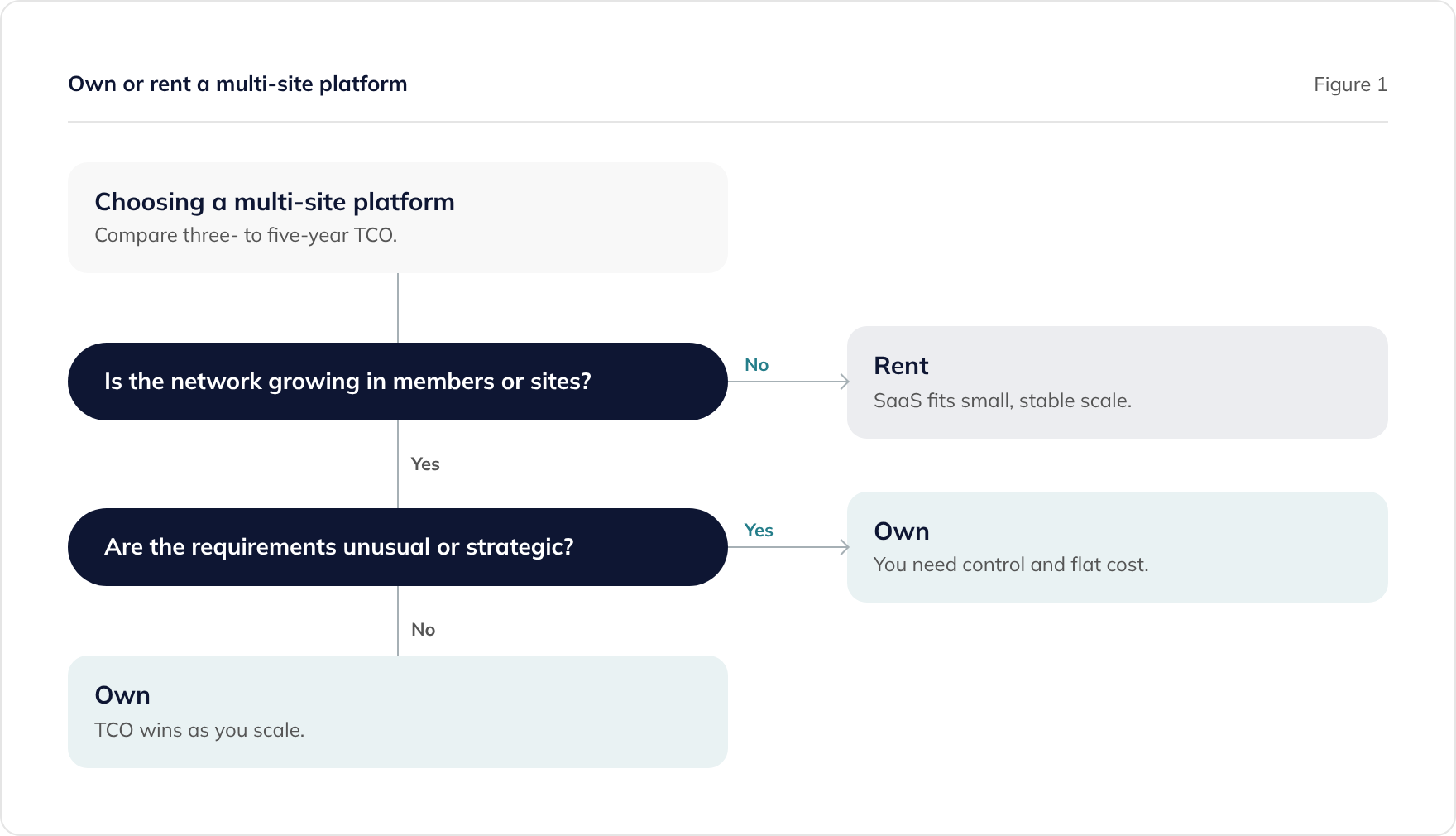
The decision turns on three things: whether your network is growing, how unusual or strategic your requirements are, and how a multi-year TCO comparison comes out.
When renting is the right answer
If your scale is small and stable, your requirements are standard, and the tool is a commodity rather than a differentiator, renting is sensible. You avoid an upfront investment, you are live quickly, and the subscription stays manageable because you are not growing into ever-higher tiers.
When owning is the right answer
If your network is growing, owning usually wins on TCO because your costs stay flat while a subscription would climb. And if your requirements are unusual or the software is strategically important, owning gives you something a subscription never can. You get control of the roadmap, a data model that matches your business, and the freedom to extend the platform on your timeline rather than the vendor’s.
Does owning mean building everything from scratch?
No, and this is the misconception that keeps operators renting longer than they should. A modern owned platform is built on proven accelerator modules, booking, billing, membership, and franchising components that already exist and have run in production, configured and extended with AI-augmented delivery. You are not starting from a blank page.
You receive a perpetual licence to those underlying components and full ownership of your project-specific code. That keeps the entry cost far below a traditional bespoke build, while still giving you everything ownership provides: no per-member fees, no lock-in, and the ability to take your code elsewhere. The Franchising accelerator and the wider accelerator platform are built exactly this way, and it is how we deliver bespoke franchise platforms.
For the general build-versus-buy decision, see build vs buy in the AI-augmented era. For why franchise networks in particular benefit from owning a unified platform, see franchise management versus operations software, and to put real numbers on the crossover, use the franchise software cost calculator.
What about the downsides of owning?
Two considerations come up most often, and both are manageable.
- Higher upfront cost. The licence and project fee is a larger initial outlay than a monthly subscription. It can often be scheduled over a longer period to align with your budget cycle, and it is a one-off rather than a forever cost.
- Responsibility for hosting and maintenance. You can self-support with your own team, or take managed hosting and support as an optional retainer. Either way you are not locked in, and you can change your mind later.
Set against no per-member fees, predictable cost as you grow, full control, and code you own outright, these are usually a price worth paying for any operator with a growing network.
Book a total cost of ownership comparison
We offer a free 30-minute session to compare owning versus renting for your specific situation. Bring your current subscription costs and your growth plan, and we will build a three- to five-year TCO comparison with you.
No pitch, no obligation. If renting is the right answer for your scale, we will tell you.
Frequently asked questions
What is the difference between owning and renting software?
When does owning software beat renting it?
How do per-member SaaS fees affect total cost of ownership?
Does owning software mean building everything from scratch?
What are the risks of owning rather than renting software?
Related guides
SaaS to Custom Software Migration: A 90-Day Playbook
How to migrate from SaaS to custom software: getting your data out, running both in parallel, cutting over safely, and exiting the contract.
Build In-House with AI or Use a Development Partner? An Honest Decision Guide
AI coding tools make in-house builds genuinely viable. A balanced decision guide for CTOs: when to build with your own team, when a partner earns its fee, and how to compare total cost honestly.
How franchise payments and payouts should work
How a franchise network collects payments and pays its franchisees: connected accounts with Stripe Connect, Direct Debit, and who holds the funds and the risk.