
How to Change Application Support Supplier Without Losing What They Know
Changing application support supplier is a planned project, not a contract swap. The most valuable asset in the whole transition is the outgoing team’s knowledge, and it is only available while they are still in contract. This guide sets out the order of work. Plan the exit before you give notice, capture knowledge while the incumbent is still there, use AI to read the whole estate, stabilise pipelines and quality assurance (QA), then take over operationally. If you are unsure what you are inheriting, start with an independent code audit, so you have a baseline before any service level agreement (SLA) is signed. Done well, the documentation and runbooks you build during transition become how the system is run afterwards. Our development partner transition service follows this approach.
The approach and timings in this guide reflect AI-augmented practice as of late 2026. AI tooling is advancing quickly, so treat specific durations as typical rather than fixed. Book a consultation to discuss your own exit timeline.
Signs it is time to change supplier
Most supplier changes are not triggered by a single failure. They build up over time. The common signals are:
- Your supplier is winding down. They are closing a development arm, have been acquired, or are leaving your sector.
- Users report problems before alerts do. Monitoring exists, but nobody reads it until something breaks.
- The pace of change has stalled. Small changes take weeks, and releases feel risky.
- Knowledge sits with one or two people. If they left tomorrow, nobody could deploy the system.
- The estate has outgrown the supplier. The system now spans Azure, mobile apps, and integrations they cannot fully cover.
If two or more of these apply, it is worth planning a transition now, even if you do not act on it for a year.
Plan the exit before you give notice
The order matters. Once notice is served, the outgoing team’s motivation and availability start to fall. Plan first, then give notice.
Start with your contract. Look for:
- Notice period and exit clauses. How long do you have, and what is the supplier obliged to do during it?
- Exit management schedule. Many support contracts require the incumbent to assist with handover. Confirm what is in scope.
- Intellectual property and source code. Confirm you own the code and have the right to give it to a new supplier. Our guide to IP licensing and source code handover covers what to check.
- Access and accounts. Identify any repositories, hosting subscriptions, or licences held in the supplier’s name rather than yours.
Then set a transition plan against the contract end date. Work backwards: when must the new supplier hold the service level agreement (SLA), and how much parallel running and knowledge transfer do you need before that?
Should the code be audited before a new SLA is agreed?
Yes. The safest sequence is audit first, then SLA. An incoming supplier who prices support without reading the code is guessing, and you carry the risk when the guess is wrong. An independent assessment gives both sides the same picture before anything is signed.
For a single application, a focused code audit usually takes 3-10 working days. It covers:
- Architecture and code quality
- Security vulnerabilities and out-of-support frameworks
- Test coverage and the maturity of build and release pipelines
- Dependency and licence risk
- Infrastructure configuration and documentation gaps
For a larger estate of several systems and integrations, allow two to four weeks. The output is a readiness scorecard and a ranked risk register.
How the audit feeds the SLA
The findings shape the support agreement directly. Severity definitions are agreed against the critical functions the audit identified. The stabilisation work it recommends becomes the onboarding plan. Response and resolution targets are set once the incoming team knows what a fix involves.
The audit also has value if you do not proceed. It belongs to you, and it is a fair basis for comparing suppliers. In our own engagements, a maintainability review is the usual starting point when a client is moving an application away from the agency that built it, and it leads into managed application support under an agreed SLA. Current support pricing is on our pricing page.
What to capture while the incumbent is still in contract
Knowledge transfer is the phase that cannot be repeated. Once the outgoing team has gone, anything they did not pass on has to be reconstructed from the code. Work to a written plan with named topics, named people, and a completion checklist.
| Area | What to capture | Why it matters |
|---|---|---|
| Access and ownership | Source control, Azure subscriptions, DNS, certificates, secrets, app store accounts, third-party licences | Losing access to any of these can stop a release or take the system down |
| Architecture | Recorded walkthroughs of each subsystem, integrations, and data flows | Explains decisions that look odd from the code alone |
| Deployment | Build and release procedures, performed live rather than described | Proves the new team can ship a change safely |
| Known issues | Bugs, workarounds, and deliberate technical debt | Stops the new team rediscovering problems the hard way |
| Operations | Monitoring, alerts, scheduled jobs, backup and restore procedures | Defines what normal looks like for the live system |
| Business context | Critical functions, peak periods, and who uses what | Tells the new team where a failure would hurt most |
Front-load the sessions only people can give you: business context, the reasons behind design decisions, and the workarounds nobody wrote down. Code analysis can recover structure later. It cannot recover intent.
Using AI to read the whole estate
Traditional knowledge transfer samples the system. The incoming team reads the parts the outgoing team points them to, and fills in the rest over months of support. AI changes that. It lets engineers work through every repository, stored procedure, and work item.
In practice, AI is used to:
- Map code paths. Which screens call which procedures, and which tables they touch.
- Draft user journeys. For each critical function, how a user moves through the system and where it can fail.
- Cluster known issues. Years of work-item history grouped into recurring problems, each linked to the code involved.
- Summarise walkthroughs. Recorded knowledge transfer sessions turned into searchable notes.
The important control is review. AI drafts, people decide. Engineers check every finding, the outgoing team confirms what they can while still in contract, and your service desk checks the known issues against the calls they actually receive. Nothing is published as fact until a person has confirmed it.
The outputs you should end up owning are:
- Knowledge base: user journeys, implementation notes, and architecture for each critical function
- Known-issues register: recurring problems, their causes, and their workarounds
- Runbooks: step-by-step procedures for common incidents and operational tasks
- Readiness scorecard: a baseline of how supportable the system is, used to measure progress
- Technical debt backlog: prioritised and estimated, so improvement work can be planned
Our guide to AI-augmented application support explains how the same approach continues after transition.
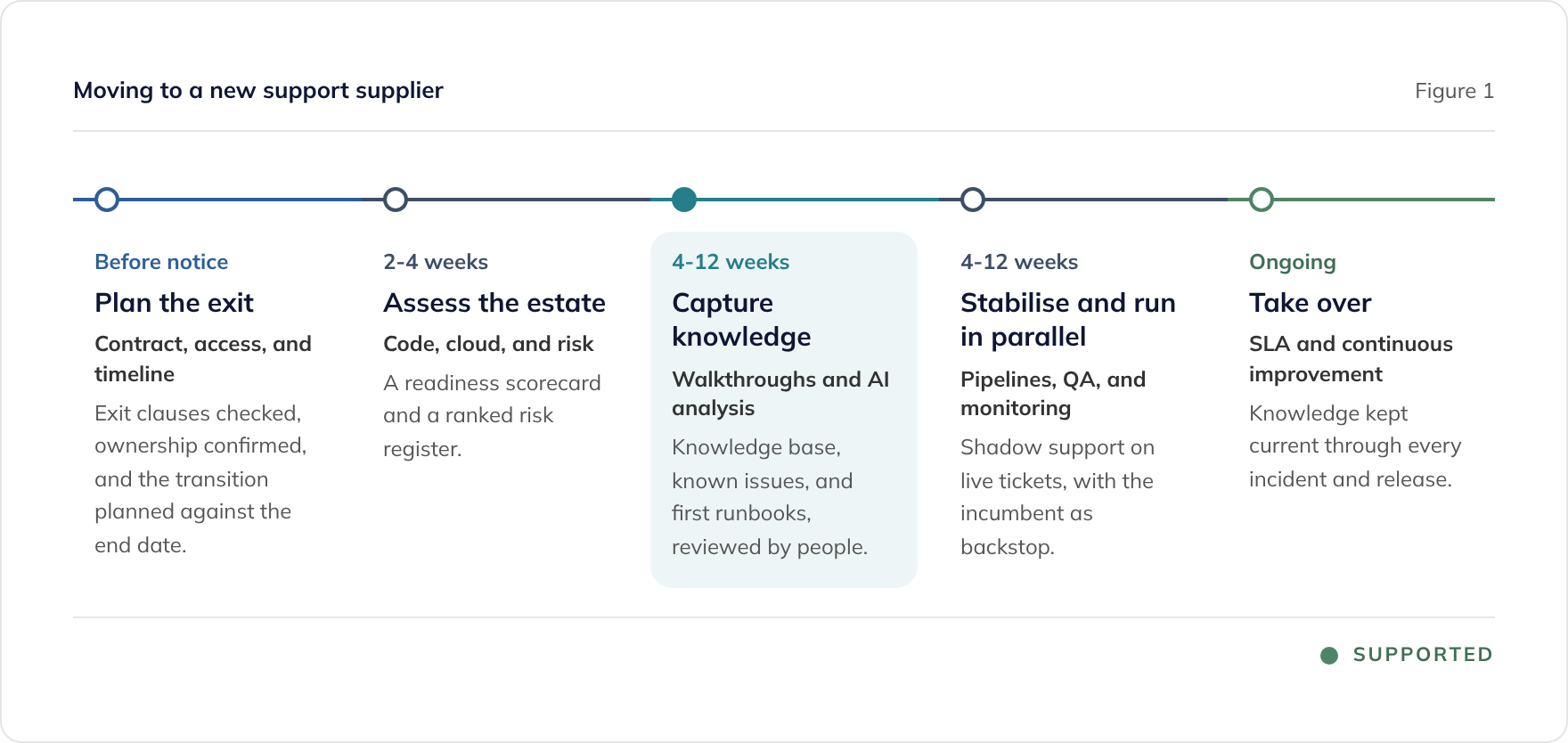
Stabilise: pipelines, a human QA gate, and monitoring
Before the new supplier takes responsibility, they need to prove they can change the system safely. Stabilisation covers three things.
Build and release pipelines. Re-establish the pipelines under the new team, ideally in your own Azure DevOps or GitHub organisation. Ship a small, low-risk change end to end. If nobody can deploy, nobody can fix.
A human QA gate. Automated regression testing is the most common gap in inherited systems. Build a regression pack around the critical functions first, then add a named tester who signs off every release. Emergency fixes should get a shortened test plan, never a skipped one.
Monitoring and alerts. Connect Application Insights, error tracking, and uptime checks, and start alerting on the critical functions. Test runbooks against real alerts. The aim is that the new team hears about problems before your users do.
Instrumentation usually needs code releases, so it follows the pipelines rather than running ahead of them.
Operational takeover
Parallel running is where the transition earns its keep. The new supplier takes live tickets while the incumbent still holds the SLA. Every gap in the handover surfaces while there is still someone to ask.
During parallel running, agree:
- SLA and escalation paths, rehearsed on real incidents
- Who does what between your service desk, the new supplier, and any other partners
- Reporting cadence, usually a monthly service report against the readiness scorecard
- The handover date, when the new supplier formally holds the SLA and the incumbent can leave
After takeover, the new team should be working from the runbooks and known issues built during transition. Many teams now add a daily AI operations brief: each morning, AI summarises overnight telemetry, errors, and tickets, and an engineer checks every finding.
Keeping knowledge current after transition
The value of transition documentation decays quickly if nobody maintains it. Build the upkeep into how the service runs:
- Incident close-out updates the known-issues register, the runbooks, and the documentation.
- Releases update the user journeys and implementation notes for the functions they change.
- Maintenance reviews add and reprioritise items in the technical debt backlog.
- Monthly service reports track progress against the readiness scorecard baseline.
This is the difference between a transition that produces paperwork and one that produces a better-run system.
Questions to ask a new support supplier
When you evaluate suppliers, ask:
- How many systems have you taken over that you did not build? Ask for references from similar transitions.
- How will you use AI during knowledge transfer, and who reviews its output?
- What will we own at the end of transition? Expect a knowledge base, runbooks, and a known-issues register, not just a support contract.
- How do you test releases? Look for a named human sign-off on every release.
- Where will our source code and pipelines live? They should stay in your ownership.
- How do you handle our data when using AI? Look for personal data removal, read-only investigation access, and AI services that exclude training on client data.
Our guide to choosing a long-term technology partner covers structured selection and tender criteria in more depth.
Where to start
- Read your contract. Find the notice period, the exit provisions, and who owns the code and accounts.
- List what you cannot see. Gaps in access, documentation, or monitoring are gaps in what can be transferred.
- Get an estate assessment. A two to four week assessment gives you a readiness baseline and a ranked risk register, whichever supplier you appoint.
See our development partner transition service for how we run supplier changes, or book a consultation to talk through your exit timeline.
Frequently asked questions
How long does it take to change application support supplier?
When should we tell our current supplier we are leaving?
Can a new supplier audit our code before taking on support with an SLA?
What should we get from the outgoing supplier before they leave?
Do we have to pay two suppliers at the same time?
How does AI help with a supplier transition?
What if the outgoing supplier will not cooperate?
Related guides
Keeping Supported Software Secure: Advanced Security and AI Threat Intelligence
How managed support keeps software secure: GitHub Advanced Security, Detectify attack surface monitoring, AI code analysis, and threat intelligence, with reviewed remediation.
Tendering for a Long-Term Technology Partner: A Buyer's Guide
How to run a selection process when you need a partner to take over and develop a business-critical application estate, not just supply developers. Shortlisting, evaluation criteria, and the questions that separate suppliers.
AI-Augmented Application Support: Custom AI for Better Outcomes
How custom, system-specific AI augments managed application support: automated DBA, tailored telemetry, infrastructure analysis, and log analysis for faster, cheaper resolution.