
Most AI support products are generic: the same models applied to every customer, with no knowledge of your system. AI-augmented managed support works the other way round. We collect telemetry tailored to your application, feed AI the code and context it needs, and build diagnosis and remediation around how your system actually works. The result is a support capability that combines senior engineering judgement with automated database administration, infrastructure analysis, and log analysis, delivering faster resolution and fewer incidents at a lower cost than a single in-house hire.
The capabilities in this guide reflect AI-augmented practices as of mid-2026. AI tooling is advancing quickly, so treat the specifics as a snapshot rather than a fixed standard. Book a consultation for how this applies to your system today.
Why a generic AI product is not a support strategy
There is no shortage of AI observability and support products. Most take the same shape: a vendor trains models on generic patterns, then applies them uniformly to every customer that plugs in. This is useful for some problems, but it has a structural limit.
A generic product has no knowledge of your domain, your architecture, or the reasons your system behaves the way it does. It cannot know that a nightly reconciliation job is meant to spike CPU at 02:00, that a particular error is benign, or that one slow query sits on the critical path for your busiest screen. It flags what looks statistically unusual, not what actually matters to your business.
Good support depends on exactly that context. The difference between a fast resolution and a long outage is usually not raw compute. It is knowing where to look, what normal looks like, and which change is safe to make. That knowledge is specific to the system.
Our approach inverts the generic model. We start from the system being supported, then shape AI tooling around it.
What AI-augmented support actually means
AI-augmented support is managed maintenance of a live system where engineers use AI to work faster and with more confidence than they could unaided. Three principles define how we apply it.
- Tailored, not generic. The telemetry we collect, the context we feed to AI, and the diagnosis and remediation we build are specific to your application, database, and infrastructure.
- AI augments, humans decide. AI reads code, correlates signals, and drafts fixes. A senior engineer reviews and owns every change to production, validated by ISTQB-qualified quality assurance.
- Expertise first. The value comes from our engineering and operations experience applied through AI, not from AI applied in place of it.
This mirrors how we build software. Across our delivery, AI authors a large share of the code (currently 91.6%), but every line is reviewed by a senior engineer. Support works the same way: AI accelerates the work, and human judgement governs it.
The building blocks of a tailored support capability
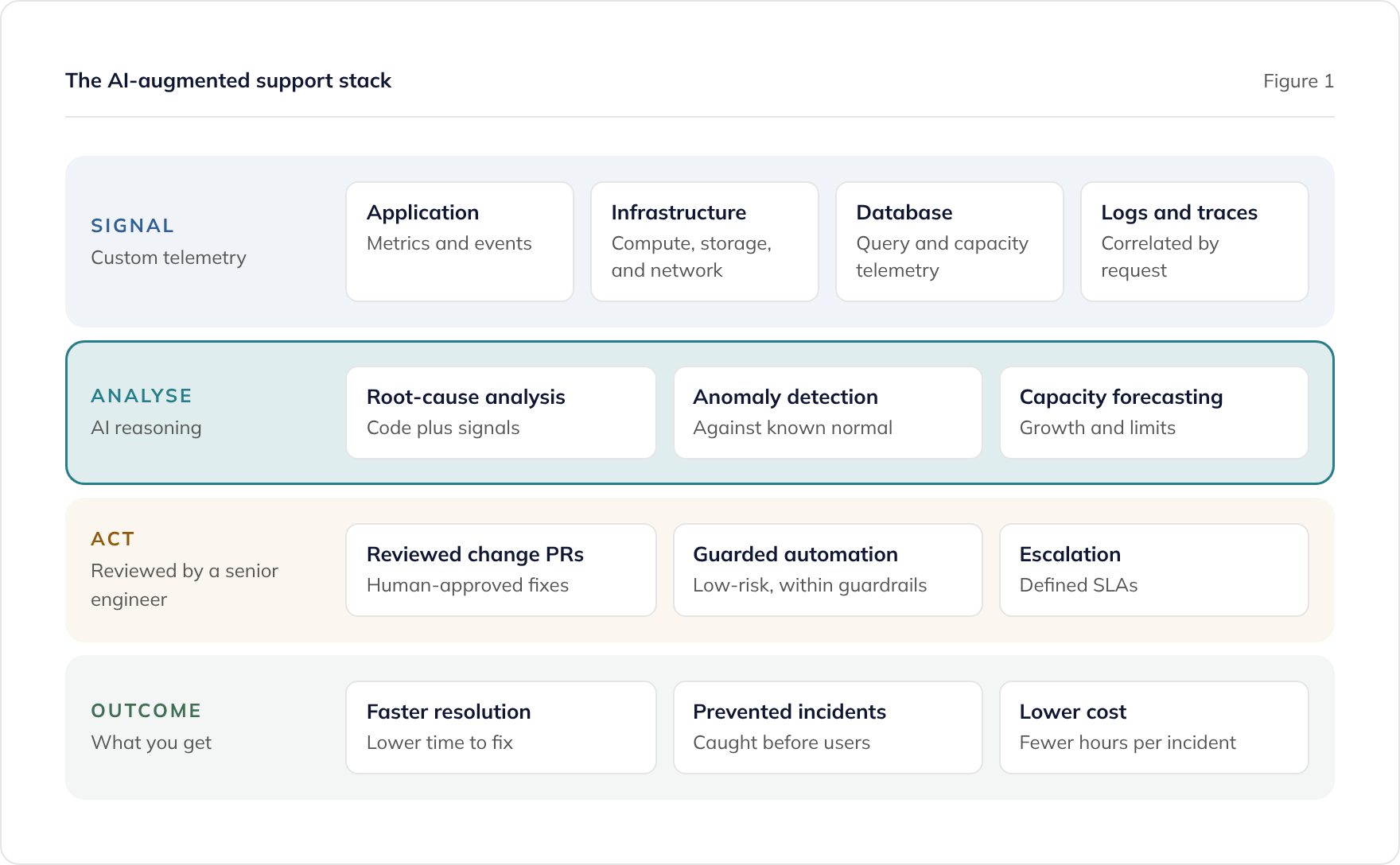
A support capability is not one tool. It is a set of building blocks assembled for the specific system, each feeding the next. The four below are the foundation.
Custom telemetry and data collection
You cannot support what you cannot see. The first step is instrumenting the system to emit the signals that matter for it specifically.
That means more than default dashboards. It means application metrics tied to business events, structured logs with correlation identifiers, distributed traces across service boundaries, and database telemetry from the right internal views. For an Azure workload this typically builds on Application Insights and Azure Monitor, extended with custom counters and events that reflect how your system is used.
The goal is a data set rich enough that AI can reason about cause and effect, not just surface a chart.
Infrastructure analysis
Application problems are often infrastructure problems in disguise: a saturated connection pool, a throttled storage account, a node running out of memory, a misconfigured autoscale rule. Supporting a system means understanding its hosting as well as its code.
We collect infrastructure signals (compute, storage, networking, and platform limits) and let AI correlate them with application behaviour. When response times climb, the question is whether the cause sits in the code, the query, the host, or a dependency. Correlated analysis answers that quickly instead of by trial and error.
Log analysis and incident diagnosis
Logs hold the story of an incident, but the story is buried in volume. A production system can emit millions of log lines a day, and the relevant handful are easy to miss under pressure.
AI changes the economics of reading logs. It can ingest a stack trace, a burst of errors, and the surrounding code path, then propose the most likely root cause with the evidence for it. What might take an engineer hours of grepping becomes minutes of guided investigation. The engineer still confirms the diagnosis, but starts from a strong hypothesis rather than a blank terminal.
Our daily AI operations brief applies this every morning: AI summarises overnight telemetry, errors, and tickets with the evidence for each finding, and an engineer reviews every one.
Automated database administration
The database is where many production incidents begin and where a single in-house developer is least likely to have deep skill. Automated database administration closes that gap.
Continuous telemetry from the database (query performance, wait statistics, index usage, and capacity) feeds AI analysis that spots slow queries, recommends indexes, forecasts growth, and flags anomalies. A qualified engineer reviews each recommendation before anything changes. This gives you database administrator coverage without a dedicated hire, and it is especially effective for SQL Server. Our guide to automated DBA for SQL Server covers this building block in depth.
How does this improve outcomes?
The building blocks matter because of what they change for the business. Four outcomes stand out.
Faster mean time to resolution. AI narrows the search space at every stage: which log lines matter, which code path is implicated, which query is slow, and which fix is safest. Engineers spend less time hunting and more time confirming and shipping.
More incidents prevented. Anomaly detection and capacity forecasting turn support from reactive to proactive. A connection pool trending towards exhaustion, a disk filling up, or an index quietly degrading can be caught and fixed before it becomes an outage.
Broader coverage. Application maintenance spans code, infrastructure, database, and security. A single engineer has gaps in some of these. AI gives one team member well-supported reach across the full stack, so the breadth gap that limits a lone hire shrinks. We cover the economics of this in managed support vs hiring.
Lower cost per incident. Faster diagnosis and resolution means fewer hours per incident. Over a year that is a material saving compared with unaided support, and it compounds as prevention reduces the incident count itself.
These gains are consistent with what AI augmentation does for our delivery work more broadly, where it drives 40-50% faster delivery with quality improving alongside speed. Support is the same principle applied to running software rather than building it.
Where does the human expertise sit?
The word “augmented” is deliberate. AI does not run your system on its own, and treating it as if it does is how organisations get burned.
AI is fast and tireless, but it is also confident when it is wrong. It can misread an unusual pattern, propose a fix that passes tests but breaks a subtle business rule, or miss context that a human who knows the domain would catch immediately. In production, those mistakes are expensive.
So the model is clear about roles:
- AI does the volume work: reading logs, mapping code, correlating signals, drafting fixes, and surfacing anomalies.
- Senior engineers do the judgement work: confirming diagnoses, weighing risk, approving changes, and deciding what reaches production.
- Quality assurance validates: changes go through the same ISTQB-qualified quality process as new development.
High-confidence, low-risk actions can be automated within agreed guardrails, such as restarting a stuck background job or applying a well-understood configuration change. Anything that alters code, data, or infrastructure goes through human review and your normal change process. You get the speed of automation without ceding control.
How we build a tailored support capability
Because the capability is specific to the system, the first job is to understand the system. AI makes that fast even when the system is unfamiliar or poorly documented.
- Assessment. A structured maintainability review maps the codebase, dependencies, data model, and infrastructure. AI accelerates this from weeks to days, which is what makes taking over an unfamiliar system practical.
- Instrumentation. We add the telemetry the system lacks: business-aware metrics, structured logging, tracing, and database signals, so there is enough data to reason about.
- Tailoring. We configure diagnosis, anomaly baselines, and remediation around how your system actually behaves, including which patterns are normal and which are not.
- Operating. Defined SLAs, monitoring, incident response, and regular reporting, with AI-augmented diagnosis running underneath and senior engineers in control.
This is particularly valuable when the team that built a system has moved on. If that is your situation, our guide on what to do when your development team leaves walks through the recovery path, and internal systems handover covers the takeover in detail. If you are moving support from another supplier, our guide on how to change application support supplier covers the transition step by step.
Where to start
- Map your current visibility. List what you can and cannot see about your system in production. Gaps in telemetry are gaps in supportability.
- Identify your highest-risk building block. For many teams it is the database, where problems are common and in-house skill is thin. For others it is infrastructure or an undocumented codebase.
- Get an assessment. A maintainability review produces a clear picture of risks and a support plan, using AI to reach that understanding in days.
See our managed application support service for how we run live systems, or book a consultation to discuss your specific system. To go deeper on a single building block, read our guides on automated DBA for SQL Server, keeping supported software secure, and running .NET on Azure Kubernetes Service.
Frequently asked questions
What is AI-augmented application support?
How is this different from a generic AI monitoring product?
What is automated DBA?
Does AI make changes to our production system automatically?
What outcomes does AI-augmented support improve?
Can you support a system your team did not build?
Related guides
How to Change Application Support Supplier Without Losing What They Know
A step-by-step guide to moving live application support from one supplier to another: exit planning, knowledge capture, stabilisation, and a clean takeover.
Keeping Supported Software Secure: Advanced Security and AI Threat Intelligence
How managed support keeps software secure: GitHub Advanced Security, Detectify attack surface monitoring, AI code analysis, and threat intelligence, with reviewed remediation.
Tendering for a Long-Term Technology Partner: A Buyer's Guide
How to run a selection process when you need a partner to take over and develop a business-critical application estate, not just supply developers. Shortlisting, evaluation criteria, and the questions that separate suppliers.