
Staff can now build working apps, agents and automations with AI tools, and many organisations already have more of them than IT knows about. Banning them tends to push the work out of sight. A proportionate approach approves a small set of tools, sets clear data rules, keeps a register, and moves any tool that the business comes to depend on into review, ownership and support.
Why is this happening now?
Building a working tool no longer needs a developer. Operations, finance and product teams can describe a problem to an AI app builder, Microsoft Copilot Studio or Power Apps, or an AI coding assistant, and have something running the same afternoon. That is good news for the backlog of small problems IT never reaches.
It also creates software nobody is accountable for. The National Cyber Security Centre (NCSC) defines shadow IT as ‘the unknown assets that are used within an organisation for business purposes’. Its shadow IT guidance is clear about the cause: ‘It’s normally due to employees struggling to use sanctioned tools or processes to complete a specific task.’ AI tools have made that workaround much easier to build. The NCSC’s conclusion still applies: ‘Shadow IT is therefore an unmanaged risk.’
What are the risks of staff-built AI tools?
Most staff-built tools are harmless, and some are valuable. The risks come from a few patterns that are easy to miss when the tool works on screen:
- Data in places nobody assessed. Customer or employee data copied into a tool, a spreadsheet behind it, or an AI service on a personal account.
- Security gaps. Tools built by prompting tend to share predictable gaps, such as missing access rules and keys in the browser. Our guide to security checks for vibe-coded apps covers how to find them.
- One person deep. The builder is the only person who understands it, and the tool stops when they leave or go on holiday.
- Hidden costs. Per-user platform licences and AI usage charges that grow with adoption and sit outside any budget.
- Wrong answers that look right. A tool that feeds a report, a price or a decision can be wrong for weeks before anyone checks it.
Who is responsible for the data?
In most cases, the organisation. It is the controller of personal data processed for its purposes, including in tools staff build on its behalf. Article 35 of the UK GDPR requires a data protection impact assessment (DPIA) before processing that ‘is likely to result in a high risk to the rights and freedoms of natural persons’. It names processing ‘in particular using new technologies’. A tool that nobody knows about cannot have had one.
When does an internal tool become business-critical?
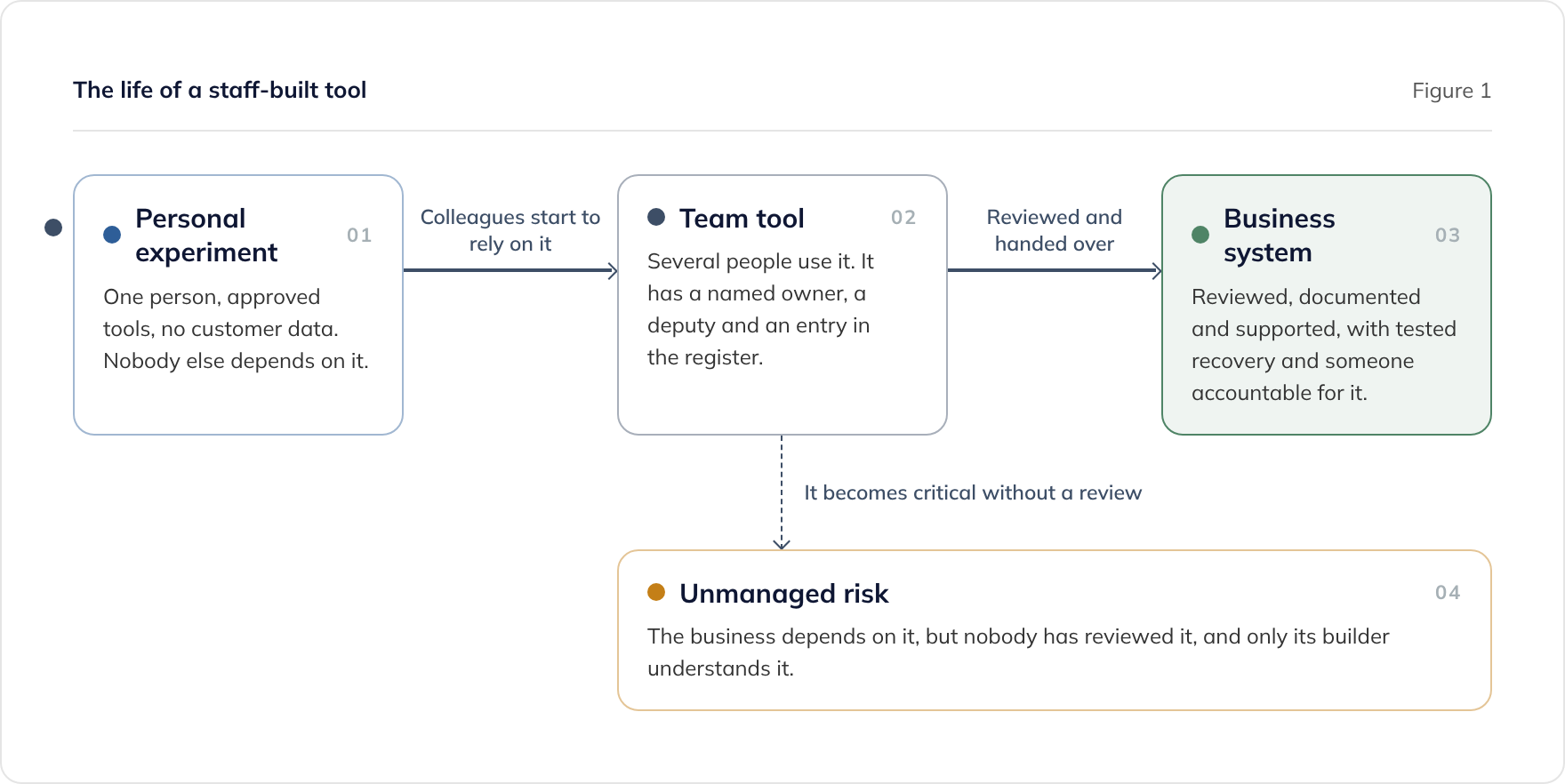
A tool becomes business-critical when the organisation would be harmed if it stopped, leaked or gave a wrong answer. We suggest treating any one of these as a trigger for review:
- It holds personal data about customers, patients, pupils or staff
- People outside the builder’s own team use it, or customers do
- Work stops or money is lost if it is unavailable for a day
- It feeds payments, prices, regulatory returns or board reporting
- It reads from or writes to core systems, such as finance, CRM or HR
- Only the person who built it understands how it works
The trigger is not that AI wrote the code. It is that the business now depends on something nobody has checked and nobody is accountable for. We use the same test for our own pricing: our managed support tier for AI-built software applies to codebases built outside a reviewed engineering process, not to AI-written code as such.
What should a proportionate policy include?
A short policy that people follow beats a long one they work around. These elements cover most of the risk.
Approved tools and data rules
Name the AI tools staff may use, on business accounts your organisation controls, and say which kinds of data each may touch. A typical rule is that personal and customer data only goes into tools on approved platforms inside your own tenant or under a data processing agreement. Check each provider’s terms for whether prompts and data are used for training, and choose plans where they are not.
A register
Keep one list of the tools people have built. Record the purpose, owner, deputy, platform, data held, users, any triggers met, and the date of the last review. A shared spreadsheet is enough to start, provided someone owns it.
Controls that rise with criticality
| Personal experiment | Team tool | Business system | |
|---|---|---|---|
| Where it runs | Approved tools, business account | Approved platform, shared workspace | Managed environment, with production separate from development |
| Data | No personal or customer data | Only the data the team needs, listed in the register | Assessed, with a DPIA where the risk is high |
| Ownership | The builder | A named owner and a deputy | An accountable owner, plus a support arrangement |
| Review | None needed | A light check against the register | A code and security review before it is relied on |
| Recovery | None needed | The owner knows how to restore it | Backups with a tested restore |
A route to graduate
Give people a simple way to ask for a review when a tool meets a trigger. The NCSC recommends ‘an effective and simple process for addressing users’ requests’ and ‘a positive and no-blame approach’ to people who adopted shadow IT. If asking for help feels like confessing, nobody will ask.
How do you find the tools that already exist?
Start by asking, with a clear promise that nobody will be blamed for what they built. Then check the places tools leave traces:
- Platform inventories. If you use Microsoft Power Platform, the admin center’s Inventory view lists the apps, flows and agents created across your tenant.
- Your identity provider. Look at which third-party applications people have connected with their work accounts.
- Code repositories. Check your organisation’s repository accounts for projects created outside IT.
- Expense claims and card statements. Subscriptions to AI tools and app builders often appear here first.
What if you use Microsoft Power Platform?
Power Apps, Power Automate and Copilot Studio run inside your Microsoft tenant, which makes them easier to govern than tools on personal accounts. Microsoft’s managed environments add controls including sharing limits, data policies, weekly usage insights, the solution checker and deployment pipelines. Microsoft says they are included with standalone Power Apps, Power Automate, Copilot Studio and Dynamics 365 licences.
Two recent changes are worth checking:
- Unmanaged developer environments are deprecated. Microsoft says that to keep an existing developer environment, you must enable managed environments on it before 15 December 2026.
- The CoE Starter Kit is no longer maintained. Microsoft’s Center of Excellence Starter Kit no longer receives updates, and Microsoft points organisations to the Inventory, Usage, Monitor and Actions features of the Power Platform admin center instead.
If a Copilot Studio agent has outgrown what it was built for, our Copilot Studio rescue service covers the options. Our Power Apps, SaaS or custom build assessment helps when a tool may need a different platform.
What if you use Claude Team or Claude Enterprise?
Claude’s business plans give IT the controls that personal accounts lack, and they include Claude Code and Cowork, which staff can use to build tools. Claude Team is for teams of 2 to 150 people, and Claude Enterprise has a 20-seat minimum. Both run under Anthropic’s Commercial Terms, which say that ‘Anthropic may not train models on Customer Content from Services’ and that the customer owns its outputs.
What both plans include
According to Anthropic’s plan comparison, Team and Enterprise both include:
- Single sign-on (SSO) and domain verification
- Central billing and administration
- Usage analytics
- Organisation-wide skills and organisation instructions
- Admin controls for remote and local connectors, which decide what Claude can reach
Domain verification matters for shadow use. On Team, admins can verify the company domain and block new personal accounts from being created on it. Personal accounts that already exist stay personal until their owners move them into the organisation.
What Enterprise adds
Enterprise adds controls that a larger or regulated organisation is likely to need:
- Domain capture, which claims and migrates existing personal accounts on your verified domain into the organisation. Anthropic says it cannot be reversed once enabled, and it requires SSO to be enforced first.
- Role-based access with fine-grained permissions
- SCIM, the standard for provisioning and removing users automatically from your identity provider
- Audit logs and a Compliance API for monitoring
- Custom data retention controls
How to govern Claude Code on these plans
Claude Code is where staff can go from asking questions to building and running software, so it needs its own policy. On Team and Enterprise, an organisation Owner can set server-managed settings for Claude Code from the claude.ai admin console. Claude Code fetches them when people sign in with their organisation account, and nothing in a user’s own settings files overrides them.
Typical settings to enforce include:
- Blocking bypass mode, by setting
permissions.disableBypassPermissionsModeto"disable", so nobody can switch off the permission prompts - Deny rules that stop Claude Code reading secret files, such as
Read(./.env) - Approved models only, using the
availableModelssetting - Connector limits, so the agent can only reach approved systems
Our guide to security checks for vibe-coded apps explains these Claude Code settings, and their limits, in more detail.
We use Claude ourselves on Team Premium seats, which include Claude Code, as our AI Velocity Report for Q2 2026 records.
What happens when a tool needs to graduate?
There are three routes, and the right one depends on the tool’s foundations rather than on how it was built:
- Review and support it. Check the code and security, fix the critical gaps, document it and put it under support. This suits a tool whose data model and platform are right for the job. Our Production Readiness Review is £5,500, fixed, over two weeks, and gives you a prioritised plan and an evidence pack.
- Rebuild it properly. Use the working tool as the specification, and build on foundations that fit what it has become. Our guide to taking AI-built software from prototype to production covers how to decide.
- Replace it. Sometimes a SaaS product now does the job, and the tool showed exactly which features matter.
If the person who built it has already left, our inherited codebase takeover and support service starts by documenting what exists. For ongoing care, managed support for AI-built software starts from £2,450 a month. This service covers AI-generated codebases we did not build.
How do we govern our own use of AI?
We apply the same thinking to ourselves. Our AI Velocity Report for Q2 2026 describes the daily workflow that pulls token and cost data from Anthropic, Cursor and GitHub Copilot into our Azure data lake. It shows us which tools are used and what they cost. We develop software under an ISO 27001:2022-certified information security management system, and every change our engineers ship, whoever or whatever wrote it, is reviewed before it reaches production.
For the wider picture on building with AI inside your organisation, see our guides on:
- Building in-house with AI or using a development partner
- Governing the AI agent supply chain
- The EU AI Act for UK businesses commissioning AI
Frequently asked questions
Should we ban staff from building tools with AI?
Who is responsible for personal data in a tool an employee built?
Are Power Apps and Copilot Studio safer than an AI app builder?
Does Claude Team stop staff using personal Claude accounts?
What should an internal tool register record?
When should an internal tool be rebuilt rather than supported?
Related guides
Claude on Azure: Choosing Between Claude and Azure OpenAI in Microsoft Foundry
Claude vs Azure OpenAI in Microsoft Foundry: what Claude's GA on Azure changes for procurement, governance, and residency, and how UK teams should choose.
Is Claude GDPR Compliant? Anthropic Assurance for UK Businesses
How UK businesses get GDPR and ISO 27001 assurance over Anthropic's Claude: commercial terms, the DPA, certifications, EU data residency options, retention settings, and a supplier due diligence checklist.
Token Cost Management for AI-Assisted Modernisation Programmes
Token cost management for AI-assisted development: model-tier policy, prompt caching, context engineering, and practical multi-model guidance for programme budgets.