
Security Checks for Vibe-Coded Apps: Lovable, Bolt, Replit, Cursor and Claude Code
Apps vibe coded with Lovable, Bolt, Replit, Cursor or Claude Code tend to share a handful of gaps: database access rules, keys in the browser, development work that can reach production, and nobody reviewing the changes. This guide gives the checks for each tool, marks which ones you can run yourself, and says what to do with the results.
How should you use this guide?
Start with the checks that apply to every tool, then read the section for each tool you used. The tools fall into two groups, and the risks differ between them:
- App builders (Lovable, Bolt, Replit) generate the app and also host it, its database and often its secrets. Most of the risk sits in how the platform’s database and settings were configured.
- Coding agents (Cursor, Claude Code) write code into your own repository and run commands on your own machine. The risk sits in the code, and in what the agent can reach while it works.
Vibe coding here means building mainly by prompting, and accepting what runs without an engineer reviewing the code. Claude Code and Cursor are also used inside reviewed engineering processes, including ours. The checks below are for apps built without that review.
For why these gaps appear, with the public incidents behind them, see our guide to taking AI-built software from prototype to production. For the full list of checks mapped to OWASP ASVS and Cyber Essentials Plus, see the production readiness checklist.
Which checks apply to every vibe-coded app?
These six checks apply whichever tool you used. The first four need no development experience.
1. Search the live app for keys
Open the live app in Chrome or Edge, open the developer tools, and use Search in the Sources panel (Ctrl+Shift+F, or Cmd+Option+F on a Mac) to search all loaded files. Search for terms such as these:
sk_liveandsk_test, the prefix of Stripe secret keyssk-, used by several AI providers’ API keyssb_secret_orservice_role, Supabase keys that bypass all access rulessecret,passwordandapi_key
A Supabase publishable key (sb_publishable_) is meant to be public. A secret key in the browser is not, and any key you find there should be treated as exposed: rotate it, then move the call that uses it to the server.
2. Try to see another user’s data
Create two test accounts. Sign in as the first, create some records, and note the addresses of the pages that show them. Sign in as the second and open those addresses. If you can see or change the first account’s records, the app’s access rules are not doing their job. Try changing any ID you can see in the address bar as well.
3. Sign out and try again
Sign out, then reopen the addresses of pages that should need a sign-in. If any still show data, that data is open to anyone with the link.
4. Check who owns the accounts
Your organisation, not a freelancer or former agency, should own the builder account, the database or cloud account, the domain and the code repository. Every one of them should use multi-factor authentication.
5. Restore a backup
Ask whoever runs the app to restore a backup to a separate environment and show you the result. Until a restore has worked, you do not know that the backup does.
6. Turn on dependency alerts
If the code is in a GitHub repository, switch on Dependabot alerts so you hear about vulnerable packages. AI tools add packages freely, and nobody else will be watching them.
How do you check a Lovable app?
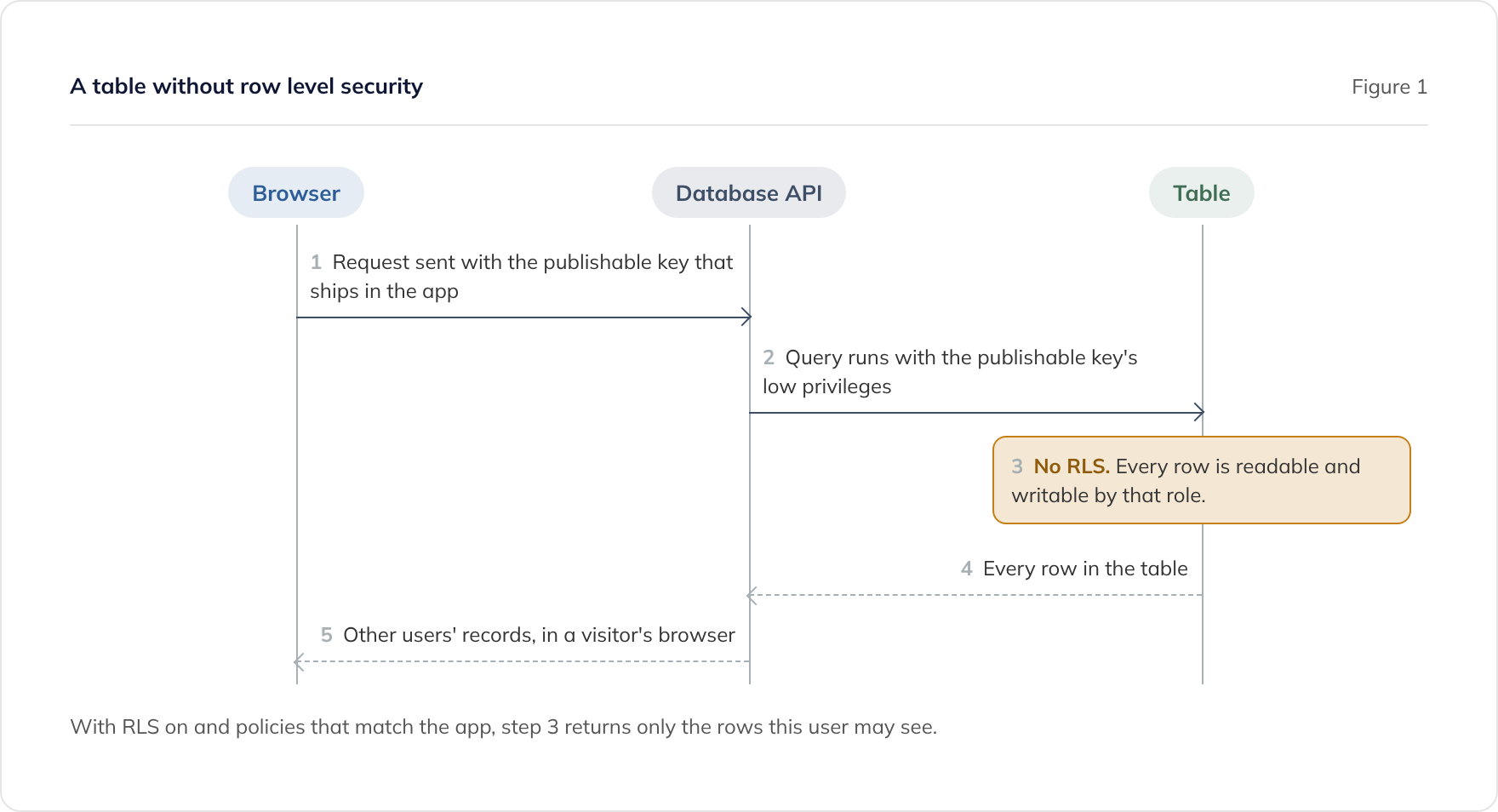
Lovable apps store their data in Lovable Cloud or in a Supabase project you connect. Lovable’s own security documentation says ‘misconfigured RLS rules are a common cause of data leaks’, where RLS means row level security: the rules that decide which rows each user can read or change. Supabase’s documentation states that ‘a table in an exposed schema without RLS is readable and writable by any role with a grant on it.’
- Run both scans. Lovable runs a quick scan when you publish and offers a deep scan of the code. Its security documentation lists what each covers. Fix every critical finding before you publish.
- Block publishing on critical findings. A workspace admin or owner can turn on ‘Block publishing with critical issues’, so a critical finding stops a publish rather than relying on someone reading a warning.
- Check that the rules match the app. A scanner can tell you a rule exists, not whether it allows the right people. The two-account test above is the practical check, and an engineer should review the policies for every table that holds personal or payment data.
- Keep keys in Secrets, not the chat. Lovable’s documentation says ‘API keys and other secrets cannot be stored safely in client-side code.’ Store keys in Lovable’s Secrets, as its documentation recommends, and never paste a key into the chat.
- Check project visibility. In April 2026, Lovable reported that between 3 February and 20 April 2026, chat history and source code of public projects could be viewed by other Lovable users with a project link. It says private projects and Lovable Cloud were not affected, and it has made existing public projects private. Check your projects’ visibility, and assume anything you pasted into a chat may one day be read by someone else.
In 2025, a researcher reported inadequate access rules on 303 endpoints across 170 of 1,645 apps in Lovable’s public showcase, recorded as CVE-2025-48757. Lovable disputes the record on the grounds that each customer is responsible for protecting their own application’s data. Either way, the check is yours to make.
How do you check a Bolt app?
Bolt’s documentation says new projects use a Bolt database by default, and that Supabase is available on Pro and Teams plans. Check which one your project uses, because that decides where the access rules live.
- If you use Supabase, run every check in the Lovable section above against your Supabase project: RLS on every table, policies that match the app, and no secret key in the browser.
- If you use the Bolt database, run the two-account and signed-out checks. Ask whoever built it how access to each table is restricted, and keep the answer on file.
- Back up before you switch. Bolt warns that connecting a Supabase database to a project with an existing Bolt database ‘will replace the connection, which may cause data loss.’
- Keep keys off the page. Calls to paid services, such as payments, email and AI models, belong in server-side functions, not in code that runs in the browser.
How do you check a Replit app?
Replit hosts the app, its database and its secrets. Two areas matter most: keeping development away from production data, and controlling who can see the secrets.
- Confirm production has its own database. Replit’s documentation describes a separate production database for published apps, so that development work does not touch live data. It also says apps on the older Neon-hosted development database must create a production database from the Publishing pane. Check that your published app uses its own.
- Remember why this matters. In July 2025, Replit’s AI agent deleted a production database during a test by SaaStr founder Jason Lemkin, and Replit responded by separating development and production databases.
- Check who can see the secrets. Replit’s Secrets documentation says collaborators can see secret names and values. It also warns that organisation members who cannot see the values can still read them ‘by printing the environment variables.’ Remove anyone who no longer needs access, and rotate any secret a former collaborator could have seen.
- Keep secrets on the server. A secret stored correctly is still exposed if code that runs in the browser reads it. Search the live app as described in check 1.
How do you check an app built with Cursor?
Cursor writes code into your own repository, so the app checks are the same as for any codebase: the six checks above, then a review against the production readiness checklist. The extra checks are about the machine Cursor runs on.
- Keep Cursor up to date. A 2025 advisory, CVE-2025-54135, described how a prompt injection could make the agent create an MCP configuration file and run code on the developer’s machine without approval. It was fixed in version 1.3.9, so check that everyone building the app runs a current version.
- Review MCP servers. MCP (Model Context Protocol) servers give the agent extra tools and access. Check the project’s
.cursor/mcp.json, and remove any server you do not recognise or no longer need. - Keep production credentials off the machine. If the agent can read a production database password from a local file, so can anything that takes control of the agent.
How do you check an app vibe coded with Claude Code?
Claude Code also works in your own repository, so the app checks are the same as for Cursor. The extra checks are about the permissions the agent runs with. Anthropic’s security documentation is direct about where responsibility sits: ‘You’re responsible for reviewing proposed code and commands for safety before approval.’
- Check whether permission prompts were switched off. The
bypassPermissionsmode, also started with--dangerously-skip-permissions, skips permission prompts. Anthropic’s permission modes documentation warns that it ‘offers no protection against prompt injection or unintended actions’ and should only be used in isolated environments such as containers or virtual machines. If an app was built this way on a laptop that also holds real credentials, treat those credentials as exposed and rotate them. - Block bypass mode where it does not belong. Setting
permissions.disableBypassPermissionsModeto"disable"in a settings file prevents the mode being used. Organisations can enforce it through managed settings. - Deny access to secret files, and know the limits. A deny rule such as
Read(./.env)stops Claude Code’s file tools reading that file. The permissions documentation notes that deny rules do not apply to a script or other process that opens files itself. For a boundary the operating system enforces, use the sandbox. - Turn on the sandbox. The sandbox limits which files and network hosts shell commands can reach. It is off by default, and you enable it with
/sandbox. It runs on macOS, Linux and WSL2. - Review MCP servers. Check the project’s
.mcp.json. Anthropic notes that servers can also be configured outside the repository, so reviewing that file does not show every server a session can load. - Run a security review on the changes. The
/security-reviewcommand runs a security pass over the changes on the current branch. It is a useful extra check, not a substitute for a person reviewing the code.
Our own engineering work has moved primarily to Claude Code, as our AI Velocity Report for Q2 2026 records. 91.6% of our code is AI-authored, and 100% of it is reviewed by senior engineers and validated by ISTQB-qualified QA. The tool is the same; what differs is the review, the tests and the controls around it. Our Claude Code development service explains how we work.
Which check matters most for each tool?
| Tool | Where your code and data live | Check first |
|---|---|---|
| Lovable | Lovable, with Lovable Cloud or your Supabase project | Row level security on every table, with policies that pass the two-account test |
| Bolt | Bolt, with a Bolt database or your Supabase project | Which database you use, and how access to each table is restricted |
| Replit | Replit, with separate development and production databases | That production has its own database, and who can see the secrets |
| Cursor | Your repository, your machine and your hosting | The six common checks, then MCP servers and a current Cursor version |
| Claude Code | Your repository, your machine and your hosting | The six common checks, then permission mode, deny rules and the sandbox |
What should you do with what you find?
Fix anything that exposes data or secrets before you do anything else. Rotate every key you found in the browser, and close any table that failed the two-account test. If real customer data is exposed and you cannot close the gap the same day, take the app offline.
Then decide whether you need help:
- If the app is failing or exposing data now, start with vibe coding rescue.
- If you need evidence for a launch or a customer, our Production Readiness Review is £5,500, fixed, over two weeks. Senior engineers validate the code against OWASP ASVS and you receive an evidence pack listing what was checked, what was out of scope and every finding by severity.
- If a customer has sent a security questionnaire, see our guide to answering a security questionnaire when AI built your product.
Once the app is live, managed support for AI-built software starts from £2,450 a month. This service covers AI-generated codebases we did not build.
Frequently asked questions
Is a Supabase key in my app's code a security problem?
Does Lovable's security scan check everything in this guide?
Is Claude Code safe to use for building apps?
Can I do these checks without being a developer?
How often should we repeat the checks?
Related guides
Production Readiness Checklist for AI-Built Apps: OWASP ASVS and Cyber Essentials Plus
A production readiness checklist for AI-built apps, mapped to OWASP ASVS 5.0 and Cyber Essentials Plus, including what Cyber Essentials Plus does not cover.
From Prototype to Production: What AI-Built Software Needs to Ship
What it takes to move a prototype built with Lovable, Bolt, Replit or Cursor into production: the usual gaps, and whether to stabilise, refactor or rebuild.
Penetration Test or Production Readiness Review: Which Do You Need?
A penetration test attacks a running system; a production readiness review checks the code. When you need each, which to do first, and why order matters.