
The unglamorous truth of every adaptive learning project is that the content work comes first. Before any engine can adapt, your questions, worksheets, and schemes of work have to become a structured item bank: items tagged to skills, with difficulty values, prerequisites, and curriculum mapping. This guide gives a practical method: audit what you have, define the target schema, and tag at scale with AI enrichment under human review. Then migrate in the right order and set quality gates that make an item trustworthy. It is the foundation the adaptive learning architecture stands on, and it is where we start when we build these platforms as custom software.
Why does the content work come first?
Every adaptive learning project runs into the same reality: the engine is only as good as the item bank behind it, and the item bank has to be built before the engine can do anything useful. Teams arrive excited about sequencing algorithms and AI features, and discover that the real project is turning a decade of content into something a machine can reason about.
This is not a detour from the interesting work. It is the interesting work, because it is where the value and the risk both sit. A beautifully engineered sequencing engine over a thin, poorly tagged bank produces confident nonsense. A modest engine over a rich, well-structured bank produces genuinely useful adaptivity. Content readiness is the constraint, and treating it as the critical path is the single best predictor of whether a project succeeds.
Most providers’ content is trapped in documents, spreadsheets, worksheets, and the judgement of experienced tutors. None of that is legible to software. The job is to make the implicit structure explicit, at scale, without losing the pedagogical quality that made the content good in the first place.
What does a content audit involve?
Start by knowing what you have. A content audit inventories the estate and assesses its readiness, and it is worth doing properly before any migration, because it sizes the real work and surfaces the decisions you cannot avoid.
An audit answers a short list of questions:
- What content exists, and where? Questions, worksheets, schemes of work, mark schemes, and media, across whatever systems and folders they currently live in.
- What format is it in? Structured question data is close to ready. A scanned worksheet is a long way from it. The distribution across that spectrum sizes the project.
- What is the quality and currency? What is still pedagogically sound, what is duplicated, and what should be retired rather than migrated. Migrating content you should delete is wasted effort.
- What implicit structure does it carry? The skills, difficulty, and sequencing that experienced authors encoded without writing down. This is the knowledge you are about to make explicit.
The output is an inventory with a readiness rating per source, an early view of the skill taxonomy the content implies, and a realistic sizing. This is where the timeline becomes honest.
What is the target schema?
Define what an item looks like before you migrate anything into it. The target schema is the shape every piece of content will take, and getting it right early avoids re-doing the whole estate later. It has four linked parts.
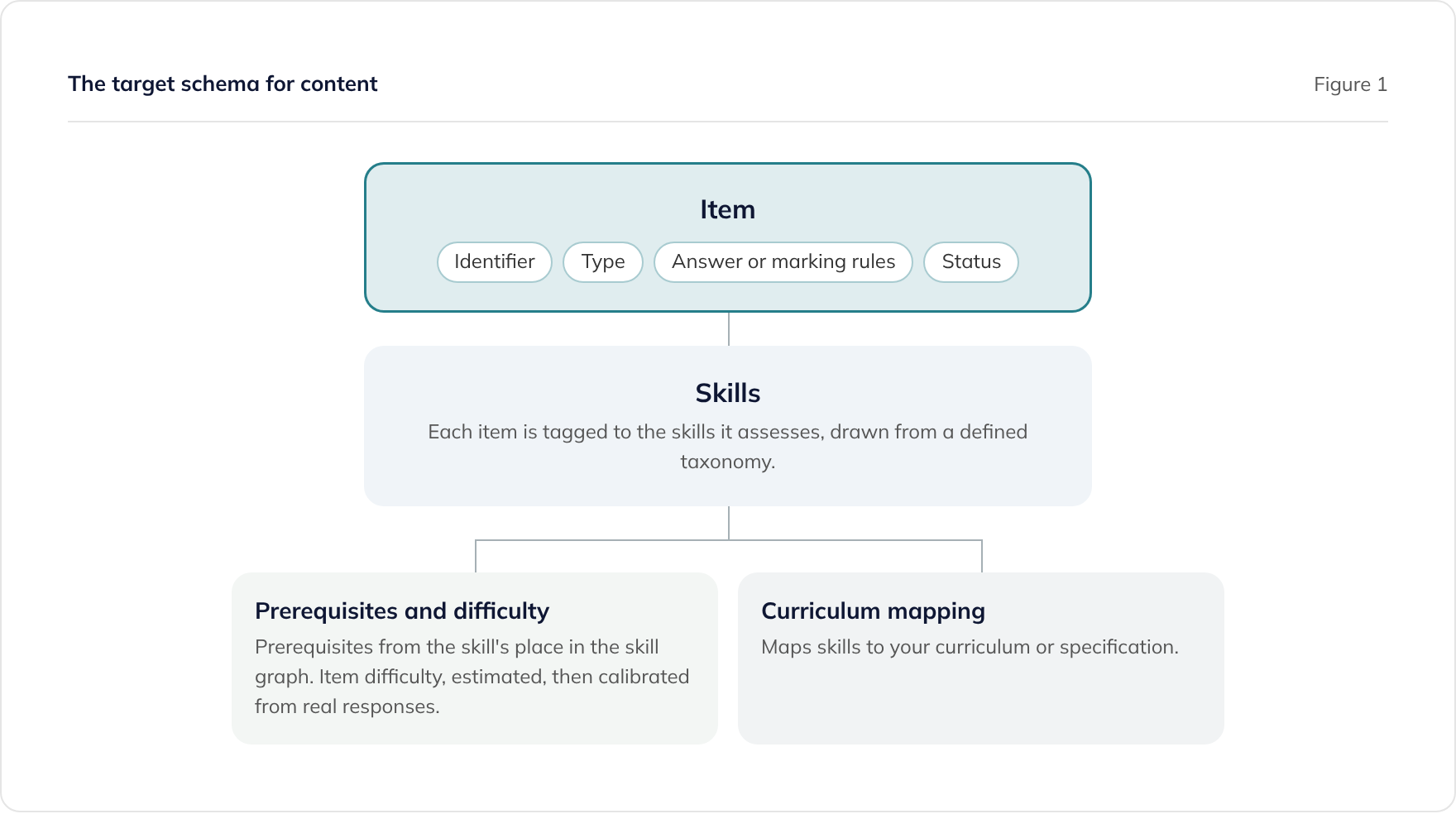
- Items. Each item has a stable identifier, a type, its answer or marking rules, and a status such as draft, reviewed, or retired. The identifier matters more than it sounds, because everything downstream references it.
- Skills. Each item is tagged to the skill or skills it assesses, drawn from a defined taxonomy. This is the link between content and the learner model.
- Prerequisites and difficulty. A difficulty value, estimated up front and calibrated later from real responses, and prerequisites expressed through the skill’s place in a skill graph.
- Curriculum mapping. A mapping from skills to your curriculum or specification, so the platform can report progress in terms a teacher, parent, or school recognises.
The skill taxonomy and skill graph are the backbone. Decide the list of skills and how they depend on each other before mass tagging, because changing the taxonomy after tagging thousands of items is expensive. It is worth spending real time here with your subject experts.
How do you tag at scale?
Tagging every item to skills, difficulty, and prerequisites is the largest single task, and it is where AI enrichment genuinely earns its place. The pattern that works is simple to state: AI proposes, a human disposes.
An AI model can read an item and suggest the skills it assesses, an initial difficulty, and likely prerequisite links, across a large estate far faster than a person tagging from scratch. This is one of the strongest applications of AI in the whole project, and it is well suited to the task because it is enrichment of existing verified content rather than generation of new facts. We have delivered assessment content platforms at scale, including Boost Insights for Hachette Learning, and the depth of our platform work with Explore Learning is where this method is grounded.
The discipline that makes AI tagging safe is human review, focused where it matters:
- Review every proposal before it is trusted. A miscategorised item quietly corrupts every adaptive decision built on it, so a tag is not final until a human confirms it.
- Concentrate effort where the AI is least confident. Surface low-confidence proposals and edge cases for closer human attention, and let clear-cut items move faster.
- Keep a written tagging guide. A short document that defines how to tag ambiguous cases keeps humans and the AI consistent, and it is the reference when two people would tag the same item differently.
Consistency beats granularity. A smaller taxonomy applied rigorously produces better adaptivity than a sprawling one applied loosely, because the learner model depends on items tagged the same way meaning the same thing.
In what order should you migrate?
Migrate in a sequence that produces usable value early and manages risk, rather than attempting the whole estate at once. A big-bang migration of a large content estate is high risk and slow to show progress.
A sensible sequence:
- Start with a coherent slice. Pick one subject, year group, or module that is reasonably self-contained, and take it all the way through the schema and quality gates. This proves the pipeline end to end.
- Prioritise high-value, high-readiness content. Content that is already structured and heavily used gives the best return for the least effort, and gets a working bank in front of learners sooner.
- Retire as you go. Do not migrate content you have decided to drop. The audit already flagged it.
- Calibrate with real responses. Once items are in front of learners, use their responses to refine difficulty values, which no amount of up-front estimation matches.
Each slice makes the next faster, because the taxonomy, the tagging guide, and the tooling all mature as you go.
What quality gates make an item trustworthy?
Decide what “done” means for an item, and enforce it, because an item that reaches the bank is one the platform will trust in front of a learner. Quality gates are the checks an item passes before it is marked reviewed.
Practical gates include:
- Complete and correct metadata. Identifier, skill tags, difficulty, answer or marking rules, and curriculum mapping all present and valid.
- Pedagogical review. A subject expert has confirmed the item is sound, the answer is correct, and any distractors are sensible.
- Tagging confirmed. AI-proposed tags have been checked by a human against the tagging guide.
- Accessibility checked. The item works for learners with a range of needs, which is both a quality and a compliance requirement.
An item that fails a gate goes back, not forward. This is what stops a fast pipeline from filling the bank with plausible-looking but unreliable content, which is the failure mode that undermines trust in the whole platform.
How does this feed the adaptive architecture?
A well-structured item bank is the foundation the rest of the platform stands on. With items tagged to a skill taxonomy, difficulties calibrated, and prerequisites expressed in a skill graph, the sequencing engine finally has something to reason over, and the learner model has skills to track.
This is the direct handoff to how adaptive learning platforms actually work, where the item bank is the first of the four components. It is also what makes safe AI features possible, because constrained generation and AI feedback both depend on a verified, structured content base, as covered in AI tutoring for children: safety by design. Do the content work well, and everything downstream gets easier. Skip it, and no engine can rescue you.
Where to start
If you are sitting on years of learning content and planning an adaptive or AI-enabled product, start with the audit, not the algorithm. Size the estate honestly, define the schema and taxonomy with your subject experts, and treat the content work as the critical path it is.
We combine sector experience with AI-augmented delivery to structure content estates and build the platforms that use them. See our tutoring and supplementary education work and our Learnosity integration capability for assessment content, or book a consultation and we will help you scope the content work before it becomes the thing that holds the project up. If you are also weighing whether to replace the software that runs your centres, our guide on replacing your tuition centre management system covers that build-versus-buy decision.
Frequently asked questions
How do I turn my worksheets into an item bank?
What metadata does learning content need?
How should curriculum content be tagged?
Can AI tag learning content automatically?
How long does content structuring take?
Related guides
Claude Code for .NET Developers: A Practical Getting Started Guide
Getting started with Claude Code for C# and .NET. Installation, IDE integration, pre-approved command setup, cloud agents, and practical .NET workflows.
Data Protection by Design: The Standard Features Every Compliant System Needs
Data protection by design is an engineering discipline, not a policy document. This guide sets out the standard software features every GDPR-compliant system needs, and how to build them in from the first line of code.
Data Subject Rights, Retention and Erasure: The Engineering
Subject access, portability, and the right to erasure are software features with statutory deadlines, not favours. This guide covers how to build them, including retention engines, crypto-shredding, and erasure that keeps the audit trail.