
How Membership Freezes Should Work: Billing, Fees, and Status Done Properly
A membership freeze should be a date-bounded record, not a toggled flag. Billing should derive from it directly: recurring fees replaced by a configurable freeze fee inside the window, add-ons and discounts suspended, every charge traceable to the freeze. Members should see a preview of the financial effect before committing, and frozen status should be calculated from the record, not set by hand. This guide explains the design, as implemented in the Membership accelerator.
Why are freezes worth designing properly?
Because a freeze is the alternative to a cancellation. Life interrupts memberships: injury, travel, financial pressure, a season away. An operator with a graceful pause keeps the member, the payment mandate, and the relationship; an operator without one processes a cancellation and hopes for a rejoin that mostly never comes.
That makes freezes a retention feature with direct revenue impact, and it makes bad freeze handling expensive. The common failure smells are familiar to anyone who has run membership operations:
- Members charged full price during an agreed freeze, then refunded manually.
- Freezes that never end because ending them depends on someone remembering.
- Frozen members whose status disagrees between billing, the front desk, and reporting.
- Freeze fees applied inconsistently because they live in a policy document, not the system.
Each of these traces back to the same root: the freeze was implemented as a flag and a workaround, rather than as a first-class record the rest of the system derives from.
What should a freeze record contain?
A freeze should be stored as its own entity with dates, not as a status on the member. The minimum useful shape:
- Who and when asked: the member and the request date, for audit and notice-period policies.
- The window: a start date and an end date. The end date should be allowed to be open, because real freezes are sometimes indefinite (“until my knee heals”).
- How it was created: a flag distinguishing member-requested, staff-created, and system-created freezes.
Everything else (status, billing changes, reporting) should be computed from this record. The Membership accelerator models freezes exactly this way: a freeze row carries the request date, start date, and an optional end date, and the member’s frozen state is established from those dates rather than set independently. Changing or removing the freeze record is how a freeze is amended or ended early; there is no second place where “frozen” lives.
The one-record principle is what prevents the classic disagreement where the billing run thinks a member is active while the front desk screen says frozen. If both derive from the same dates, they cannot diverge.
How should billing behave during a freeze?
The recurring charge should be replaced, not patched. For any billing date that falls inside the freeze window, the calculation that would have produced the membership fee should produce the freeze fee instead, using the same machinery: same billing run, same charge records, same audit trail.
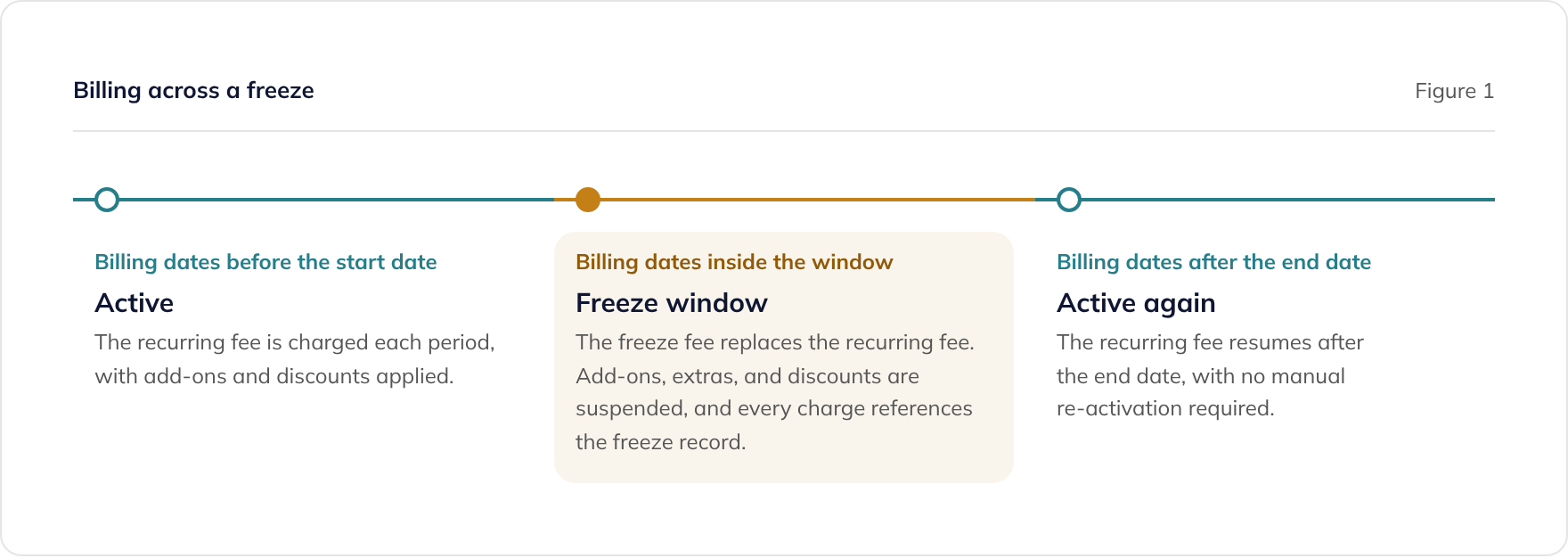
The replacement rule has three parts, and all three are checkable in a demo:
- The fee swaps: a billing date inside the window produces the freeze fee, at the freeze fee’s own tax treatment, instead of the membership fee.
- The extras pause: add-on subscriptions, ad-hoc charges, and discounts are suspended while frozen. Charging a frozen member for their locker rental is a complaint generator.
- The paper trail holds: each freeze-period charge records which freeze produced it, so support can answer “why was I charged £5 in March?” from the record rather than from folklore.
This is how the Membership accelerator’s billing calculator behaves: a charge date inside the freeze window swaps the recurring item for the freeze item, skips add-on and ad-hoc charges and discounts, and tags the charge with the freeze it belongs to. Resumption is just as important and comes free with the same design: a billing date past the end date picks up the normal fee again because the date comparison says so, not because someone flipped the member back on.
Where should freeze fees be configured?
At every level the business actually varies them, with scheduled changes like any other price. In practice that means three layers:
- Per package, per site: the freeze fee is a price, and prices differ by membership tier and location. The accelerator carries a freeze fee on each package’s per-club pricing, alongside the recurring and joining fees.
- Per member, agreed at signup: the fee the member actually agreed to should be captured on their membership, so later list-price changes do not silently rewrite existing agreements.
- Scheduled changes: freeze fees rise like any other fee. A scheduled price change with an effective date should cover the freeze fee too, applied by the same mechanism that handles recurring-fee changes. In the accelerator, scheduled package price changes carry registration, recurring, and freeze fees together, applied per site on the effective date with a full audit trail.
If a product you are evaluating stores the freeze fee as a single global setting, that is a sign membership pricing generally has been modelled too shallowly. Our guide on own versus rent for membership software covers why pricing flexibility tends to be where per-member SaaS products pinch first.
Why preview the freeze before committing it?
Because the member is agreeing to a financial change, and the system should tell them exactly what it is. A freeze touches the next several billing dates: the last full charge, the first freeze-fee charge, possibly a partial period, and the resumption charge. Asking members (or front-desk staff) to reason that out from a policy document is how disputes start.
The design answer is a non-persisting dry run: execute the freeze through the identical lifecycle and billing logic, capture the resulting charges and status, show them, and throw the changes away. If the member confirms, commit the same operation for real. Because preview and commit share one code path, the preview cannot lie.
The Membership accelerator implements freezes (and cancellations) this way: the preview runs the same account-update strategy in a preview mode that returns the resulting charges, discounts, and membership state without persisting anything. The same one-code-path discipline applies across its lifecycle events, because signup, plan changes, freezes, and cancellations all flow through the same billing orchestration, with pro-rata adjustments calculated by shared logic rather than per-event special cases.
How should frozen status work across the platform?
Derived, never hand-set. “Is this member frozen?” should be answered by computing over the freeze record’s dates, and that computation should be the single authority every other feature consults. The accelerator maintains a membership state (active, frozen, cancelled, and so on) that is established from the freeze and cancellation records, including a grace date marking when the current freeze ends.
Deriving status matters because a freeze quietly touches everything else the member can do, and each of those features needs one trustworthy answer:
- Access and check-in: should a frozen member get through the door? Policy varies by operator, but whatever the policy, it must read the derived status. A well-designed platform makes eligibility a rule over membership status rather than a hard-coded behaviour.
- Bookings and credits: can a frozen member book classes, and do their credits accrue or pause? Again: a policy over status, applied consistently at the API rather than in each front end.
- Reporting and payment runs: frozen members need to be visible as frozen in billing analytics, retention reporting, and the payment run that charges them the freeze fee.
The evaluation question that exposes weak designs: “show me where frozen status is stored, and show me what happens if a freeze’s end date is edited.” If status lives in one place and follows the edit automatically, the design is sound. If someone has to update the member as well as the freeze, you have found the workaround factory.
What should you demand in a demo?
Freeze handling is easy to describe and hard to fake live. Ask the vendor to demonstrate, in the demonstrate-not-describe spirit of our franchise software buyer’s guide:
- Create a freeze with dates and show the member’s status change without anyone touching a status field.
- Run billing across the window and show the freeze fee replacing the recurring fee, add-ons suspended, and the charge referencing the freeze.
- Preview first: show the member-facing financial preview before the freeze is committed, and show that committing produces exactly what was previewed.
- Edit the end date and show billing and status follow the change with no secondary updates.
- Change the freeze fee on a schedule and show existing agreed fees are respected while new freezes pick up the new price.
An operator processing hundreds of freezes a month will feel the difference between a product that passes these tests and one that handles freezes with flags and credit notes.
Where does this fit in a wider membership platform?
Freezes are one lifecycle event among several (join, plan change, cancel, renew), and the design lesson generalises: model each event as a dated record, derive status and billing from it, preview before committing, and push every consequence through one shared billing path.
The Membership accelerator is built on that pattern, with the Billing Engine providing the recurring Direct Debit collection the freeze fees flow through. Both ship under a perpetual source-code licence, so the lifecycle logic is yours to inspect and adapt. Where your membership model has rules no packaged product fits, our custom software development service builds on the same foundations.
Book a membership lifecycle review
If freezes in your current system mean manual refunds, forgotten end dates, or status fields that disagree, the cause is almost always the flag-based design described above. Bring your freeze policy and your current tooling and we will map what a derived, preview-first design would change.
No pitch, no obligation. If your current setup is sound, we will tell you.
Frequently asked questions
What is a membership freeze in software terms?
Should members pay a fee while their membership is frozen?
What should happen to billing during a membership freeze?
How should a freeze end?
Why does a freeze need a billing preview?
Related guides
Claude Code for .NET Developers: A Practical Getting Started Guide
Getting started with Claude Code for C# and .NET. Installation, IDE integration, pre-approved command setup, cloud agents, and practical .NET workflows.
Data Protection by Design: The Standard Features Every Compliant System Needs
Data protection by design is an engineering discipline, not a policy document. This guide sets out the standard software features every GDPR-compliant system needs, and how to build them in from the first line of code.
Data Subject Rights, Retention and Erasure: The Engineering
Subject access, portability, and the right to erasure are software features with statutory deadlines, not favours. This guide covers how to build them, including retention engines, crypto-shredding, and erasure that keeps the audit trail.