
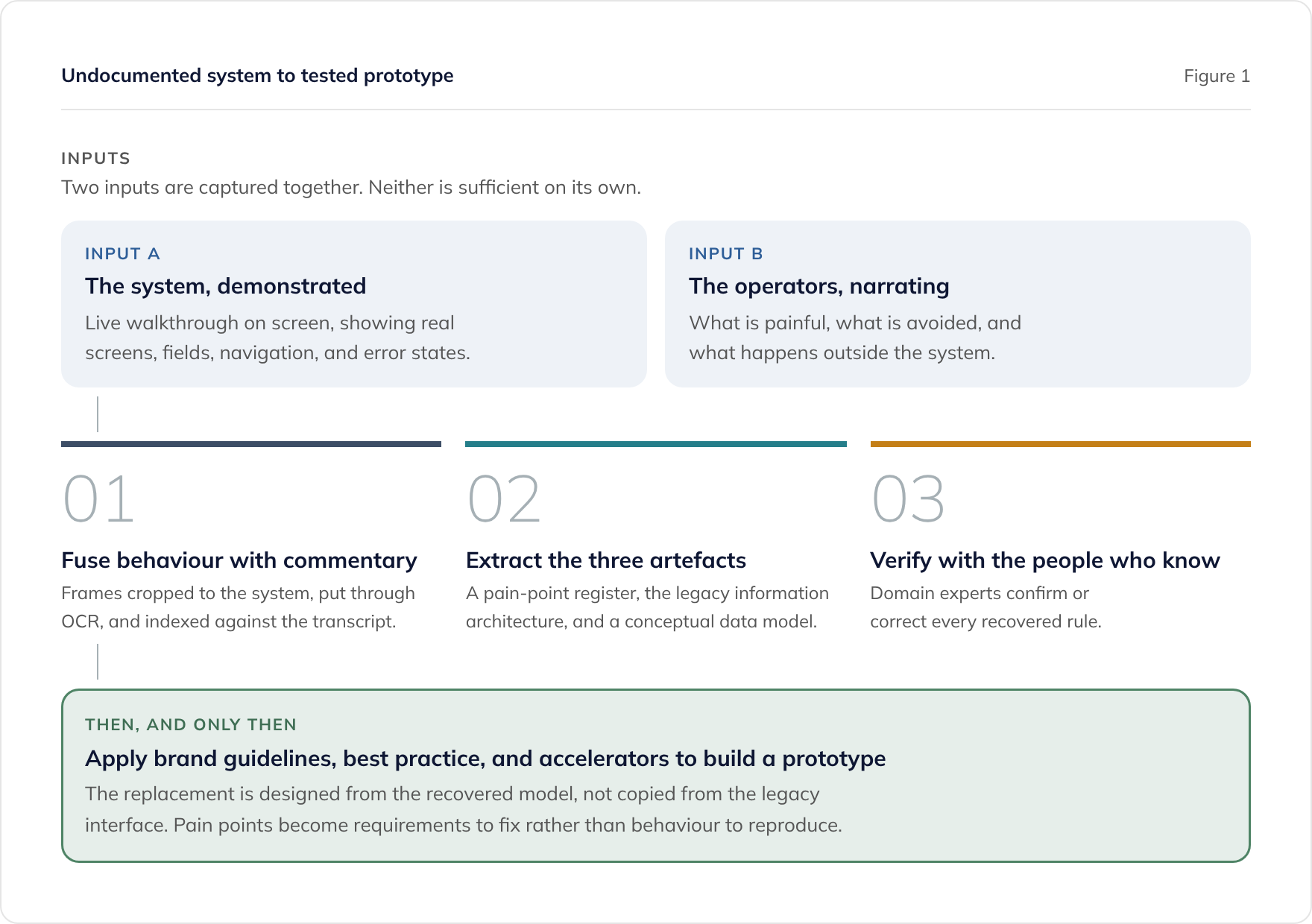
When a legacy system has no documentation, the knowledge has not disappeared. It sits with the people who use the system every day. The fastest route to a specification is to record them demonstrating and narrating it, then use AI to fuse what the system does with what they say about it.
- Screenshots and recordings alone describe the surface. Paired with operator narrative, they reveal intent and pain.
- Frames are cropped to the system, put through optical character recognition, and indexed against the transcript, which is what links each screen to what was said about it.
- The outputs are a pain-point register, a legacy information architecture map, and a conceptual data model.
- The goal is not a like-for-like clone. Capturing what does not work is what makes the replacement better than the original.
- Applying brand guidelines, in-house best practice, and existing accelerators turns those artefacts into a working prototype.
- This compresses requirements, user experience, and architecture work that traditionally runs for weeks or months.
Our legacy application modernisation service uses this method during discovery.
Why undocumented systems stall modernisation before it starts
The blocker is rarely technology. It is that nobody can say with confidence what the current system actually does.
This is the normal condition of a system that has been in production for fifteen years. The original developers have left. The vendor has been acquired or has closed. The specification, if one ever existed, describes release one of a system now on release forty. What remains is a running application, a set of people who know how to operate it, and no reliable account of the rules encoded inside it.
That uncertainty is what kills the business case. A board will fund a replacement when it knows the scope. It will not fund an open-ended discovery exercise whose first milestone is “find out what we have”. So the system stays, the risk compounds, and the conversation repeats the following year.
The way out is to accept that the documentation cannot be recovered, because it never existed, and to recover the understanding instead. That is a different and much more achievable goal.
Why reading the code is not enough
Most reverse engineering advice starts with static analysis: point tooling at the source, generate dependency graphs, extract business rules. That is useful, and where source code exists we do it. It also has three limits that matter more than they are usually admitted to.
The source may not exist, or may not build. Lost repositories, dead build environments, and compiled-only deliverables are common in exactly the estates that most need replacing.
Code tells you what happens, not what matters. A static analyser will faithfully extract a validation rule. It will not tell you that the rule has been wrong since 2019, and that three people maintain a spreadsheet to correct for it. Both facts belong in the specification. Only one is in the code.
Code does not record the workarounds. In a long-lived system, much of the real process lives outside the application. It lives in shared inboxes, in exported spreadsheets, and in the sequence of steps an experienced user takes to avoid a screen that locks up. None of that is visible in a repository, and all of it is in scope for a replacement.
There is a fourth risk specific to using AI here, and it is the one to design around. A language model given only screens and code will produce a fluent, structured, confident account of intent that it has partly invented. The output reads like a specification and cannot be distinguished from one without checking every line. Reconstructing business logic without a human source of truth is where this approach fails.
What actually works: demonstrate the system, and narrate it
The method we use is a facilitated workshop in which the people who operate the system walk through it live, on screen, while talking through what they are doing and why. The session is recorded. Both channels matter, and the value is in the combination.
The demonstration gives ground truth about behaviour: the real screens, the real field names, the real navigation, the real sequence, the real error states. Nothing is filtered through somebody’s recollection of how the system works.
The narrative gives what no amount of observation can supply:
- Which steps are painful, slow, or routinely avoided.
- Which fields are mandatory in the interface but meaningless in practice.
- Which parts of the process happen outside the system entirely.
- Where the same information is entered more than once.
- Which behaviour is deliberate design, and which is a defect everyone has stopped reporting.
Running this as a workshop rather than a solo screen recording matters. When several people from different roles watch the same demonstration, the disagreements are the most valuable output in the room. One person’s “this is just how it works” is another’s “we stopped doing it that way two years ago”. Those contradictions surface a lot of undocumented process, and they surface it fast.
What the pipeline looks like at scale: a worked example
The description above is the shape of the method. On a large system the volume is the thing that has to be engineered around, so it is worth showing real figures from one engagement.
Six workshops of roughly ninety minutes each produced the source material. Turning that into something analysable ran as follows.
Extract frames, not video
The recordings were reduced to around 1,800 screenshots capturing every distinct state of the system that was shown. Working from stills rather than continuous video matters for a practical reason: a still can be indexed, cross-referenced, reordered, and cited in a requirements document. A timestamp in a ninety-minute recording cannot.
Crop to the system, and only the system
Each frame was cropped to show the application alone. Two things were deliberately removed:
- Participant video tiles, which are the largest source of personal data in a typical Teams recording and carry no information about the system.
- Browser chrome, toolbars, and desktop furniture, which add noise and can leak unrelated information such as other open tabs, bookmarks, or notifications.
This step is usually presented as tidying up. It is better understood as data minimisation, and it is the cheapest privacy control in the whole process because it happens before the images are indexed or analysed. It removes participants’ faces from the dataset entirely rather than justifying their retention later.
OCR and index against the transcript
Every cropped image was put through optical character recognition (OCR), which converts the text in the image into machine-readable text. The extracted text was then indexed against the workshop transcriptions.
This is the mechanism behind the fusion described earlier, and it is the part that makes the method work at scale. Once a screen’s field labels, menu items, statuses, and error messages are searchable text, they can be matched to the moment in the transcript where somebody was talking about them. That link between a screen and the commentary about that screen is the whole asset. Without it you have a large pile of pictures and a long transcript, and no reliable way to connect the two.
The toolchain is a pipeline, not a single model
It is worth being explicit about this, because “feed it to an AI” is a misleading description of what happens and sets the wrong expectation about effort.
| Stage | What does the work |
|---|---|
| Transcription of the workshop audio | Whisper, a speech recognition model, run through Hugging Face |
| Frame extraction, cropping, and batch image processing | Conventional image manipulation tooling, scripted |
| Optical character recognition on the cropped frames | Dedicated OCR processing |
| Indexing, fusion, and extraction of the artefacts | Large language models, using Claude Opus and Fable for different parts of the work |
| Verification of every recovered rule | People who know the business |
The language models do the part they are genuinely good at. They read a large indexed corpus, spot that a screen and a passage of commentary refer to the same thing, and draft structured artefacts from it. They are not doing the transcription, the cropping, or the character recognition. Using them for those stages would be slower, more expensive, and less accurate than the specialist tools.
The practical consequence is that most of this is deterministic, scripted processing. That is a feature. The more of the pipeline that is repeatable tooling rather than model inference, the smaller the surface over which a model can invent something. It also makes the whole exercise far easier to run again on the next system in the estate.
Reorganise by functional area, then consolidate
The initial 1,800 images were in the order they happened to be demonstrated, which follows the flow of a conversation rather than the structure of the system. Extracting the information architecture provides the structure to sort them into, so the images are reorganised by functional area.
Consolidation then removes the redundancy that recording inevitably produces: the same screen captured a dozen times, near-identical states, and frames that differ only in the record being viewed. That reduced 1,800 images to roughly 360, a five-to-one reduction, and 360 is a set a human review team can genuinely work through.
The sequence matters here. Consolidating before extracting the information architecture means deciding what is redundant without knowing what the system’s structure is, and the temptation is to keep the visually distinctive screens rather than the structurally significant ones. Sorting first, then consolidating within each functional area, keeps coverage honest and makes gaps visible. A functional area with only two screenshots against it is a prompt to check whether it is genuinely small, or simply was not covered in the workshops.
What comes out of the analysis
Three artefacts, produced in order, each one building on the last.
The pain-point register
A numbered list of the specific problems with the current system, each traceable to the moment in the session where it was raised. Numbering matters more than it sounds. Once each pain point has an identifier, every later requirement can cite the problem it exists to solve, which is what stops a replacement programme drifting into scope that nobody asked for.
Typical entries are concrete rather than abstract:
- Duplicate accounts created because users cannot find the existing record.
- A report rebuilt by hand every month.
- A status that has to be set in two places before it sticks.
The legacy information architecture
A map of how the current system organises information: its navigation, its screen hierarchy, and the routes users actually take through it as opposed to the ones the menu implies.
This is the artefact most often skipped, and it is the one that protects the replacement from a specific and expensive failure. If you redesign the navigation without first understanding the model users hold in their heads, you produce a system that is objectively better organised and that everybody finds harder to use. Recovering the legacy structure tells you which parts of it are load-bearing conceptually, and which are simply accidents of how the software grew.
The conceptual data model
The entities the business actually deals with, their attributes, and the relationships between them, expressed in business terms rather than as a database schema.
Derived from the screens, this is usually the first clear statement of the domain anyone has had. It routinely surfaces problems the organisation has lived with for years without ever naming them:
- The same real-world entity represented three different ways in three modules.
- A relationship the interface implies is one-to-one that is in fact one-to-many.
- A field used for two unrelated purposes, because adding a column was too expensive at the time.
It also drives the data migration plan, which is normally the highest-risk part of a replacement and the part most likely to be underestimated.
Why this produces more than a like-for-like replacement
This is the point on which this approach differs most sharply from the automated visual reverse engineering tools now entering the market. Those tools set out to reproduce the legacy interface as modern code. That sounds efficient and is usually the wrong goal.
A system extended for fifteen years contains fifteen years of compromise:
- Screens laid out around the constraints of a framework nobody uses now.
- Steps that exist only to satisfy a defect.
- Terminology inherited from a business process that changed in 2016.
Reproducing that faithfully gives you the same system in a supported technology stack. The support cost falls. Nothing else improves.
The narrative captures dissatisfaction as deliberately as it captures behaviour. That lets the output distinguish between three different things:
- Behaviour to preserve. Rules that are load-bearing, often regulatory or financial, which must survive the transition exactly.
- Behaviour to fix. Pain points, workarounds, and steps that exist only because of a limitation in the old system.
- Behaviour to drop. Features built for a process that no longer exists, which are still being maintained because nobody was certain they were unused.
That third category is worth the exercise on its own. Removing genuinely dead functionality is one of the few reliable ways to make a replacement smaller than the thing it replaces.
From there the replacement is designed rather than transcribed. The recovered data model and information architecture set the domain. Brand guidelines set the visual and tonal direction (our guide to AI-friendly brand guidelines covers what they need to contain). In-house best practice and existing platform accelerators supply the parts that are not differentiating, such as authentication, roles and permissions, scheduling, billing, and audit. What remains for bespoke design is the part that is genuinely specific to the client.
Why it compresses discovery from months to weeks
Traditional discovery on a system like this runs as a long sequence of separate exercises: requirements workshops, then user experience research, then information architecture, then solution architecture, each with its own analysis and write-up phase. The elapsed time is dominated not by the sessions but by the gaps between them.
This method changes the ratio. The workshop time is broadly unchanged, and deliberately so, because the sessions are where the knowledge comes from and compressing them would defeat the point. What compresses is everything downstream: transcription, alignment of narrative to screens, first-pass extraction of entities and relationships, and the drafting of a structured requirements catalogue. Work that conventionally sits in analysts’ queues for days is available for review in hours.
Two second-order effects matter as much as the raw speed.
The feedback loop tightens. When a draft model comes back within a day of the session, the participants still remember the session. Corrections are sharper and cheaper than they are six weeks later.
Requirements, experience, and architecture stop being sequential. Because the same recorded material feeds all three, they are derived in parallel from one source rather than handed between teams. That removes an entire class of translation error, where the architecture is built from a written summary of a workshop somebody else attended.
The honest caveat: this compresses the analysis, not the decisions. Stakeholder alignment, prioritisation, and funding approval run at the speed of the organisation, and no tooling changes that.
Where the human has to stay in the loop
The failure mode of this approach is a plausible specification full of invented intent. Guard against it explicitly.
- Every recovered rule is confirmed by a domain expert before it enters the requirements catalogue. AI drafts the candidate rule. A person who knows the business confirms, corrects, or rejects it. This step is not optional and does not get faster with a better model.
- Calculations get special treatment. Anything financial, contractual, or regulatory is verified against real worked examples, not against a description of the rule. Where source code or a database is available, it is used as the cross-check here first. Our guide to recovering business rules without source code covers this in full, including how to grade confidence and track what you have not yet found.
- Silence is not evidence. If no participant mentioned a screen, that means it was not covered, not that it is unused. Track coverage against the system’s actual navigation, and be explicit about what has not yet been examined.
- Disagreements are recorded, not resolved on the spot. Where two participants describe the same process differently, capture both accounts. The resolution usually requires somebody who was not in the room.
How to run this on your own estate
- Establish who owns the system, and confirm you hold the rights to examine it. If it is a third-party product you licence, stop and read the guide to lawful reverse engineering from recordings and screenshots before recording anything.
- Sort out the data position before the first session. Use a training environment, anonymised data, or masked records where you can. Recordings of production systems contain live personal data and need a lawful basis, access control, and a retention decision.
- Pick the right people, not the most senior. You want daily operators from each distinct role, plus whoever is known as the person who understands the awkward parts.
- Run the demonstration as a real task, end to end. Ask participants to complete an actual piece of work rather than tour the menus. Real tasks surface the workarounds; menu tours do not.
- Prompt for pain, explicitly and repeatedly. People normalise the systems they use daily and will not volunteer friction unless asked. “What would you change about this screen” is worth asking on every screen.
- Produce the artefacts in order, pain points, then information architecture, then conceptual data model, and get each reviewed before building the next on top of it.
- Prototype early, and put it in front of the same people. An interactive prototype validates the recovered understanding in a way that a document never will. Our prototype to production approach treats this as the point where requirements get tested rather than agreed.
Related reading
- Legacy System Reverse Engineering is our service for running this method, alongside AI-assisted code and binary analysis, on your estate.
- Recovering Business Rules When You Do Not Have the Source Code covers the calculations and edge cases that sit underneath the workflows.
- Legacy .NET Application Assessment: A Scoring Framework scores modernisation readiness before you commit budget.
- Modernise, Rebuild, or Replace Legacy Systems covers the strategic decision this discovery work informs.
- Our Development Team Left: What Next? addresses the most common trigger for an undocumented system becoming urgent.
- Prototype First: Using AI Tools to Validate Requirements explains why an interactive prototype beats a written specification for validation.
- Is It Lawful to Reverse Engineer a System From Recordings and Screenshots? covers ownership, licence terms, and the personal data in your recordings.
- Is REA Legal? AI Reverse Engineering, SaaS, and UK Law covers decompiling binaries with tools such as REA, and where ownership and licence terms draw the line.
Frequently asked questions
Can AI reverse engineer a legacy system from screenshots alone?
Do we need the source code for this to work?
Is this just a way of cloning our existing system?
How long does this take compared with traditional discovery?
Is it lawful to record and analyse a system in this way?
What tools does this actually use?
How do you handle the volume on a large system?
What do we actually get at the end?
Related guides
Modernising Legacy .NET Applications with AI: The Enterprise Playbook (UK, 2026)
A structured approach to modernising legacy .NET Framework applications using AI-assisted development. Four pillars, real migration patterns, and practical guidance for enterprise teams.
Modernising SQL Server Stored Procedures with AI: From T-SQL to a Tested C# Service Layer
How to modernise SQL Server stored procedures with AI: classify a large T-SQL estate, move business rules into tested C#, and prove behaviour parity.
WinForms to the Web: An AI-Assisted Rebuild Guide with Claude Code
WinForms to web migration with Claude Code: why conversion fails, rebuild versus strangler fig, salvaging business logic, and the delivery workflow.