
WinForms has no direct migration path to the web. Upgrading to .NET 10 keeps the application on the desktop, and conversion tools translate syntax without redesigning a desktop interaction model for the browser. The realistic routes are a rebuild with salvage or a strangler fig transition, and coding agents change the economics of both. They map event handlers, extract buried business rules, generate characterisation tests, and build the new ASP.NET Core front end against enforced architecture rules.
- Decide the route first: rebuild with salvage, or strangler fig if the desktop must keep running.
- The UI has to be rebuilt, but the business logic can usually be kept once it is extracted from code-behind and pinned by characterisation tests.
- Keep the database schema stable during the rebuild, because it is your behavioural baseline.
- Use guardrails (layer rules, hooks, and ArchUnitNET) so generated code cannot recreate the coupling you are escaping.
Our legacy application modernisation service covers desktop-to-web programmes end to end. For new builds and ongoing C# work, see our .NET development service.
Your WinForms application has run the business for fifteen years. Now it needs to be on the web
The application works, but only at desks, on Windows machines on the corporate network, where IT has installed it. The business now wants browser access, remote working, and integrations that the desktop model cannot offer. Meanwhile, the .NET Framework support clock is running underneath it.
This situation is common across UK mid-market estates, and it is structurally different from the .NET Framework version migration covered elsewhere in this cluster. A version migration moves the application to a newer platform and leaves its structure much as it was. A move from WinForms to the web changes how the application is structured and used, which is why the decisions in this guide differ from those in a version migration.
Why is there no direct WinForms to web migration path?
The desktop and web interaction models are incompatible, so better conversion tooling would not close the gap. WinForms is a stateful desktop model: the form lives in memory, event handlers mutate it directly, modal dialogs block, and multi-window workflows are normal. The web is request-based or component-based, stateless by default, and designed around navigation rather than windows.
Microsoft’s own guidance for the nearest comparable move (Web Forms to Blazor) makes clear that the UI layer is reconstructed rather than translated. Component vendors say the same for WinForms, and DevExpress’s migration guidance notes that data and business logic layers can be reused while the UI is rebuilt. Automated conversion products exist, and they can translate control trees into web components. They cannot tell you whether a screen-for-screen copy of a 2010 desktop workflow is what the business needs in a browser in 2026, and that question decides whether the result is any good.
Usually it is not what the business needs, because the rebuild is a chance to fix workflows that users have worked around for years. Treating the move as a conversion wastes that chance, and often produces a web application that feels like a desktop application squeezed into a browser tab.
Rebuild, convert, or strangler fig: how do you choose?
Two questions settle the route, in order: must the desktop keep running during the transition, and is the business logic separable from the UI? Where it is not, the rebuild has to recover the behaviour from the legacy code itself.
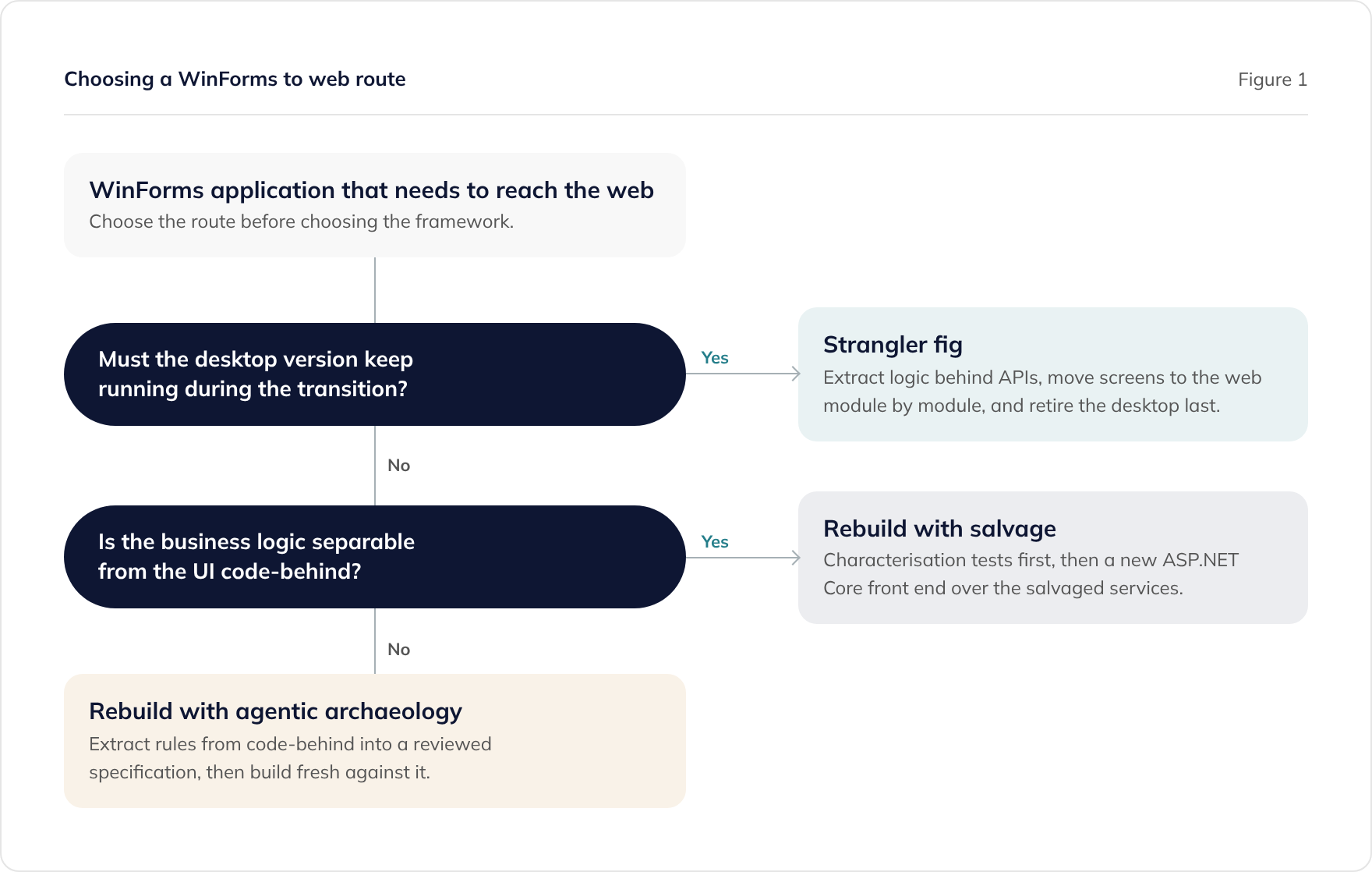
Strangler fig suits revenue-critical systems that cannot pause. The extracted business logic is exposed behind APIs, the desktop application is refactored to call them, and web screens replace desktop screens module by module. Incremental approaches like this ship value every sprint instead of at the end, at the cost of running two front ends for the transition period.
Rebuild with salvage suits applications where a cutover is acceptable and the logic layer is worth keeping. The UI is designed fresh for the web, and the business logic moves across behind characterisation tests.
Rebuild with agentic archaeology covers the hardest case, where business logic is so entangled with the UI, and so undocumented, that nothing can be ported directly. The legacy codebase then serves as the source of the specification, and none of its code is carried across. Agents extract the rules, people review them, and the new system is built against the reviewed specification. This mirrors the assess, map, extract-rules, transform, and validate workflow in Anthropic’s code modernisation playbook.
If you are still weighing modernisation against rebuild at the estate level, the modernise, rebuild, or replace framework covers that decision. This guide assumes the web is the destination.
What survives the rebuild? Salvaging business logic from code-behind
In a typical WinForms application, the most valuable code sits inside event handlers, which is the hardest place to reuse it from. Fifteen years of validation rules, pricing logic, and edge-case handling accumulate in btnSave_Click methods that also touch the UI and the database.
Salvage means extracting those rules into plain services that know nothing about forms or HTTP. The same logic can then serve the old desktop (in a strangler transition) and the new web front end.
// BEFORE: WinForms code-behind. Validation, pricing, and data access
// entangled with the UI in one event handler.
private void btnSave_Click(object sender, EventArgs e)
{
    if (dtpDelivery.Value < DateTime.Today.AddDays(2))
    {
        MessageBox.Show("Delivery date must be at least 2 working days ahead.");
        return;
    }

    var discount = 0m;
    if (chkTradeCustomer.Checked && numQuantity.Value >= 50)
        discount = 0.12m;

    using var conn = new SqlConnection(connectionString);
    using var cmd = new SqlCommand(
        "INSERT INTO Orders (CustomerId, Quantity, Discount, DeliveryDate) " +
        "VALUES (@c, @q, @d, @dd)", conn);
    cmd.Parameters.AddWithValue("@c", (int)cboCustomer.SelectedValue);
    cmd.Parameters.AddWithValue("@q", (int)numQuantity.Value);
    cmd.Parameters.AddWithValue("@d", discount);
    cmd.Parameters.AddWithValue("@dd", dtpDelivery.Value);
    conn.Open();
    cmd.ExecuteNonQuery();
    MessageBox.Show("Order saved.");
}// AFTER: the rule extracted into a service that knows nothing about
// forms or HTTP. The same service serves web, API, and tests.
public class OrderService(IOrderRepository repository, TimeProvider timeProvider)
{
public async Task<Result<Order>> CreateOrderAsync(
CreateOrderRequest request,
CancellationToken cancellationToken = default)
{
var earliestDelivery = timeProvider.GetUtcNow().Date.AddDays(2);
if (request.DeliveryDate < earliestDelivery)
return Result<Order>.Failure(
"Delivery date must be at least 2 working days ahead.");
var discount = request is { IsTradeCustomer: true, Quantity: >= 50 }
? 0.12m
: 0m;
var order = new Order(
request.CustomerId, request.Quantity, discount, request.DeliveryDate);
await repository.AddAsync(order, cancellationToken);
return Result<Order>.Success(order);
}
}The web front end (a Razor Pages handler, an MVC controller action, or an API endpoint) becomes a thin adapter over that service. The legacy desktop form becomes one too, if it needs to keep running during a strangler transition.
Two disciplines make the salvage safe:
- Characterisation tests before extraction. Pin the current behaviour with tests written against the legacy logic, including behaviour that looks like a bug. Every extraction has to keep those tests green, so any change in behaviour becomes a decision agreed with a product owner instead of an accident.
- Keep the database schema stable. The data layer is the behavioural baseline for the whole exercise, so resist the temptation to fix the schema mid-rebuild. Database modernisation is its own workstream, covered in the .NET modernisation playbook.
How do coding agents change the economics of a desktop-to-web rebuild?
Full rebuilds have a bad reputation for good reasons: years of spend before any value, and a specification that existed only in the old code. Coding agents help with both problems, because the most expensive phases of a rebuild are the ones agents handle well.
Archaeology at scale. An agent can sweep every form and event handler in the solution and produce a structured inventory. It records which handlers contain business rules and which are pure UI plumbing, what each rule appears to do, and where the same rule is duplicated with variations. On estates with hundreds of forms, this turns weeks of reading into days of review. The output is a rules catalogue that people then verify with the business, screen by screen.
Characterisation tests without the drudgery. Agents generate the pinning tests against the extracted rules, and mutation testing confirms that the tests fail when the behaviour changes. Our AI test quality guide explains why coverage alone is misleading here.
Generation under guardrails. In our experience, the new front end and service layers are the kind of pattern-consistent code agents produce well, provided the harness stops them recreating the coupling you are escaping. We treat three things as the minimum set: layer rules enforced with ArchUnitNET, a PostToolUse hook that runs dotnet build after every edit, and an AGENTS.md carrying the rebuild rules. The harness engineering guide explains the model, and the .NET configuration guide has the copy-pasteable setup.
Design and UX at scale. On systems with large screen inventories, we use AI for the design and UX work as well. It generates a design system, screen layouts, and consistent interaction patterns across hundreds of screens. At that scale it is far more efficient than manual design. Consistency across the whole application comes from the approach itself, so reviewers do not have to enforce it screen by screen. People can then spend their time validating the redesigned workflows with the users who rely on them.
A rebuild-specific AGENTS.md looks like this:
# Project: OrderDesk WinForms to web rebuild

## Target
- Source: WinForms on .NET Framework 4.8 (read-only reference at /legacy)
- Target: ASP.NET Core on .NET 10, Razor Pages
- Hosting: Azure Kubernetes Service (AKS)
- Database: existing SQL Server schema, unchanged

## Architecture rules
- Layers: Web -> Application services -> Domain -> Data access
- Web layer never references data access directly
- No SqlConnection/SqlCommand outside the data access project
- All rules from /docs/rules-catalogue.md implemented in Application services
- Every extracted rule keeps its characterisation tests green

## Do not
- Copy UI structure from the legacy forms
- Change database schema, table names, or column names
- Reimplement a rule that is not in the rules catalogue without flagging it
- Weaken or delete a characterisation test to make a build pass
The ‘read-only reference’ line is important. The legacy solution stays in the workspace so that agents can read it and check behaviour against it, but they should not copy code from it. Deny rules in .claude/settings.json can stop it from being edited.
Our AI Velocity Report publishes our own quarterly figures on how much production code agents author under this kind of harness.
Which web UI target should you choose?
Choose the target to fit the application’s interaction profile, rather than what the team is familiar with or what seems the default.
- Razor Pages or MVC fit form-centric, page-at-a-time applications, which describes most internal WinForms line-of-business systems. Hosting and the state model are both simple, and developers with these skills are easy to hire.
- Blazor Server fits teams that want richer interactivity while staying in C#. Plan for its connection behaviour, because every user holds a live circuit (a persistent connection to the server), which changes the operational profile compared with stateless pages.
- React with a .NET API fits complex client-side interaction, an existing design system, or a product with external users. It also cleanly separates the API layer that a strangler transition needs anyway. Our BFF pattern guide covers how to structure that API layer.
A screen inventory usually shows that the application is a mix of things, for example eighty data-entry screens, a handful of complex interactive ones, and some reports. It is reasonable to serve those with different tools inside one application shell, instead of forcing everything through a single framework choice.
What does the delivery workflow look like?
The sequence below assumes the rebuild-with-salvage route. The strangler variant runs the same phases per module rather than per system.
- Assess and inventory. An agent sweeps the forms, event handlers, timers, integrations, and print paths, and produces a screen inventory, a draft rules catalogue, and an integration map. The legacy .NET assessment framework provides the scoring structure.
- Verify the rules catalogue with the business. It is cheapest to find out that a rule is obsolete, wrong, or contested before it is rebuilt. People carry out this step, and it is where decisions about workflow redesign are made.
- Pin behaviour with characterisation tests. Agents generate the tests against the catalogue, engineers review them, and mutation testing verifies them.
- Extract the service and data access layers. Salvage what is separable and reimplement the rest from the catalogue. ArchUnitNET rules lock the layering from the first commit.
- Build the web front end module by module. Group screens by workflow and build them against the services. Where modules are independent, parallel agents can work in separate worktrees (the scaling coding agents guide covers the context strategies).
- Run acceptance against the old system. Put the same inputs through both systems against the same data, and compare the outputs. Each difference should turn out to be either a defect or an improvement that has been agreed.
- Cut over, or retire the desktop module by module on the strangler route.
What about the database and the stored procedures?
Keep the schema stable through the rebuild, and treat database logic as a separate decision. Many WinForms estates carry significant business logic in SQL Server stored procedures. Some of it belongs in the new service layer, while some (set-based bulk work, for example) belongs where it is.
Our stored procedure modernisation guide covers the classify-then-move workflow in full. If Azure SQL is the eventual destination, run Microsoft’s assessment rules early, so compatibility issues come to light before they disrupt the plan.
What to watch for
State assumptions. Desktop code assumes the form stays alive between events, and web code cannot rely on that. Every piece of logic that reads ‘what the user did three clicks ago’ from control state needs an explicit decision about where that state lives: the page round-trip, the session, or component state.
Grid-heavy screens. WinForms grids handle editing, sorting, filtering, and clipboard behaviour that users rely on, often without anyone having specified it. Inventory the grid behaviours users depend on before choosing a web grid component, or the gaps will surface during user acceptance testing.
Printing, exports, and reports. A web application cannot send output straight to a printer the way a desktop application can. Every print path becomes a generated document or a job for a reporting tool, and each one should be captured as a requirement rather than treated as plumbing to port.
Long-running operations. Desktop applications block or spin up background workers, whereas the web needs job queues and progress patterns. Timers in forms (System.Windows.Forms.Timer doing polling or scheduled work) often hide integration logic that belongs in a background service.
Multi-window workflows. Users who work with three forms side by side will not accept a single linear page flow. Supporting it is an interaction design problem to solve as part of the rebuild, and porting the existing forms will not answer it.
Authentication and audit. On the desktop, Windows identity came for free. The web application needs an explicit identity design (typically Microsoft Entra ID for internal systems), and the rebuild is a good moment to add the audit trail the desktop version never had.
Security posture of generated code. A rebuild produces a large volume of new web-facing code quickly. The controls that prevent injection and cross-site scripting (XSS) vulnerabilities therefore need to be built into the harness through analysers, banned APIs, and review gates, rather than left to code review alone. The risks of AI-augmented development guide covers the control set.
Next steps
We recommend starting with the assessment before any debate about frameworks. The screen inventory, rules catalogue, and integration map determine the route, the sequencing, and a realistic cost, and an agent-assisted assessment produces them quickly.
Related guides in this cluster:
- The .NET modernisation playbook sets out the strategic frame.
- The .NET Framework migration guide applies if a version migration comes before the rebuild.
- The Claude Code for .NET developers guide covers the tooling.
- The assessment framework provides readiness scoring.
If you would like to look at your own estate, book a free consultation and we will talk through how a screen and rules inventory would work for your application.
Frequently asked questions
Can a WinForms application be converted to a web application automatically?
Should we target Blazor, Razor Pages, MVC, or React?
Can the desktop application keep running during the move?
How much of a WinForms to web rebuild can AI tooling do?
What happens to printing and reporting?
Do we have to rewrite the database at the same time?
How long does a WinForms to web rebuild take?
Related guides
Modernising Legacy .NET Applications with AI: The Enterprise Playbook (UK, 2026)
A structured approach to modernising legacy .NET Framework applications using AI-assisted development. Four pillars, real migration patterns, and practical guidance for enterprise teams.
Modernising SQL Server Stored Procedures with AI: From T-SQL to a Tested C# Service Layer
How to modernise SQL Server stored procedures with AI: classify a large T-SQL estate, move business rules into tested C#, and prove behaviour parity.
.NET MAUI vs React Native: Choosing a Xamarin Migration Target
An honest comparison of .NET MAUI and React Native for teams leaving Xamarin: support lifecycles, team cost, and when each one is the wrong answer.