
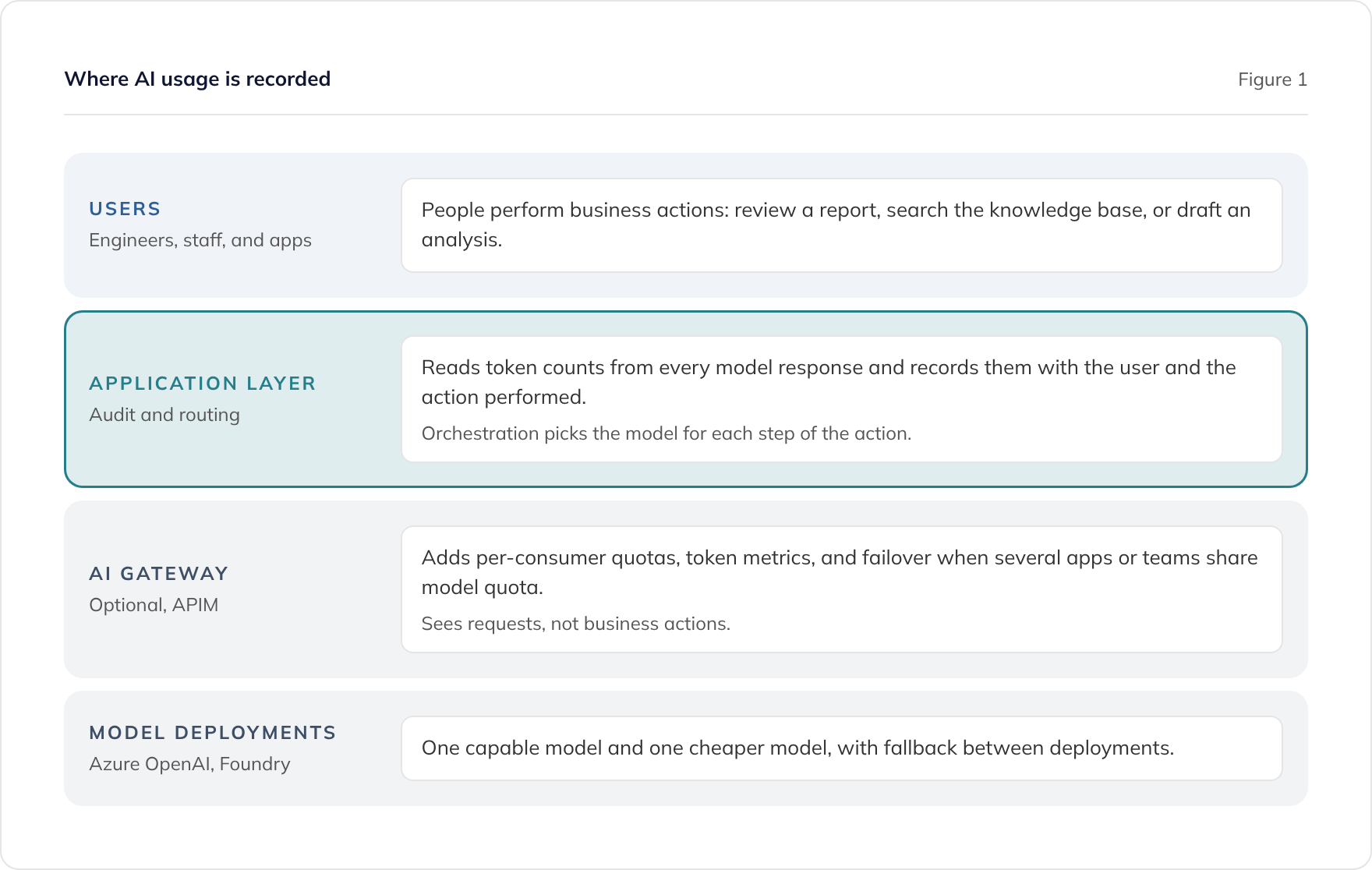
Large language models (LLMs) are another metered cloud API, so govern them the way you govern any metered service: record who used what, for which purpose, and at what cost. For AI built into an application, we read the token counts from each model response and store them in the audit trail alongside the user and the action performed. Azure API Management (APIM) is Microsoft’s recommended gateway for direct API consumers, but it lacks the business context of each call. Keep model routing simple: one capable model, one cheaper model, and fallback between deployments.
Why do AI token costs worry people more than they should?
Token costs are driven by usage, and usage is what you wanted when you built the solution. We often see organisations treat AI spend as a special risk, when it behaves like any other consumption-based cloud service. The cost grows when people use the tool, and it stays small when they do not.
Governance should therefore tell you who is using the solution and whether that use is valuable. A high token bill on a feature that saves senior engineers hours each week can be a good result, while a small bill on a feature nobody uses is still money spent for nothing. For that reason we track usage and its value together, rather than watching cost in isolation.
Prices have also fallen considerably since the first generation of enterprise AI projects. Once retrieval and data preparation are done well, mid-tier models handle most business tasks, which keeps the per-request cost modest.
What does Microsoft’s recommended architecture provide?
Microsoft’s recommended pattern places Azure API Management in front of your model deployments as an AI gateway. Every request to a model passes through the gateway, which can authenticate it, limit it, and report on it.
The relevant capabilities include:
- Token limits and quotas through the
llm-token-limitpolicy, keyed on a subscription, an IP address, or any value you derive in a policy expression - Token metrics through the
llm-emit-token-metricpolicy, with custom dimensions such as API, client, or a user ID passed in a request header - Logging of token usage, prompts, and completions to Azure Monitor and Application Insights, with a built-in usage dashboard
- Load balancing and circuit breaking across several model backends, so traffic moves to a healthy deployment when one is throttled
This is the right shape when people or teams call LLM APIs directly. Developers using a shared Azure OpenAI deployment, or several internal applications drawing on one pool of quota, all benefit from per-consumer attribution and limits applied in one place.
Why is gateway-level tracking not enough for AI inside an application?
The gateway sees HTTP requests, so it can tell you which consumer called which model and how many tokens it used. It cannot tell you what the user was trying to do. We find that the context of the call is the information people ask for, and it is the hardest thing to express at the gateway.
Consider a document review assistant. When an engineer asks it to check a report, the application might run a retrieval query, call a model to compare sections against past examples, and call it again to draft suggestions. The gateway records three unrelated requests. The business wants to know that one engineer reviewed one report and what that review cost.
You can pass a user ID to the gateway in a header, and Microsoft’s documentation shows exactly that. Carrying the action, the document, the customer, or the outcome through headers soon becomes awkward, and the result still sits in infrastructure logs that business users do not read. When users are not calling the LLM APIs themselves, we do not usually recommend deploying API Management purely for usage tracking.
How do we track AI usage inside an application?
We read the token counts from the model’s response and store them in the application’s audit trail, alongside the user and the action they performed. Every chat completion from Azure OpenAI and Microsoft Foundry returns a usage object with prompt and completion token counts, so the figures are already there to capture.
What goes in each audit record
A typical record links the following:
- The user who performed the action
- The action itself, such as ‘review document’ or ‘search knowledge base’
- The business context the action relates to, such as a document, project, or customer
- The model deployment each call used
- Prompt and completion tokens for each call
- The time of the action
Because one action often makes several model calls, we group the calls under the action. Reports then show the cost of reviewing a document rather than a list of disconnected requests.
Why this works better than infrastructure logs
The audit trail is part of the application’s data, so it can be reported on alongside everything else the application knows. You can show usage by team, by feature, or by customer without joining infrastructure logs to business data. It also sits within the same access controls and retention rules as the rest of your audit data.
Treating the model as one more metered dependency keeps the design simple. It is the same pattern you would use to track calls to a mapping or payment API.
How should you separate indexing costs from query costs?
Indexing and querying have different cost profiles, so track them separately. Indexing a document library into Azure AI Search, including generating embeddings, runs as a batch process. Its cost is easy to attribute because it happens on a schedule or when documents change.
Query-time usage is where per-user tracking matters. Every time someone asks an assistant a question, the application retrieves content and calls a model, so that cost belongs to a specific user and action. Recording it in the audit trail gives you a per-action cost that you can compare with the value of the action.
When should you put Azure API Management in front of your models?
Use API Management as an AI gateway when users or teams call LLM APIs directly. In that situation there is no application layer to record context, and the gateway is the natural place to attribute requests, enforce quotas, and report costs through Azure Monitor.
It also earns its place when several applications share a pool of model quota. Microsoft assigns quota to model deployments as tokens per minute, and the gateway can stop one busy application from starving the others. Its backend load balancing and circuit breaker also handle failover between deployments in different regions.
The two approaches combine well. An application can record business context in its audit trail while the gateway enforces quotas and failover underneath it. For a single application that is the only consumer of its models, we usually start with the audit trail and the deployment’s own token limit, and add the gateway when a second consumer appears. Our Azure API Management service covers gateway design and configuration as infrastructure as code.
How should model routing work?
Route each task to the cheapest model that does it well. We use orchestration to send simpler tasks, such as classification, short summaries, or query rewriting, to a lower-cost model. Complex reasoning across retrieved documents goes to a more capable one.
Keep the number of models low
We usually run two models: one high-end and one low-end. Each additional model brings prompts to tune, behaviour to test, and quota to manage. For most business solutions two is enough, and the operational simplicity is worth more than small savings from a third.
Plan fallback between deployments
Throttling and regional incidents happen, so the orchestration should fall back to another deployment when one is unavailable. That can be the same model in another region or, for less demanding tasks, the other model in your pair. The gateway’s backend pools can do this when API Management is in place, and the application can do it when it is not.
Use code where a model is not needed
Some steps do not need a model at all. Rules, lookups, and calculations are cheaper and more predictable in ordinary code, which is the approach behind our AI integration service. Removing those steps from the model’s workload reduces token use more than any routing rule.
What should you report on?
Report on usage and value side by side. The audit trail gives you cost per user, per action, and per feature, and the application’s own data tells you what those actions achieved.
Useful measures include:
- Active users and actions per user over time
- Tokens and cost per action type
- Heavy users, so you can see whether their usage is producing results
- Outcomes the action supports, such as reviews completed or suggestions accepted
Concerns about a few very heavy users come up often in our projects. Per-user reporting turns that concern into evidence, because you can see what each heavy user’s actions produced before deciding whether to limit them.
How does Talk Think Do build AI governance into solutions?
We design usage tracking into the application from the start, rather than adding it after the first invoice. Azure and .NET have been our core stack since 2014, and we are a Microsoft Solutions Partner with Azure designations.
Our approach typically includes:
- An audit trail that records the user, action, context, model, and token counts for every AI call
- Model routing between one capable model and one cheaper model, with fallback
- Azure API Management as an AI gateway where users or teams call models directly or share quota
- Reporting that puts usage and value side by side
We develop software under an ISO 27001:2022-certified information security management system and hold Cyber Essentials Plus. Code is delivered into client-managed Azure environments, where runtime security remains the client’s responsibility.
For the retrieval side of the same solutions, read our guide to RAG accuracy for technical documents. Our custom generative AI service and Azure AI Foundry development service cover the full build. To discuss governance for your own AI solution, book a free consultation.
Frequently asked questions
Is Azure API Management enough to track AI token usage?
Where do the token counts come from?
Do we need a gateway in front of Azure OpenAI at all?
How many models should an AI solution use?
Should we set hard token quotas per user?
Related guides
RAG Accuracy for Technical Documents: Chunking, Search, and Evaluation
Why RAG accuracy over technical documents depends on structure-aware chunking, hybrid search, and an expert-agreed evaluation set more than on the model you choose.
Is Claude GDPR Compliant? Anthropic Assurance for UK Businesses
How UK businesses get GDPR and ISO 27001 assurance over Anthropic's Claude: commercial terms, the DPA, certifications, EU data residency options, retention settings, and a supplier due diligence checklist.
Claude Code vs GitHub Copilot for .NET Teams: A UK CTO's Guide
Claude Code vs GitHub Copilot for .NET teams: autocomplete versus agentic delivery, what Copilot running Claude models changes, and how UK CTOs decide.